
Fusion CRA Account Ledger
Your CRA payroll, GST/HST and corporate accounts, line by line, matched to your bank and your books.
The ledger reads the transaction files CRA My Business Account exports for payroll (RP), GST/HST (RT) and corporate income tax (RC) program accounts, and keeps every line as CRA posted it, old years included. The account screen puts "CRA says" beside "Books say", with what you owe CRA, the arrears account and the difference in red or green.
- Odoo 19
- Version 19.0.1.6.0
- Newly listed
Fusion CRA Account Ledger, step by step
4 workflows, 16 steps. Every screen is real, from a demo company with invented data.
Bring in CRA's statement
Download the transactions file from CRA My Business Account and import it into the matching CRA account, line by line as CRA posted it.
-
Set up the CRA accounts
Record the business number and one CRA account per program, payroll (RP), GST/HST (RT) and corporate (RC), each linked to the program account registered for the company.
Accounting > CRA > CRA accounts
-
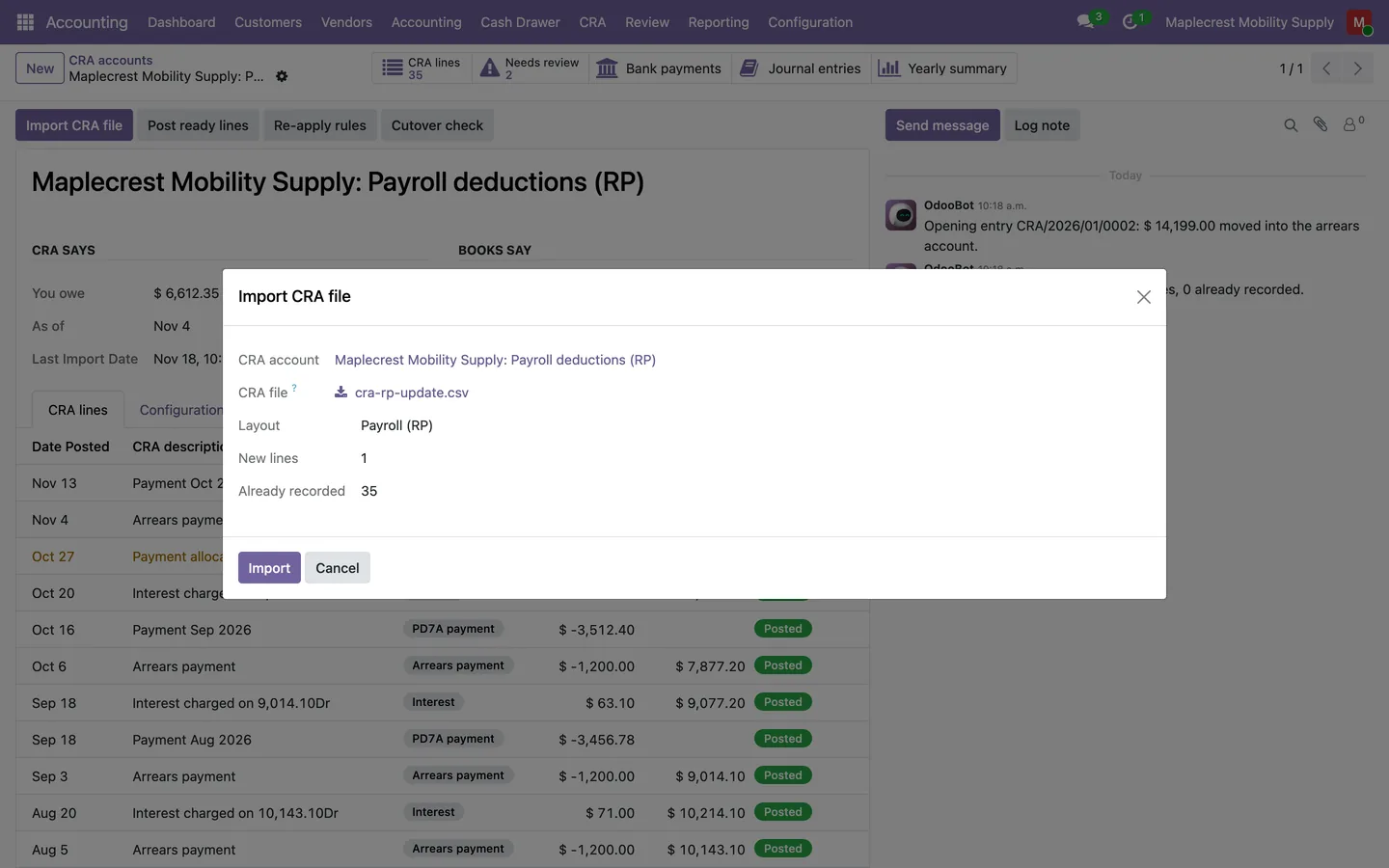
Check the file
"Check file" shows how many lines are new, how many are already recorded and any CRA wording no rule knows, before "Import" adds anything.
CRA account > Import CRA file
-
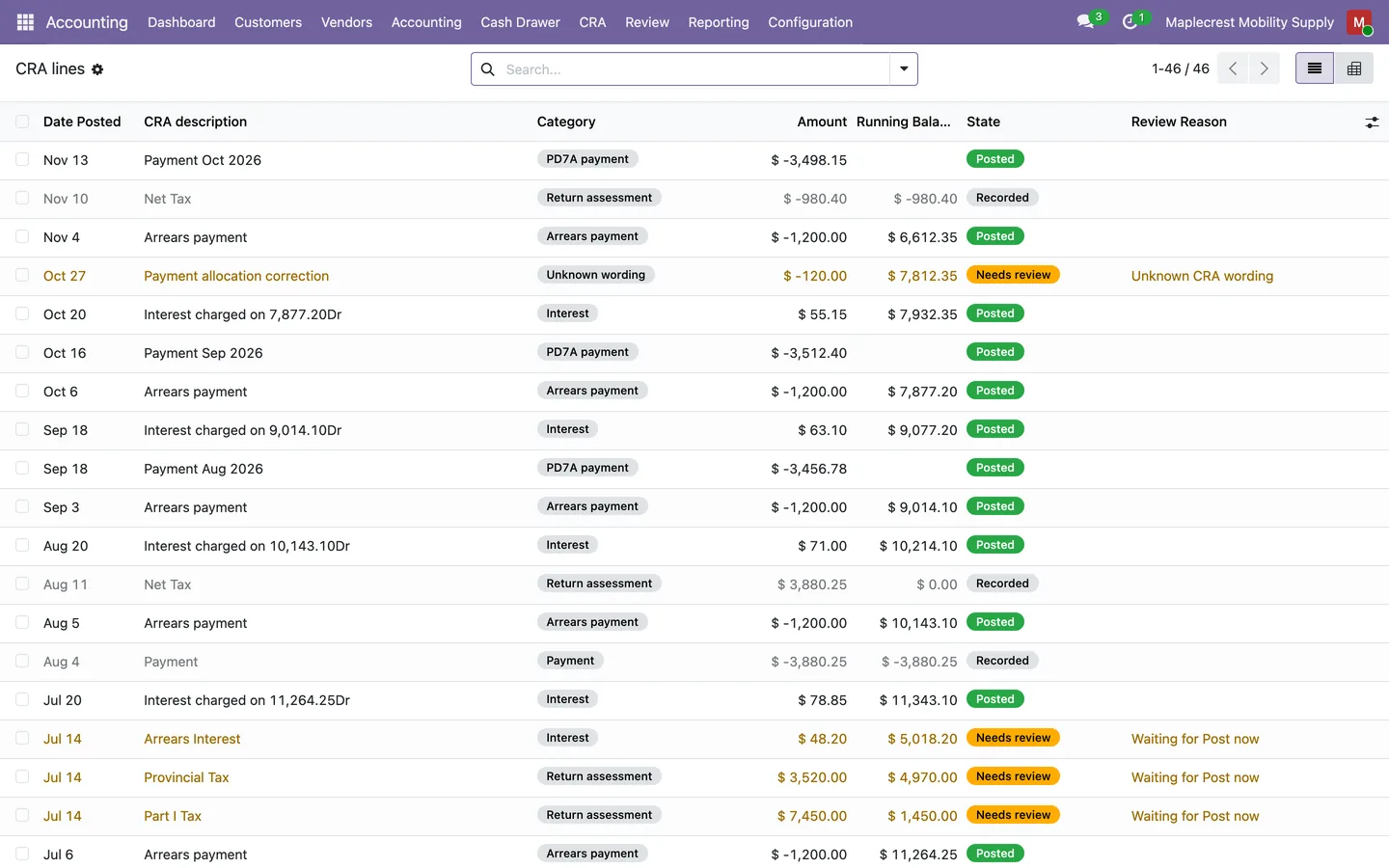
Import and sort
The new lines are created in CRA's order with CRA's running balance, sorted by the wording rules, matched to the bank and posted where they can be.
Accounting > CRA > CRA lines
-
Keep the file as evidence
Each imported file is kept with its original contents, a fingerprint, the dates it covers, its row counts and who imported it.
Accounting > CRA > Import history
Keep payroll arrears equal to CRA
Each payroll line books its own entry from the posting start date, and the account shows what CRA says beside what your books say.
-
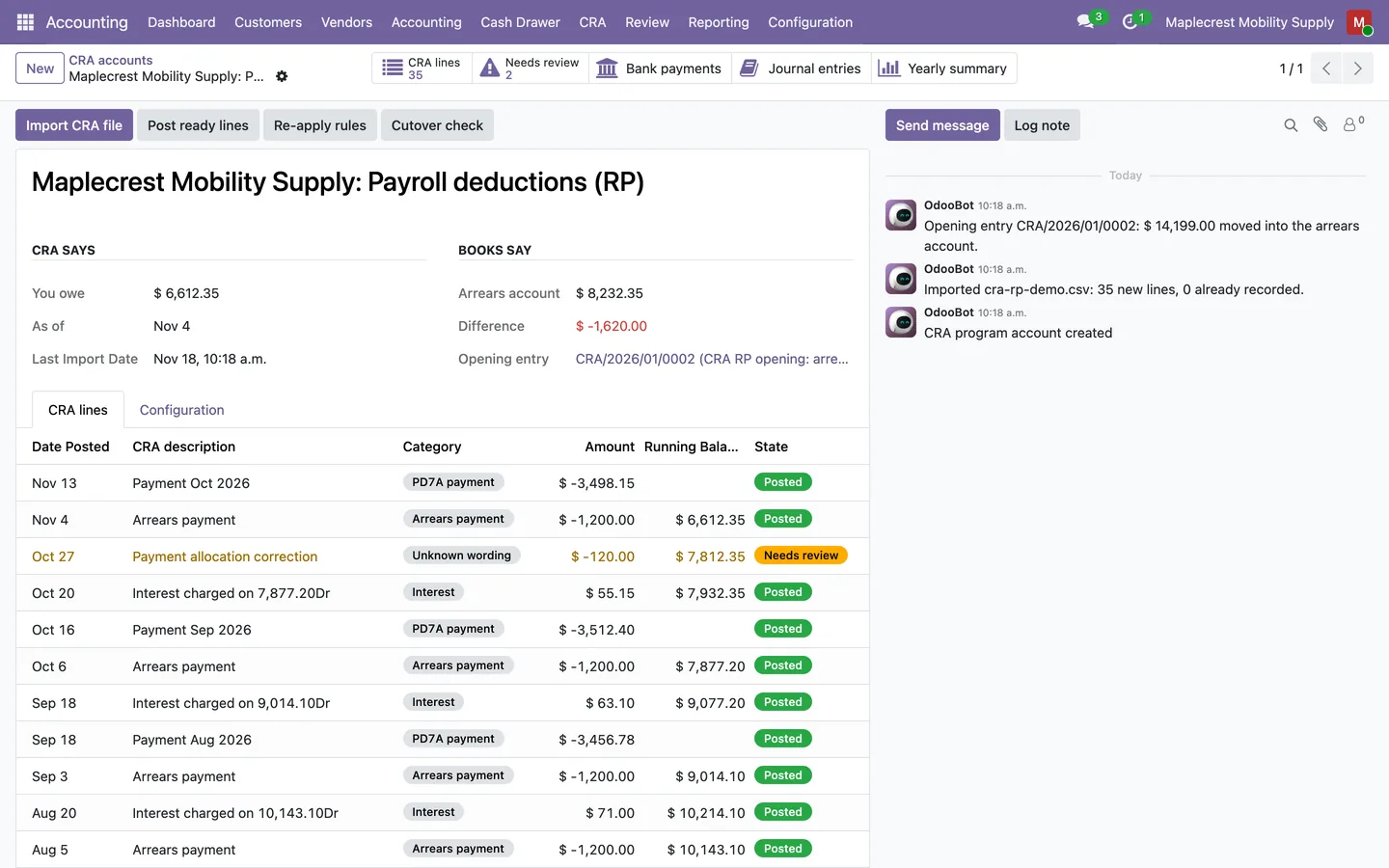
Open the arrears account
"Create opening entry" moves the arrears CRA confirmed into the arrears account, and the account puts "CRA says" beside "Books say" with the difference.
Accounting > CRA > CRA accounts
-
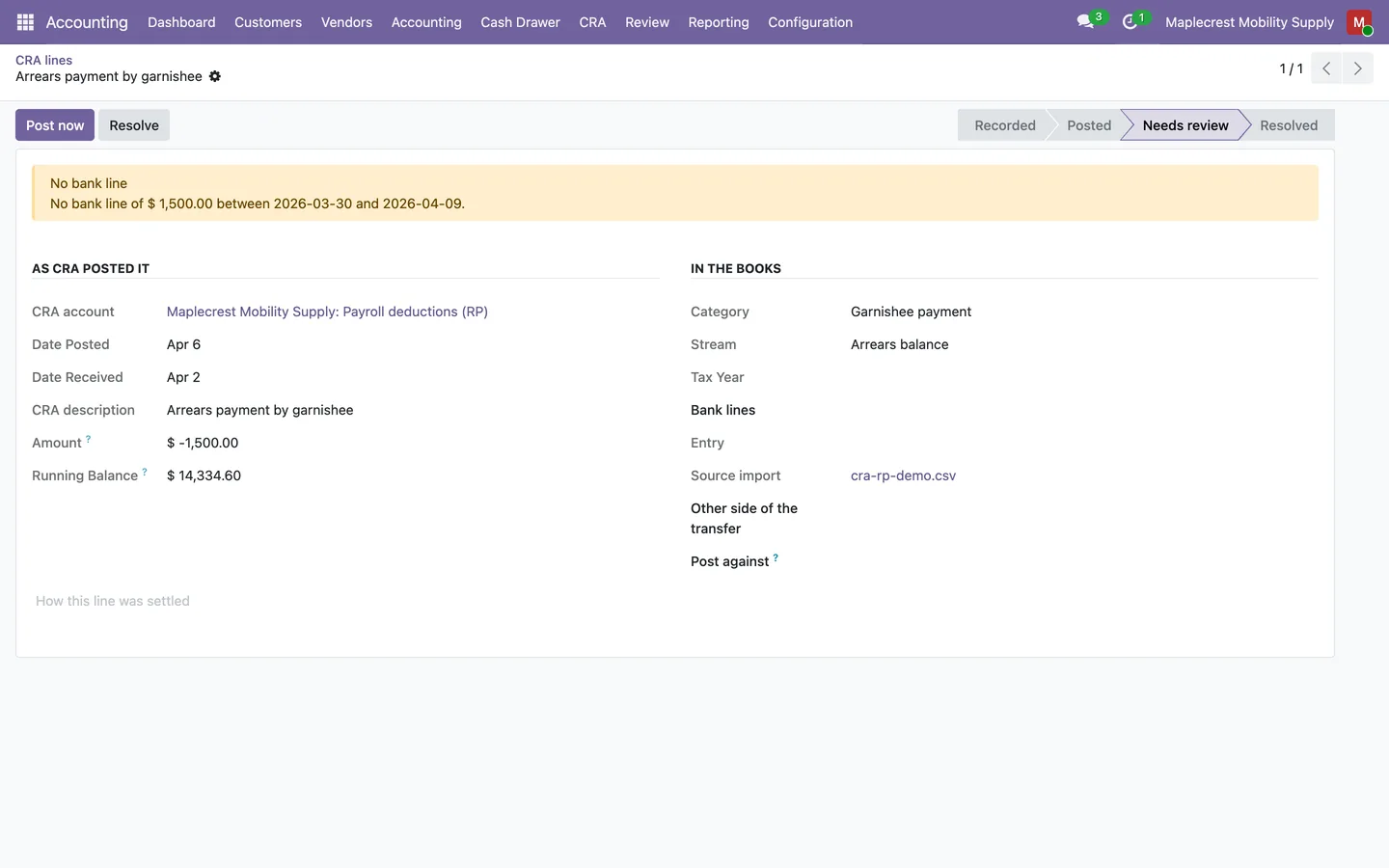
Decide the lines in review
A line it cannot place waits in "Needs review" with the reason. Link the bank line, or choose an account under "Post against" and use "Post now", or "Resolve" it with a note.
-
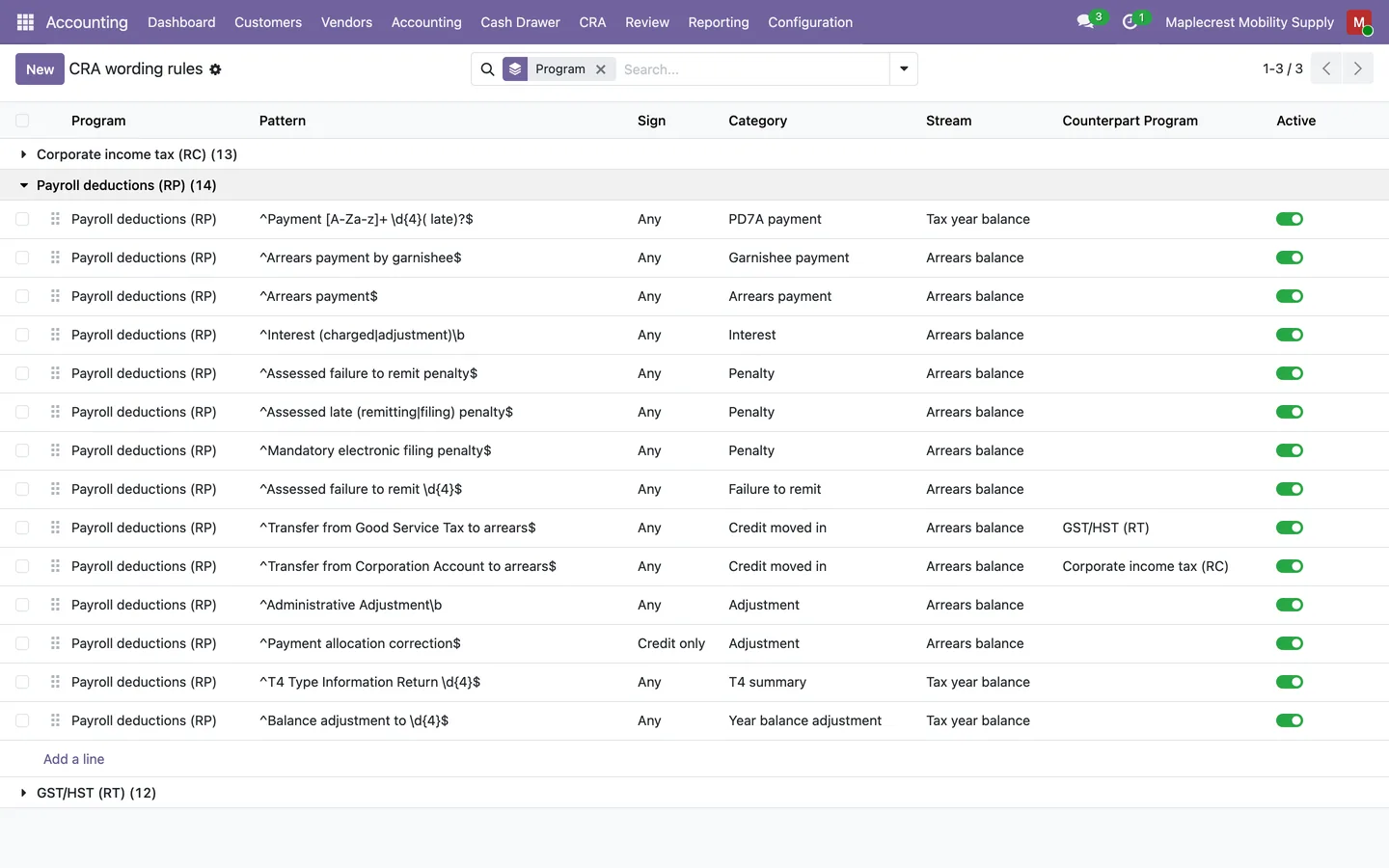
Teach a new wording
Add a rule for CRA wording no rule knows, then "Re-apply rules" sorts the waiting lines again.
Accounting > Configuration > CRA wording rules
-
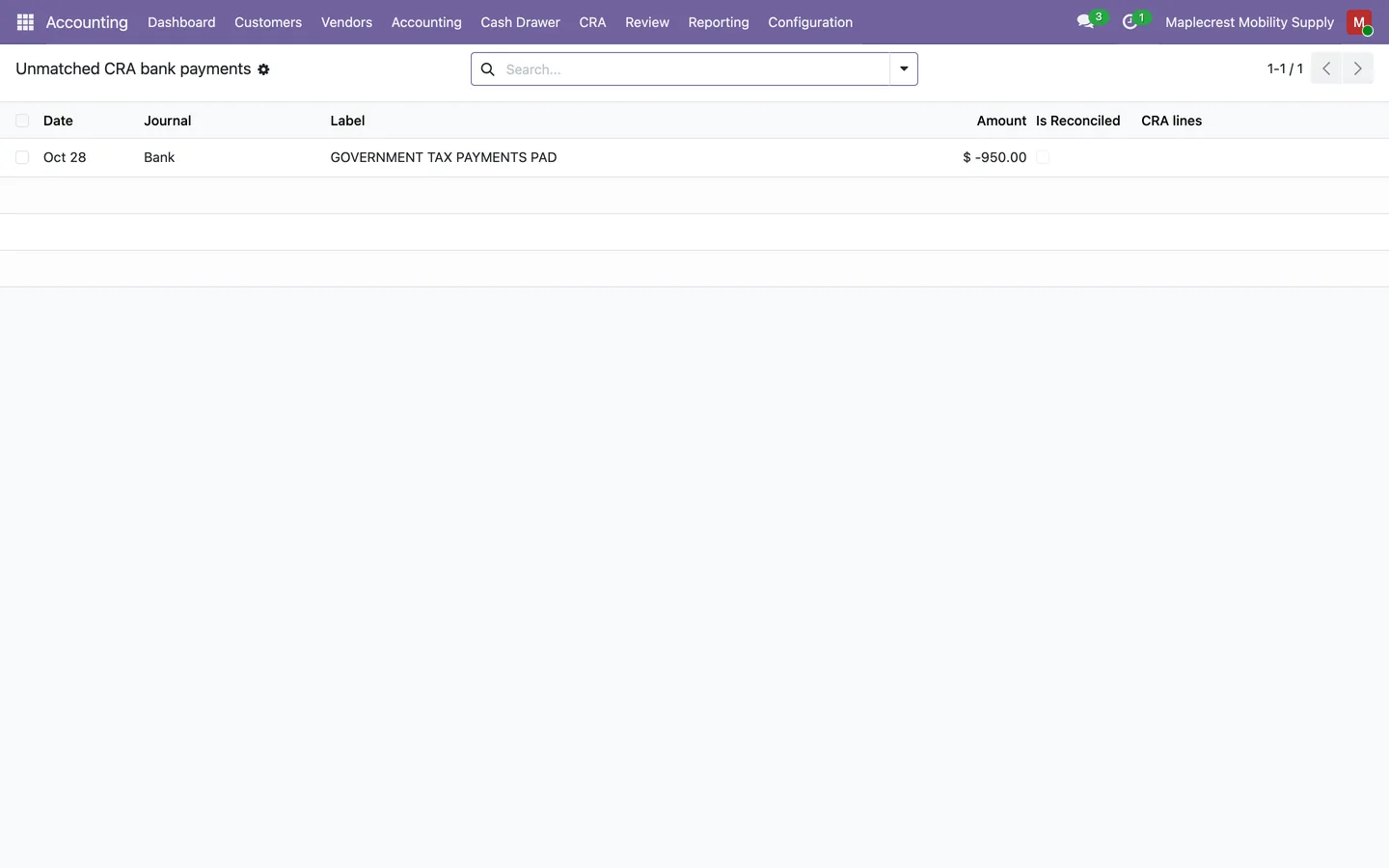
Chase payments CRA never posted
Bank debits that look like CRA payments but that CRA never posted to any line are listed for follow-up.
Accounting > CRA > Unmatched CRA bank payments
-
Confirm the books match
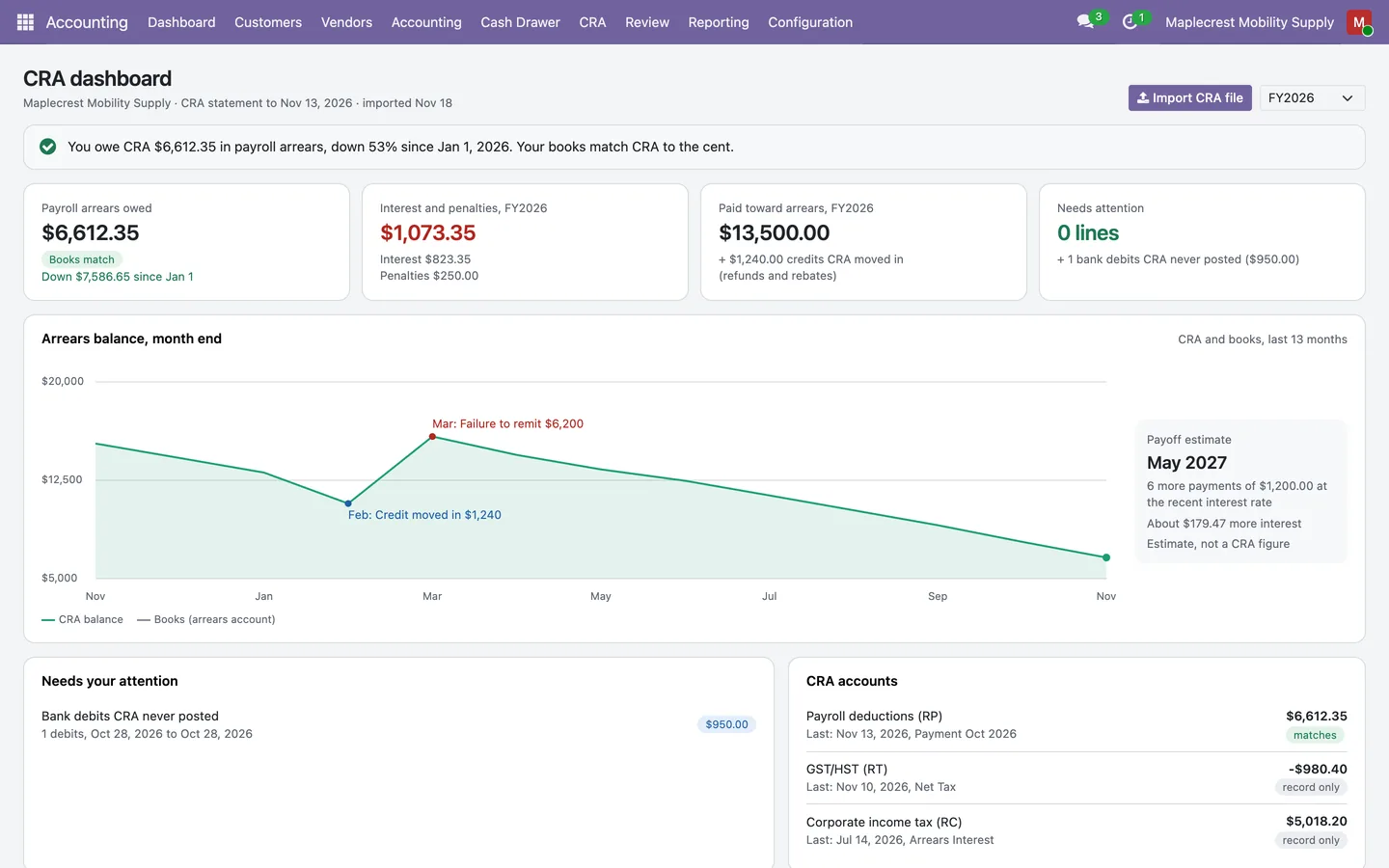
Once every line is placed, the dashboard says what you owe in payroll arrears and that your books match CRA to the cent.
Accounting > CRA > Dashboard
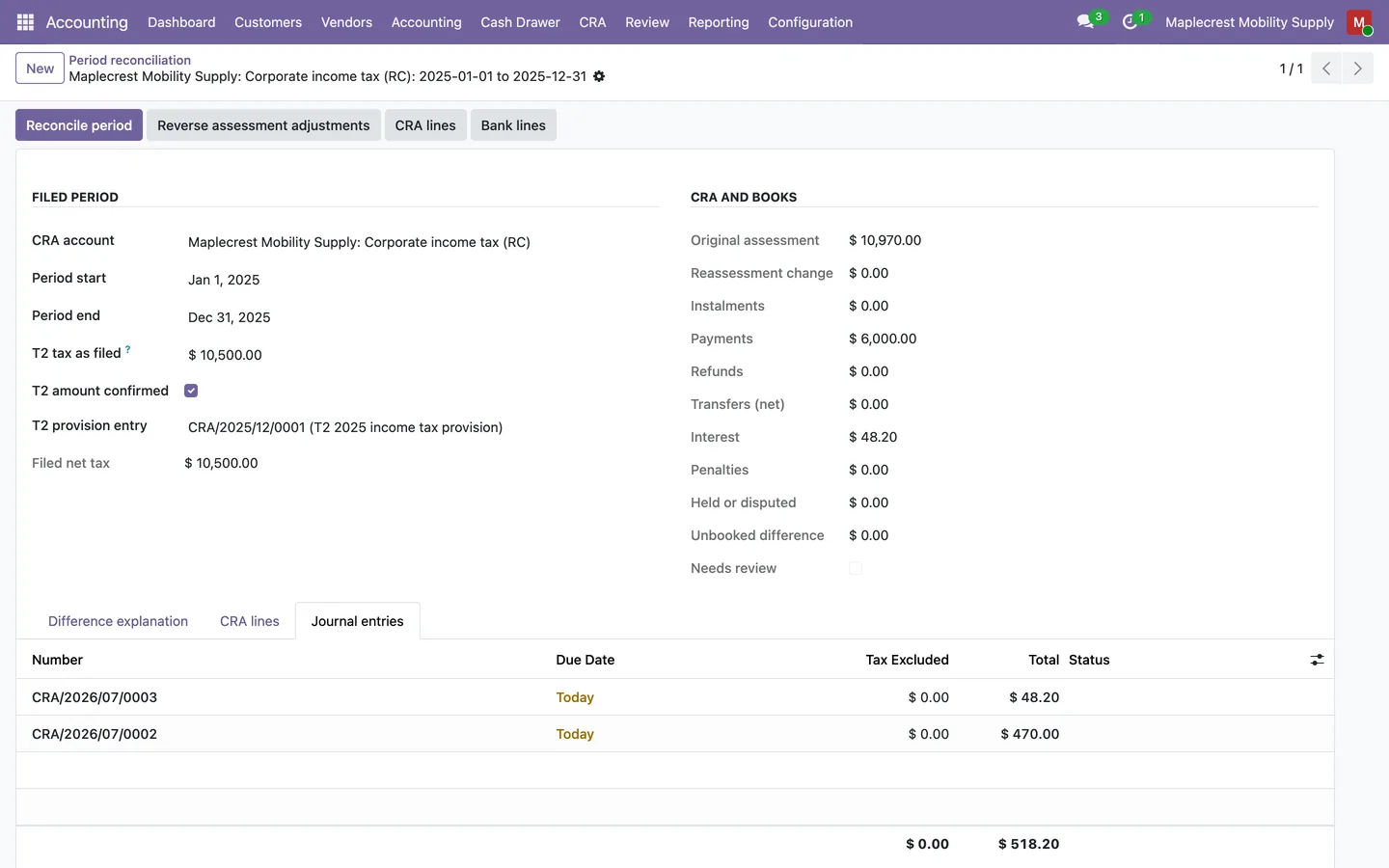
Reconcile a corporate or GST/HST period
The tax you filed stays the baseline, and only what CRA assessed differently is booked.
-
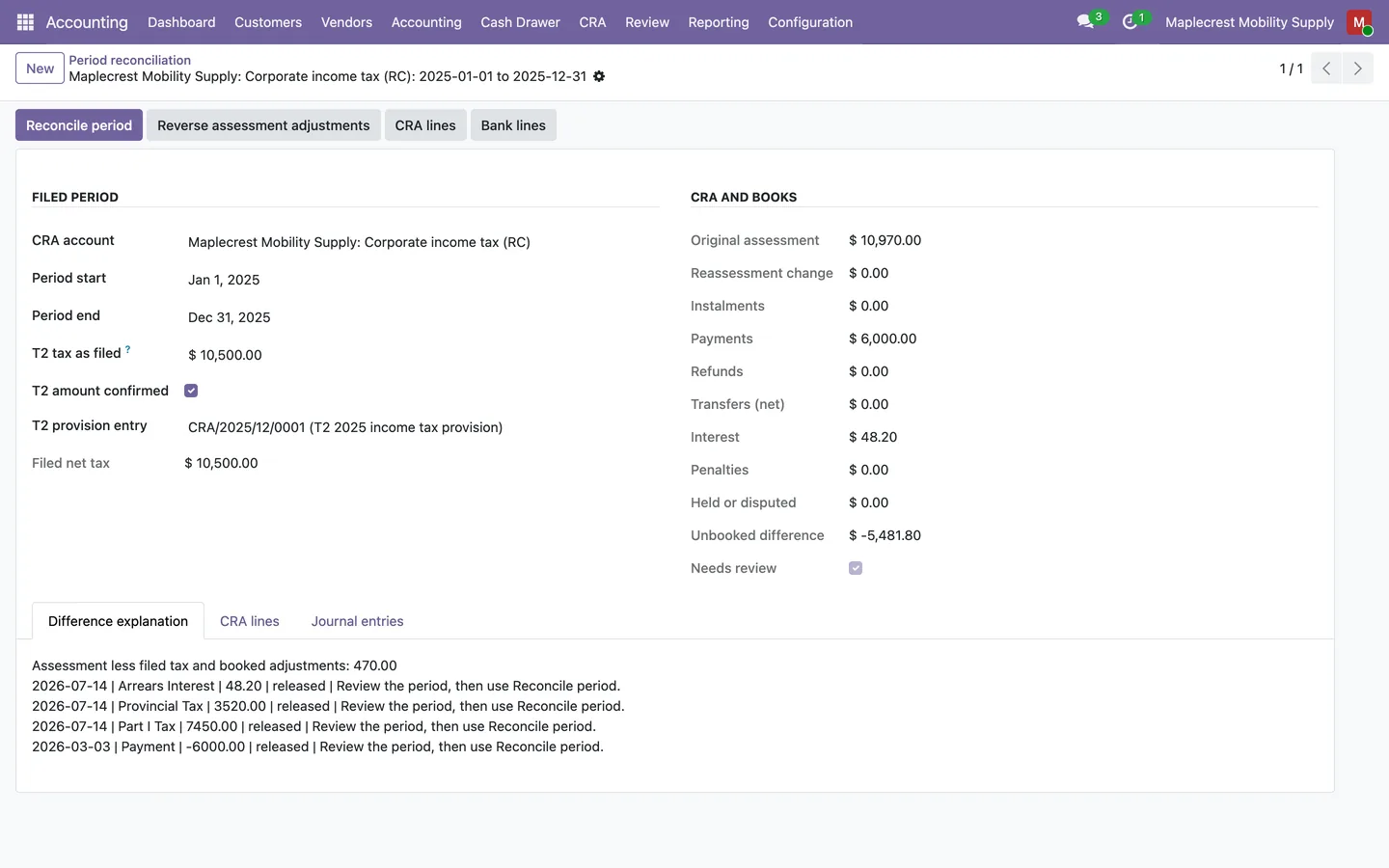
Open the period
Each period shows the filed tax, the original assessment, any reassessment, instalments, payments, refunds, transfers, interest, penalties, held amounts and the unbooked difference.
Accounting > CRA > Period reconciliation
-
Mark the evidence
Mark a reassessment as a revised total or an adjustment, a payment as an instalment, or hold or dispute an amount so it never posts.
-
Reconcile the period
"Reconcile period" books only the assessment difference to the tax adjustment account and posts interest, penalties, payments and refunds, leaving no unbooked difference.
-
Follow GST/HST credits
The GST/HST Refund and Credit Ageing report follows each credit from claim to assessment, refund or transfer, with ages and a tie-out to the GST/HST current account.
Watch the balance
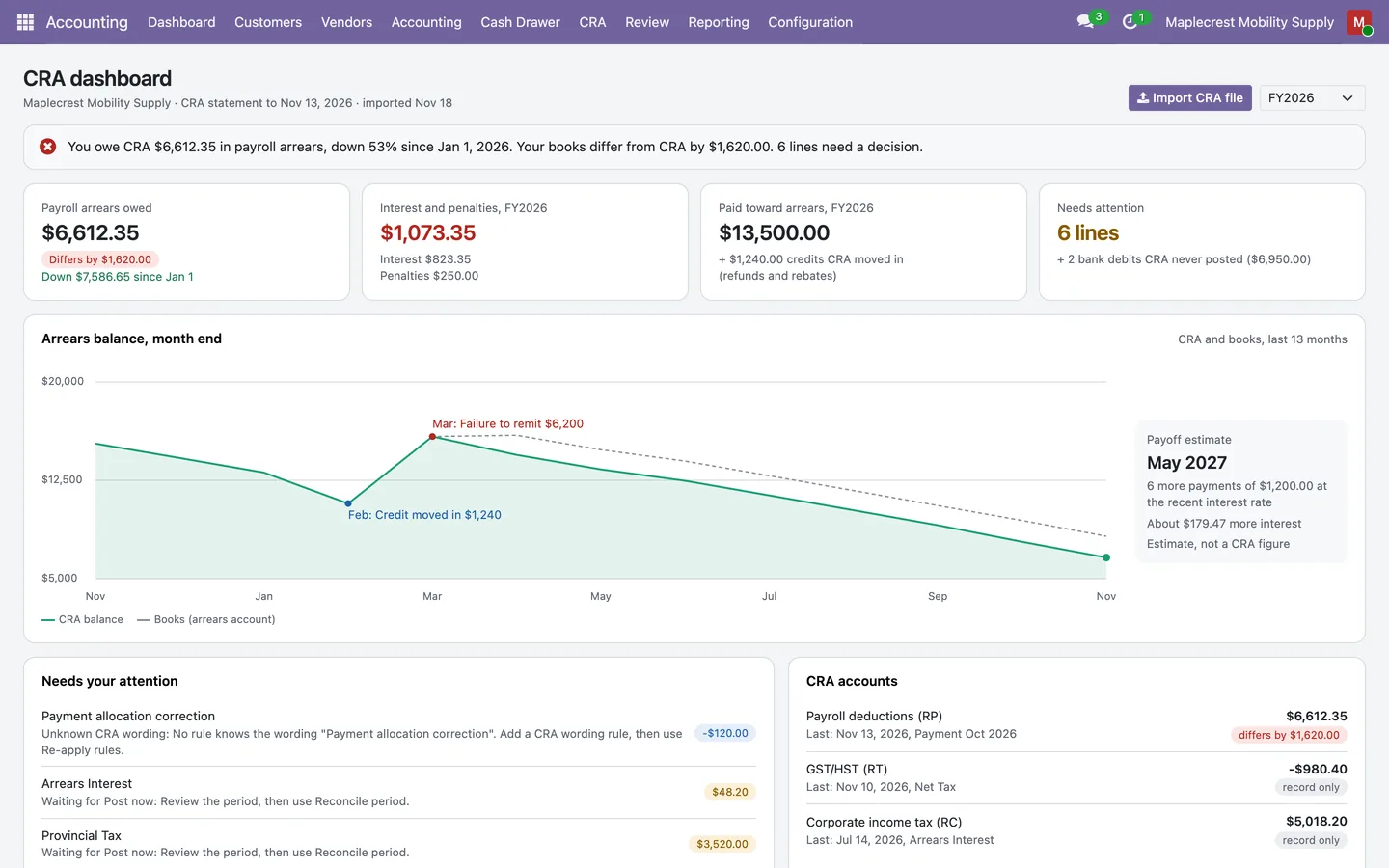
One screen says what you owe CRA, whether the books agree and which lines need a decision.
-
Read the dashboard
A sentence, four tiles, a 13-month chart with a payoff estimate, the lines that need your attention and every CRA account with its balance.
Accounting > CRA > Dashboard
-
Drill into a figure
Every tile, attention row and account row opens the CRA lines, bank lines or account behind it.
-
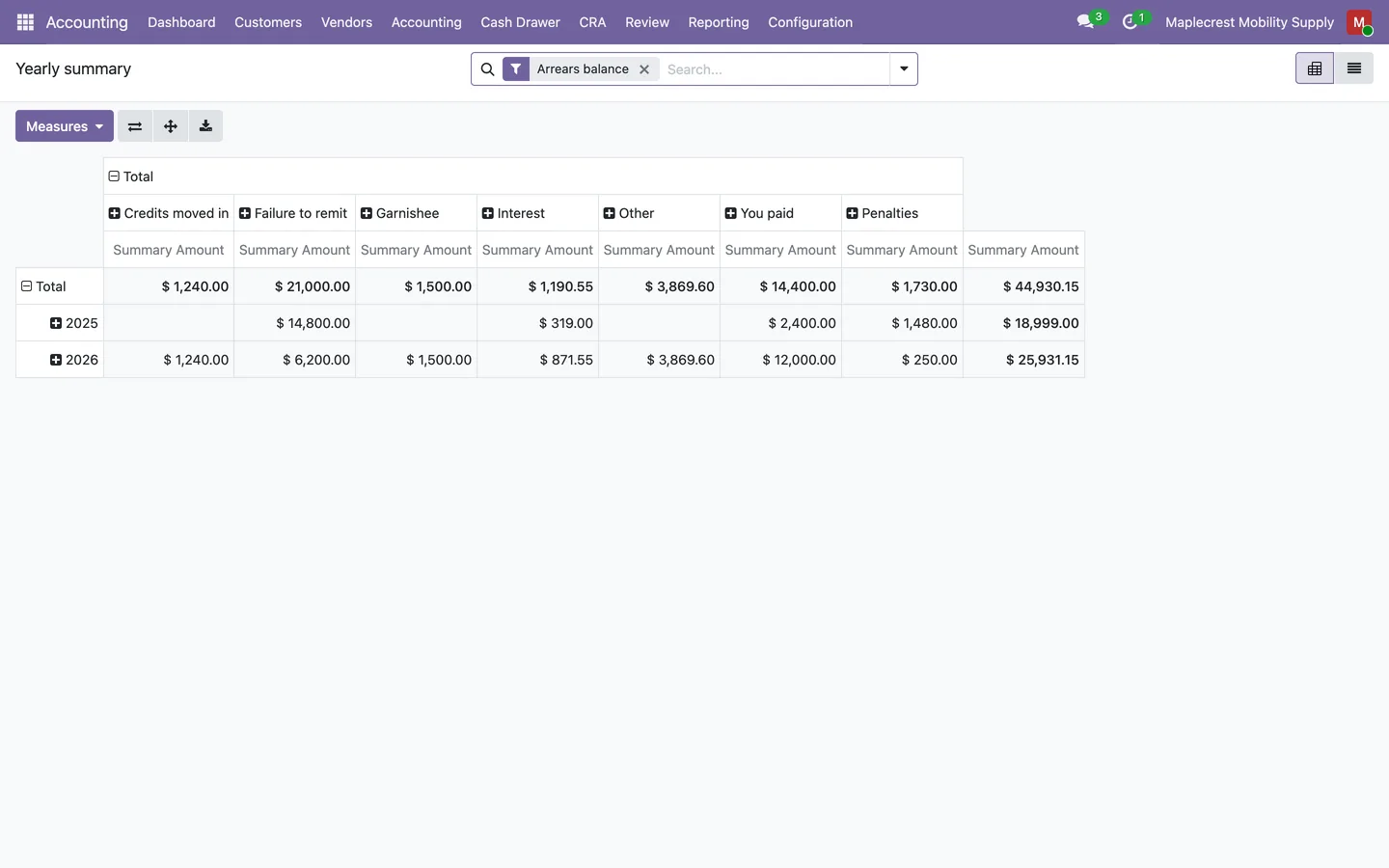
Yearly summaries
"Yearly summary" and "Tax year balance" are pivot tables of CRA lines by calendar year and by tax year.
Accounting > CRA > Yearly summary
What it does
 Import CRA's own records
- The ledger reads the transaction files CRA My Business Account exports for payroll (RP), GST/HST (RT) and corporate income tax (RC) program accounts, and keeps every line as CRA posted it, old years included.
- "Check file" shows how many lines are new, how many are already recorded, whether this exact file was imported before and any CRA wording no rule knows, before "Import" adds anything.
- Importing the same download again, or a longer one that overlaps an earlier file, adds only the lines not yet recorded, while two identical lines in one file are both kept.
- A row that cannot be read stops the import with its row number, so a file is never half imported.
- Every imported file is kept as evidence with its original bytes, a SHA-256 fingerprint, the dates it covers, its row counts and who imported it and when, and it cannot be edited or deleted.
- Lines keep CRA's order within each posting day, and each one shows CRA's running balance after it.
 Sorted by CRA's wording
- Wording rules sort each line as a PD7A payment, arrears payment, garnishee payment, payment, refund, interest, penalty, failure to remit, credit moved in or out, return assessment, T4 summary, adjustment, rebate or balance brought forward.
- A rule is a pattern matched against CRA's wording, can be limited to debits or credits, and the first matching rule in the list wins.
- Payroll lines are split between the arrears balance and the tax year balance, so monthly PD7A payments and T4 summaries do not move the arrears figure.
- A line whose wording no rule knows waits for review with the wording quoted, and "Re-apply rules" sorts it again once you add a rule.
 Payments matched to the bank
- Each payment on CRA's statement is matched to the bank line it came from, looking from 3 days before to 7 days after the date CRA received it, and both limits can be changed per account.
- When several bank lines fit, it picks the one whose bank text matches the CRA payment texts you list for the account.
- When CRA splits one payment over several lines, they are matched together to the single bank line that paid them.
- When no bank line or several fit, the line waits for review with the amount, the dates searched and the bank lines that could be it.
- "Unmatched CRA bank payments" lists bank debits that look like CRA payments but that CRA never posted to any line.
- Credits CRA moves between your payroll, GST/HST and corporate accounts are linked to the matching line on the other account within a week.
 Payroll arrears equal to CRA
- From a posting start date you choose, each payroll line books its own entry: interest and penalties to their expense accounts, failure-to-remit assessments from payroll liabilities into arrears, and credits moved in from the other CRA account.
- Matched bank payments are booked to the arrears account, or to payroll liabilities for monthly PD7A payments, without creating a second payment entry.
- Lines before the start date stay as a record only, and "Create opening entry" moves the arrears CRA confirmed on the day before into the arrears account.
- The account screen puts "CRA says" beside "Books say", with what you owe CRA, the arrears account and the difference in red or green.
- A line it cannot place waits in "Needs review" with the reason, and you can link the bank line, choose an account under "Post against" and use "Post now", or "Resolve" it with a note.
 GST/HST and corporate periods
- GST/HST and corporate accounts are reconciled one period at a time against the tax you filed, which stays the baseline and is never booked a second time.
- Each period shows filed net tax, the original assessment, any reassessment change, instalments, payments, refunds, transfers, interest, penalties, held amounts and the unbooked difference, with a written explanation.
- "Reconcile period" books only the assessment difference to the tax adjustment account, posts interest, penalties, payments and refunds, and refuses to post when the filed return, its closing entry or the registration does not check out.
- The GST/HST Refund and Credit Ageing report follows each credit from claim to assessment, refund or transfer to payroll, corporate or another period, with ages, buckets, flags and a tie-out to the GST/HST current account.
 Dashboard and summaries
- The CRA dashboard opens with one sentence saying what you owe in payroll arrears, whether your books match CRA to the cent and how many lines need a decision.
- Tiles show payroll arrears owed, interest and penalties for the fiscal year, what was paid toward arrears and the lines that need attention, and each tile opens the lines behind it.
- A chart shows the month-end arrears balance by CRA and by your books for the last 13 months, with the biggest rise and fall labelled by their cause.
- A payoff estimate gives the month the arrears clear at your recent payments and interest, and says plainly that it is an estimate, not a CRA figure.
- "Yearly summary" and "Tax year balance" are pivot tables of CRA lines by calendar year and by tax year.
What's new
Recent changes to Fusion CRA Account Ledger, newest first.
-
- A new GST/HST Refund and Credit Ageing report follows each credit to its refund, offset or transfer, with ages and a tie-out to the GST/HST current account.
-
- The CRA ledger screens and messages are now available in Canadian French.
-
- The CRA ledger moved into the Fusion Accounting suite and now runs on Fusion bank reconciliation and Fusion GST/HST returns, with no Odoo Enterprise app needed.
- Every imported CRA file is now kept with its fingerprint, dates and row counts under "Import history", and the same file cannot be imported twice.
- GST/HST and corporate accounts can now be reconciled period by period against the filed return or T2, posting only the assessment difference, interest, penalties, payments and refunds.
- Each CRA account now links to the company's registered program account, and "Registrations needing review" lists the ones that do not match.
Related modules


See Fusion CRA Account Ledger on your own Odoo.
Book a call and tell us how your team works today. We'll show you the module and what it would take to set it up. Prefer the phone? Call 905-792-0000.