The Problem We Solve

ADP applications require signatures, assessments, and documents from people who don't sit in your office. The manual process creates bottlenecks that delay funding and frustrate everyone.

Paper Signatures

Paper-Based Signatures Delay Everything

OTs sign ADP Pages 11 & 12 on paper, which must be scanned, emailed, and manually attached to cases. Pages get lost, signatures are illegible, and re-signing delays claims by 3–5 days.

No Visibility

OTs Have Zero Case Visibility

Authorizers complete an assessment and then hear nothing until someone calls weeks later asking for corrections. They can't see status, track progress, or submit documents independently.

Duplicate Entry

Every Assessment Gets Entered Twice

Assessment details written on paper must be re-keyed into Odoo by office staff. This doubles the work, introduces transcription errors, and wastes billable hours every single day.

Chasing People

Staff Spend Hours Chasing People

"Did the OT sign Page 12?" "Did the rep upload the prescription?" Office staff become full-time coordinators instead of processing claims.

Licence Cost

Odoo Licences Are Expensive

Giving every OT and sales rep a full Odoo Enterprise licence just so they can fill out a form and sign a page? That's thousands of dollars a year for minimal access.

Not Mobile

Nothing Works on Mobile

OTs visit clients at home. They need to fill out forms and capture signatures on an iPad or phone — but paper forms and Odoo's backend don't work on mobile.

Your Problem. Our Feature. One Line Each.

No vague promises. Every real-world headache, matched to a specific thing the Authorizer Portal does today.

Problem

"I have to print Page 11, drive to the OT, get it signed, scan it, and email it back."

Solution

OT opens their portal, taps Sign, draws their signature on-screen. Done in 10 seconds. Attached to the case automatically.

Problem

"The OT called asking 'what happened with the Thompson case?' — I had to dig through emails to find out."

Solution

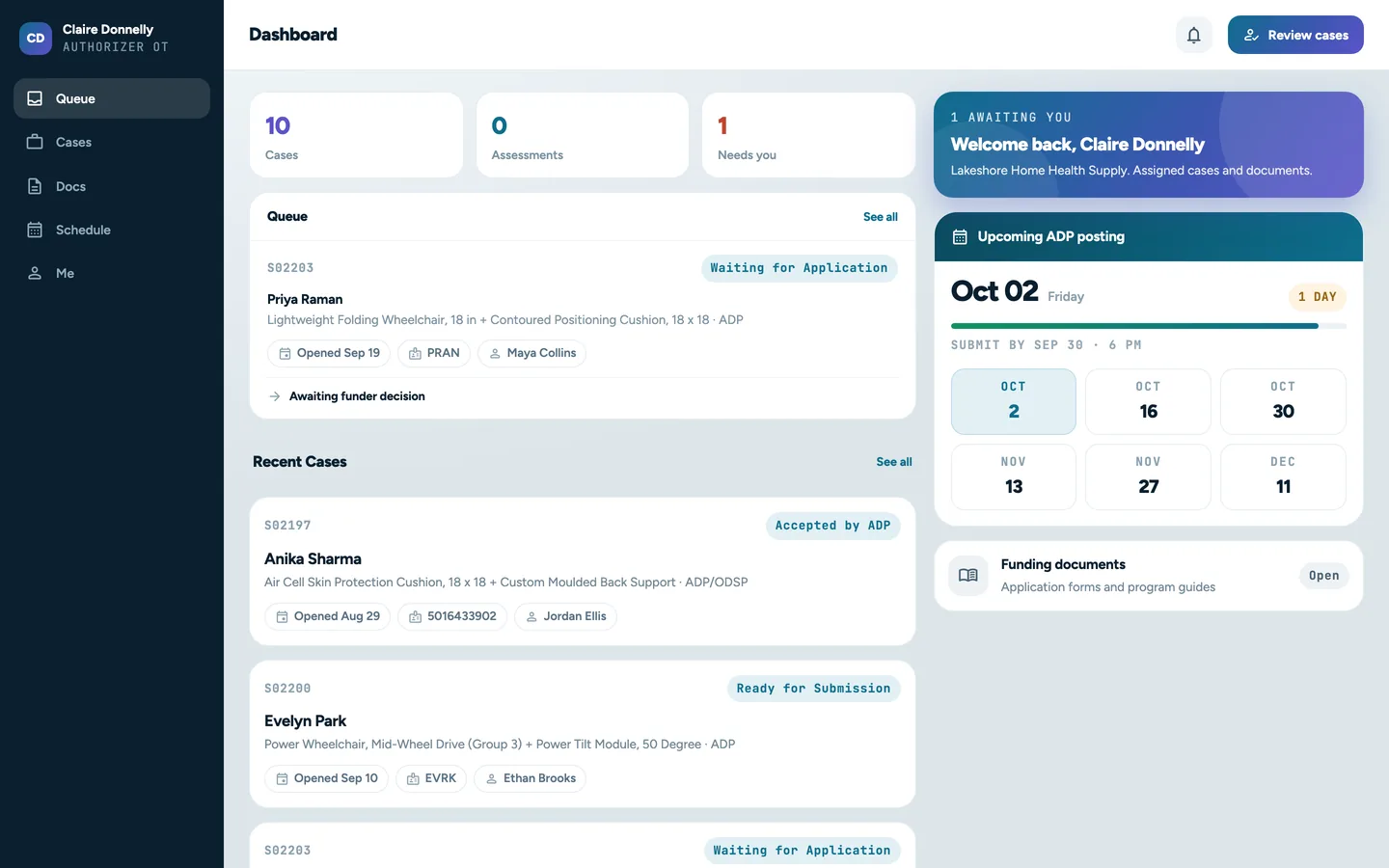
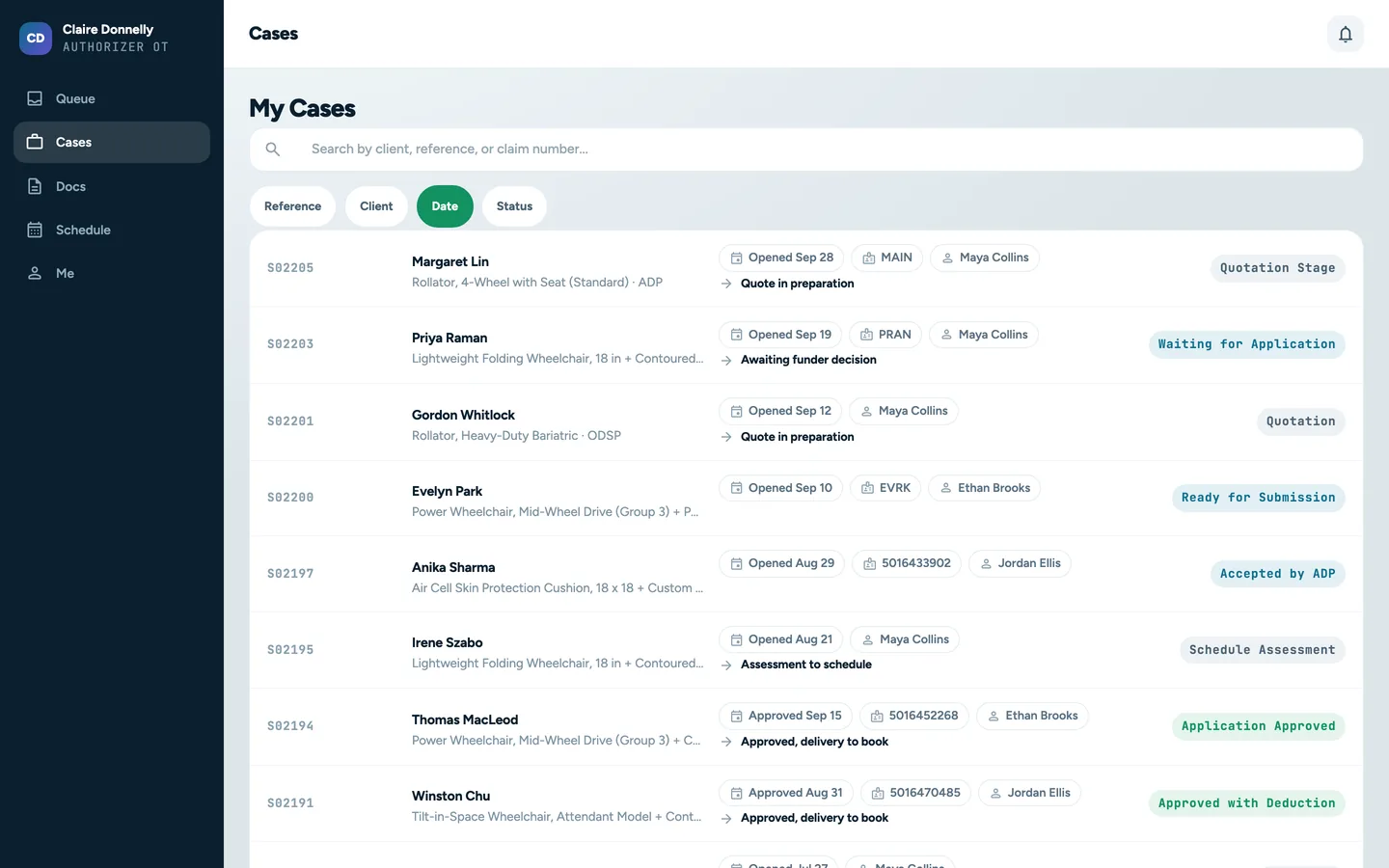
OTs see real-time case status in their portal dashboard. Automatic email notifications on every status change.

Problem

"The assessment form was handwritten. I spent 20 minutes deciphering it and re-entering everything into Odoo."

Solution

OT fills out the assessment in the portal. Data flows straight into Fusion Claims. Draft Sale Order created automatically — zero re-entry.

Problem

"We'd need 8 more Odoo licences at $50/month each just so our OTs can submit forms."

Solution

Portal accounts are free. OTs see only their own cases. Your licence count stays the same.

Problem

"Our sales rep was at a client's home and couldn't start a case because she didn't have office access."

Solution

Sales reps create new ADP cases from their phone, search clients, and submit — no VPN, no office, no waiting.

Problem

"The prescription was emailed to me, but I forgot to attach it. ADP rejected the application."

Solution

OTs and reps upload documents directly to the case in the portal. Files are version-tracked and permanently attached.

From Assessment to Draft Sale Order in Four Steps

The Authorizer Portal plugs directly into the Fusion Claims workflow. Here's how a typical ADP case moves through the system.

Create Case

1. Sales Rep Creates the Case

A sales rep logs into the portal from their phone or laptop, searches for the client by name or ADP file number, selects the device category, and submits a new ADP case.

OT Assessment

2. OT Completes the Assessment

The assigned Occupational Therapist receives an email notification, logs into their portal, fills out the structured assessment form, and uploads any required documents.

Digital Signatures

3. OT Signs Pages 11 & 12

The OT signs ADP Pages 11 and 12 digitally on-screen — works on tablets during home visits. Signatures are captured, timestamped, and attached to the case instantly.

Draft SO

4. Draft Sale Order Created

Fusion Claims automatically creates a draft Sale Order with all the OT's data pre-filled. Office staff review, verify, and submit to ADP — no re-entering anything.

Everything the Portal Does. Nothing It Doesn't.

Purpose-built for the people who work outside your office but inside your ADP workflow.

Digital Signatures

Digital Signatures

Touch-friendly signature pad for ADP Pages 11 & 12. Works on phones, tablets, and desktops. No printing, scanning, or mailing.

Mobile First

Mobile-First Design

The portal works beautifully on phones and tablets. OTs complete assessments and sign during home visits — from a client's kitchen table.

Real-Time Status

Real-Time Case Status

OTs and Sales Reps see exactly where each case stands. No more "just checking in" calls. Email notifications fire automatically.

Document Upload

Document Upload

Upload prescriptions, assessment reports, and supporting documents directly to the case. Files automatically attached and version-tracked.

Zero Re-Entry

Zero Data Re-Entry

Assessment data entered by the OT flows directly into Fusion Claims. Draft Sale Orders created automatically from portal submissions.

No Licence Needed

No Licence Required

OTs use free Odoo portal accounts. They see only their own cases and nothing else. Your Odoo licence count stays the same.

Client Search

Real-Time Client Search

Search clients by name, ADP file number, or phone. Instant results. No scrolling through spreadsheets or calling the office.

Email Notifications

Email Notifications

Every status change triggers an email — to the OT, sales rep, and internal staff. Nobody is left wondering what happened.

10 sec
Digital Signature vs. 3–5 Days Paper
$0
Per Portal User — No Licence Cost
0x
Manual Data Re-Entry by Office Staff
100%
Mobile — Works on Any Device

Designed for Every Role in the ADP Process

Three roles. Three different needs. One portal that serves them all.

Occupational Therapists

Complete assessments and sign ADP pages from anywhere, on any device. Track case progress in real time. Upload documents instantly. No Odoo licence or training needed.

Sales Representatives

Create new ADP cases on the go. Search clients by name or ADP file number. See all assigned cases at a glance. Receive email updates on every case change.

Office Staff

Stop re-entering assessment data. Stop chasing signatures. Auto-created draft Sale Orders with signed documents already attached. Focus on getting claims submitted and paid.

Multi-Vendor ADP Suppliers

Work with a network of OTs and sales reps across Ontario? Give each one their own portal login — they see only their cases, you see the full pipeline.

Home Visit Assessment Teams

OTs visiting clients at home need mobile-friendly forms and signature capture. The portal works on iPads and phones — no laptop required, no offline sync headaches.

Growing Mobility Businesses

Scaling from 5 to 50 OTs? The portal grows with you. No per-user licence fees. No training overhead. Every new OT is productive from their first login.

Built on Top of Fusion Claims

The Authorizer Portal isn't a standalone tool — it's a direct extension of the Fusion Claims workflow, sharing the same data, ADP codes, and claim lifecycle.

Ready to Eliminate the Paper Chase?

See how the Authorizer Portal fits into your ADP workflow. Book a free demo and we'll walk through a case from assessment to signed Page 11 in under 15 minutes.