
Fusion Labels Pro
A drag-and-drop label designer, a design gallery and a Print Labels screen with a live preview.
Design product labels in a drag-and-drop Label Studio, from a gallery of ready-made designs or your own label stock. Print them from one screen with a live preview of each label and the whole sheet.
- Odoo 19
- Version 19.0.3.0.2
Fusion Labels Pro, step by step
3 workflows, 12 steps. Every screen is real, from a demo company with invented data.
Start a design
Copy a ready-made design from the gallery, or start a new one from the label stock you already buy.
-
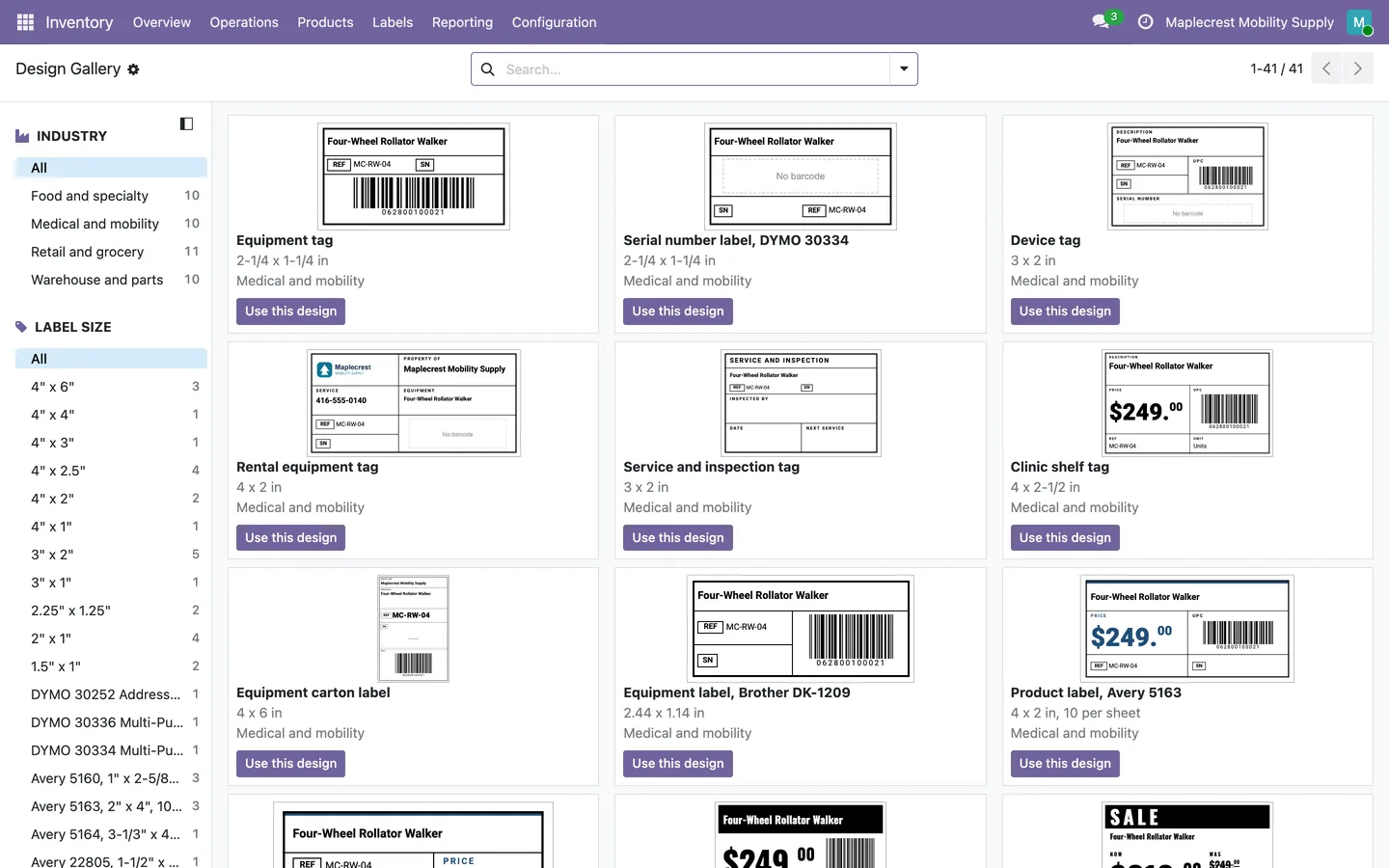
Pick from the gallery
The Design Gallery holds ready-made designs for medical and mobility, retail, warehouse and food, filtered by industry and label size. "Use this design" copies one into your designs.
Inventory > Labels > Design Gallery
-
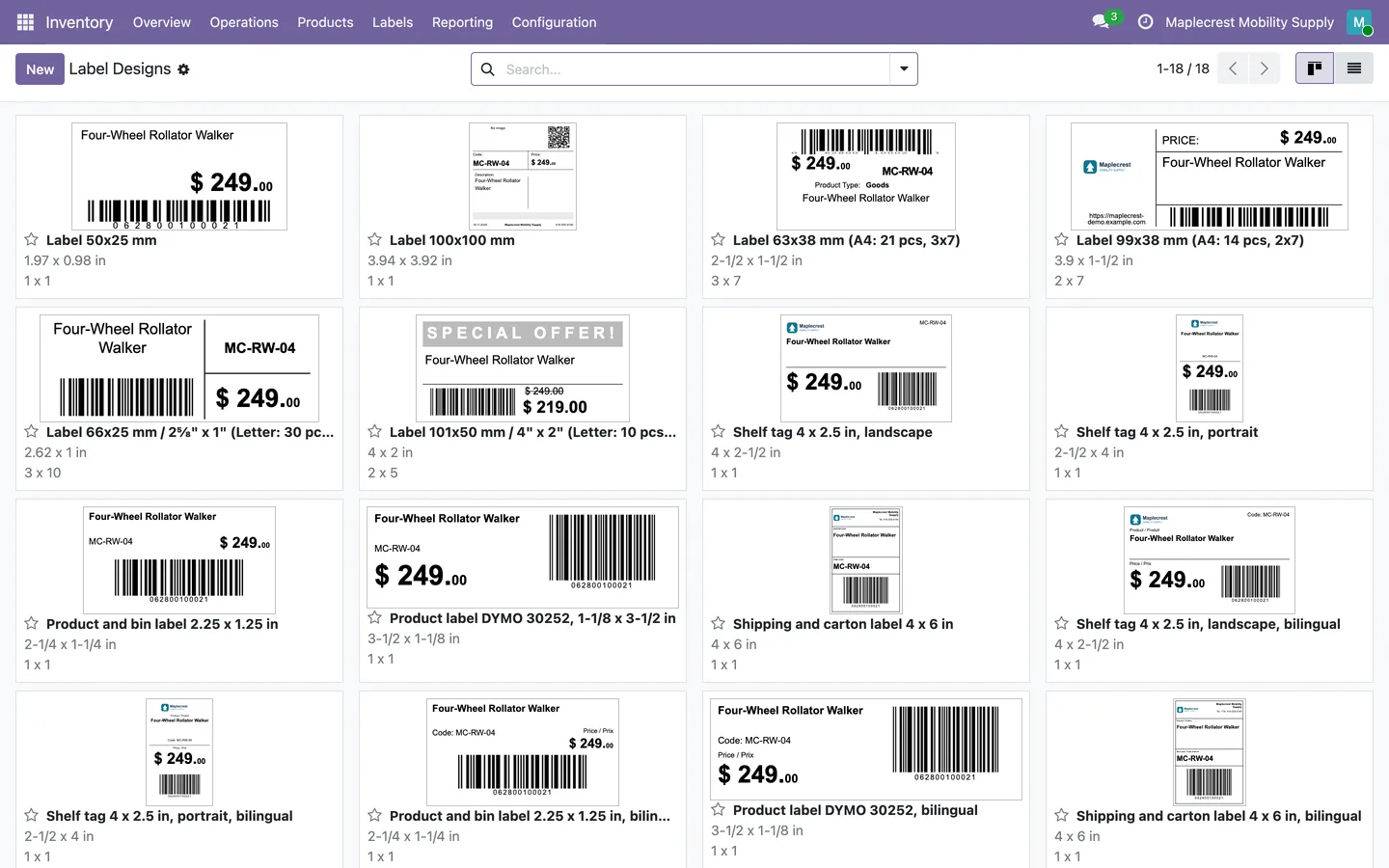
Your designs
Label Designs shows every design as a card with a live thumbnail. Star the ones you use most and they are listed first.
Inventory > Labels > Label Designs
-
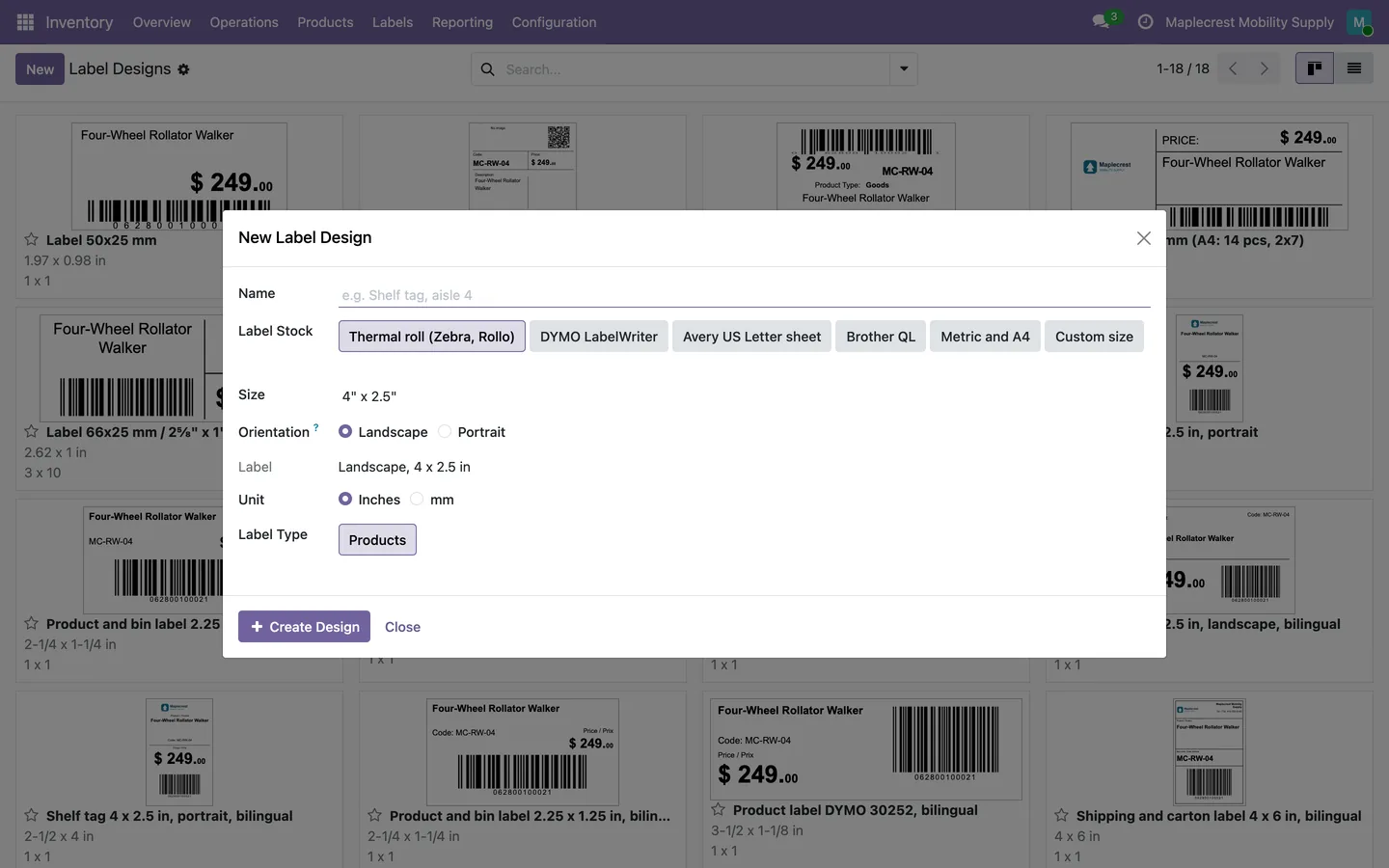
Or start from a label stock
A new design starts from a thermal roll, DYMO LabelWriter, Avery US Letter sheet, Brother QL, metric and A4, or a custom size.
Inventory > Labels > Label Designs > New
Design the label
Drag text, prices, barcodes and the company logo onto the label and see it with a real product.
-
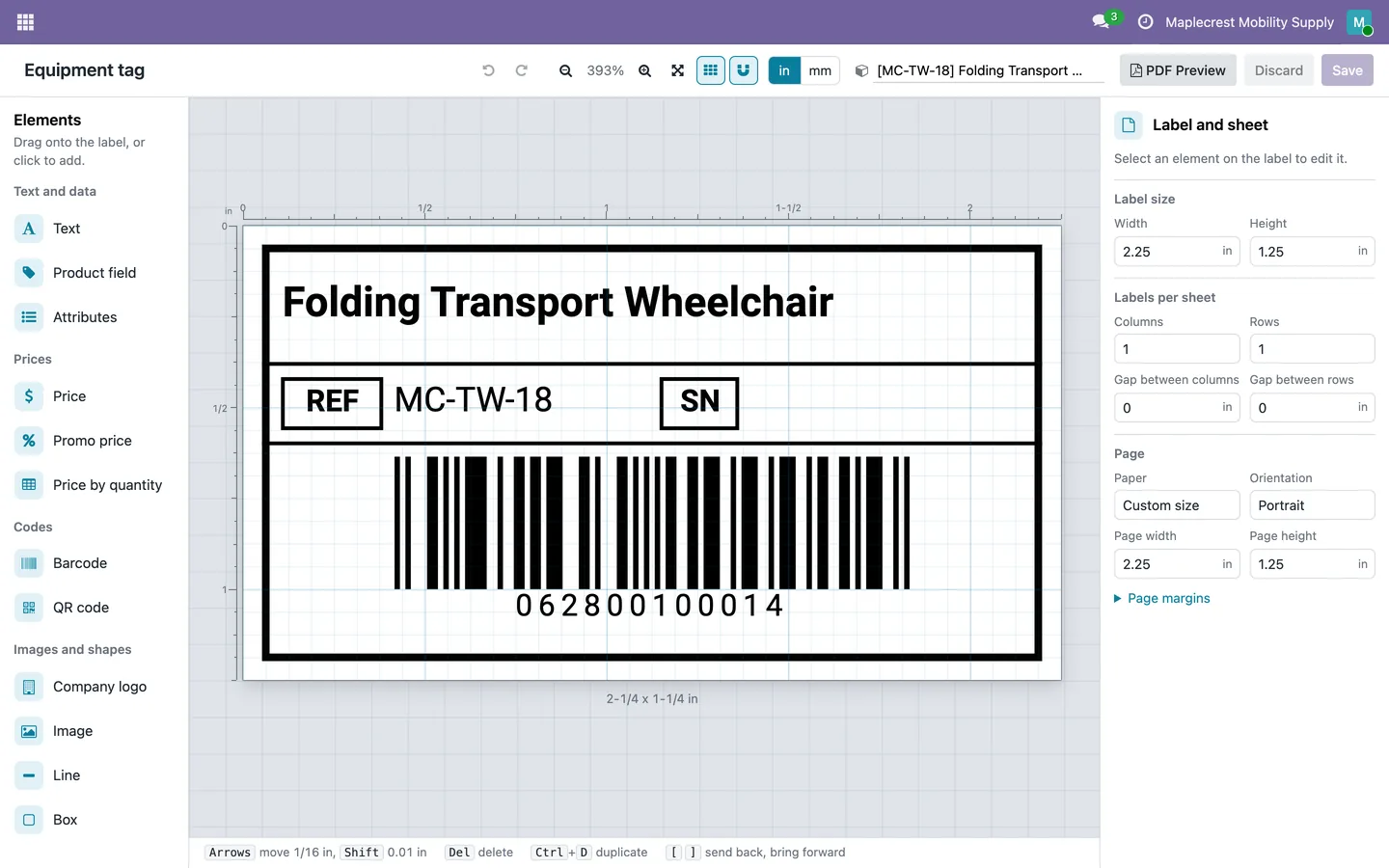
Lay it out
Drag elements onto the label, then move and resize them with the grid and snapping, in inches or millimetres, with undo and redo.
Inventory > Labels > Label Designs, open a design
-
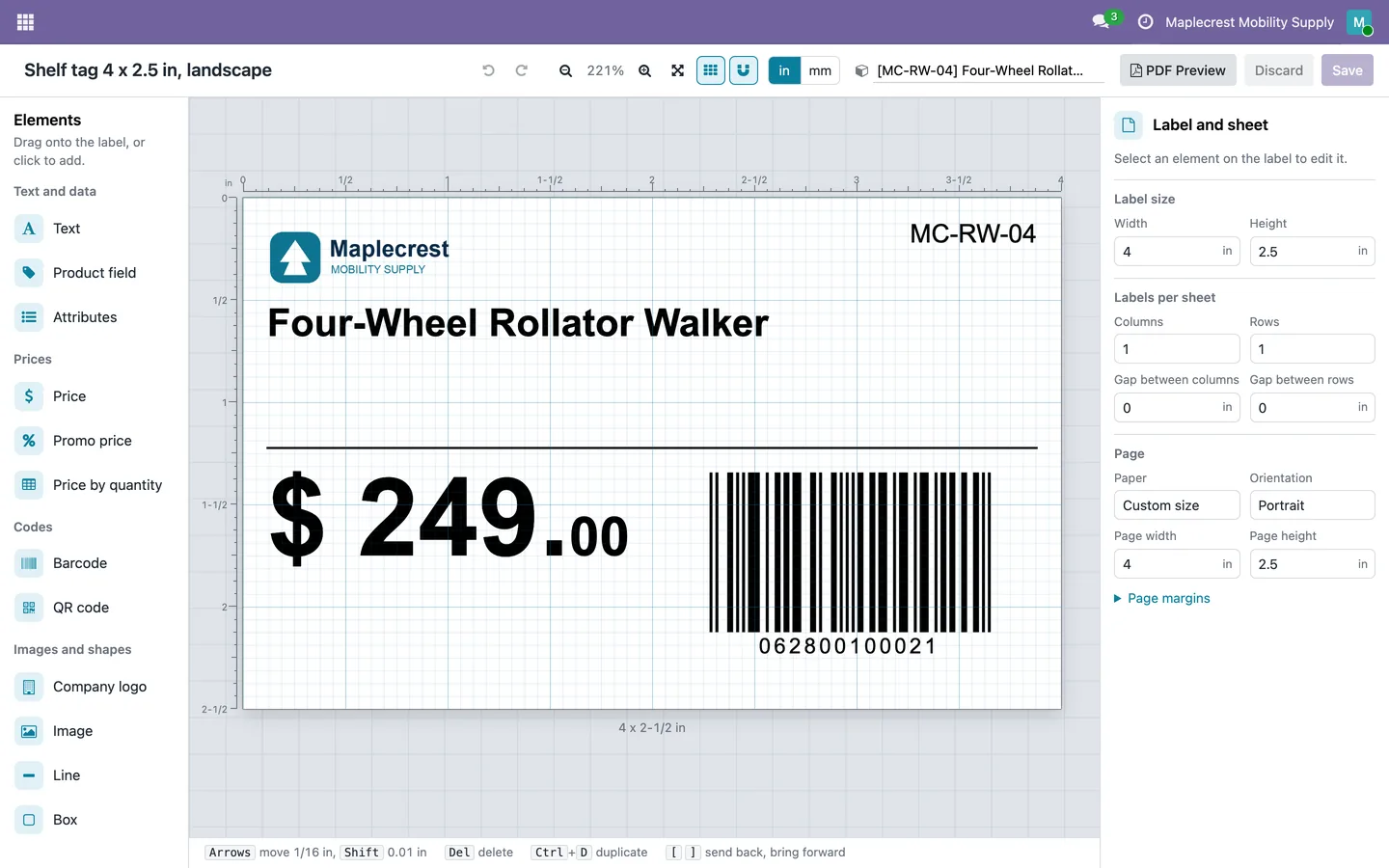
Preview with a product
Pick a product and the design shows its own name, price and barcode, with the company logo.
-
Check the fit
Long text shrinks to fit its box without going below its minimum size, and prices can print their cents small.
-
Save and preview the PDF
"Save", then "PDF Preview" opens the saved design as a PDF.
Print labels
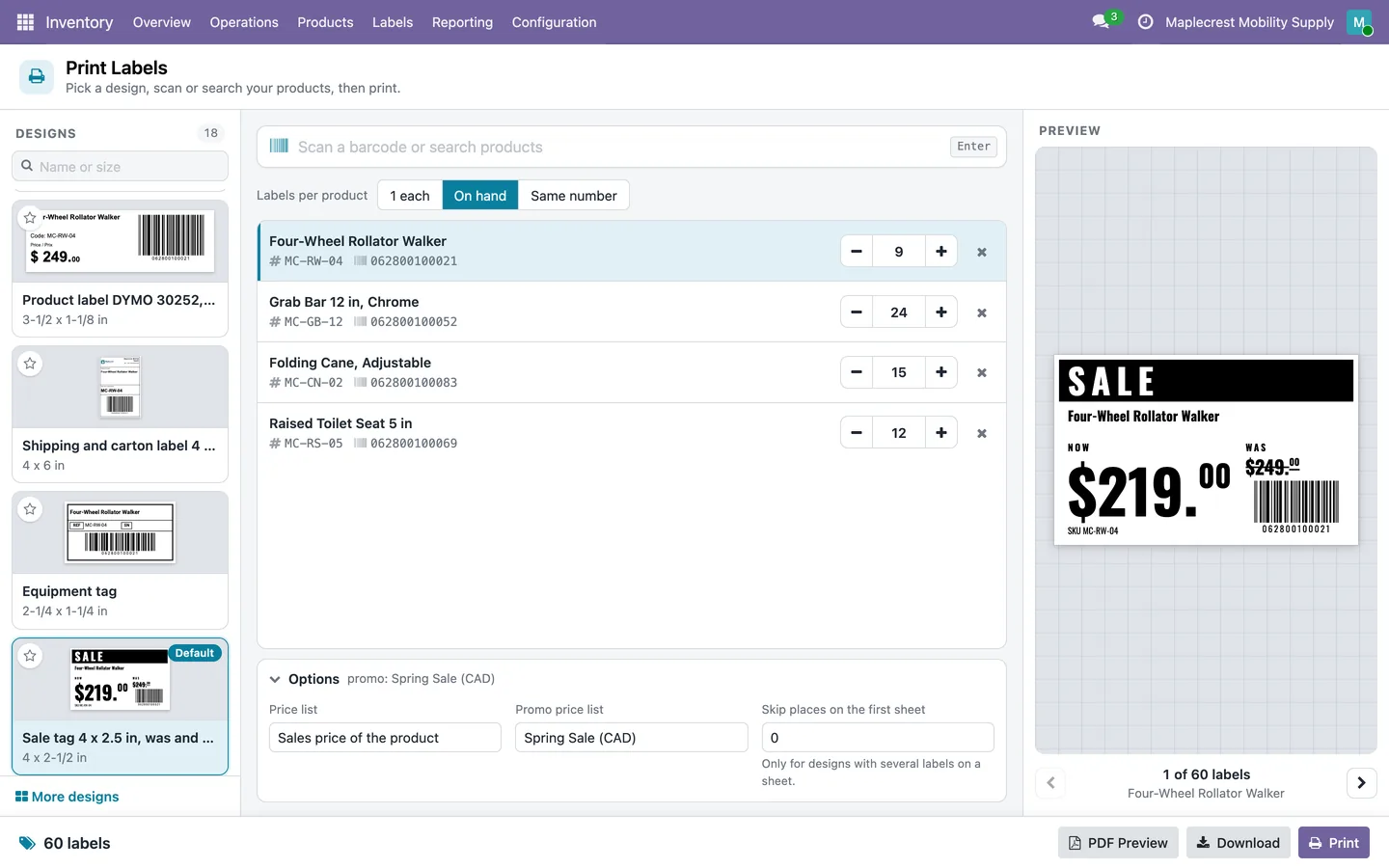
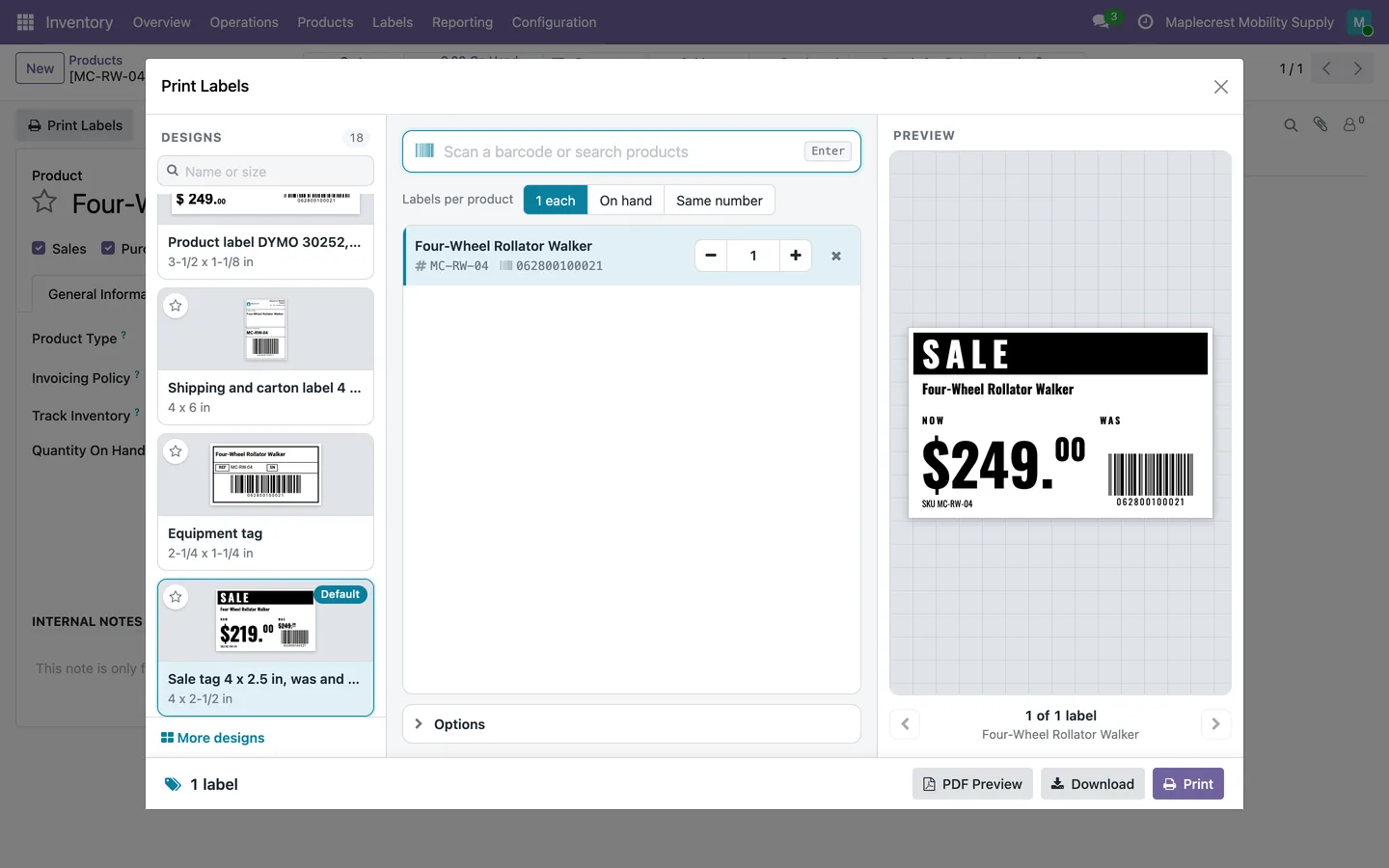
Scan or search products, choose how many labels, check the sheet and print, all on one screen.
-
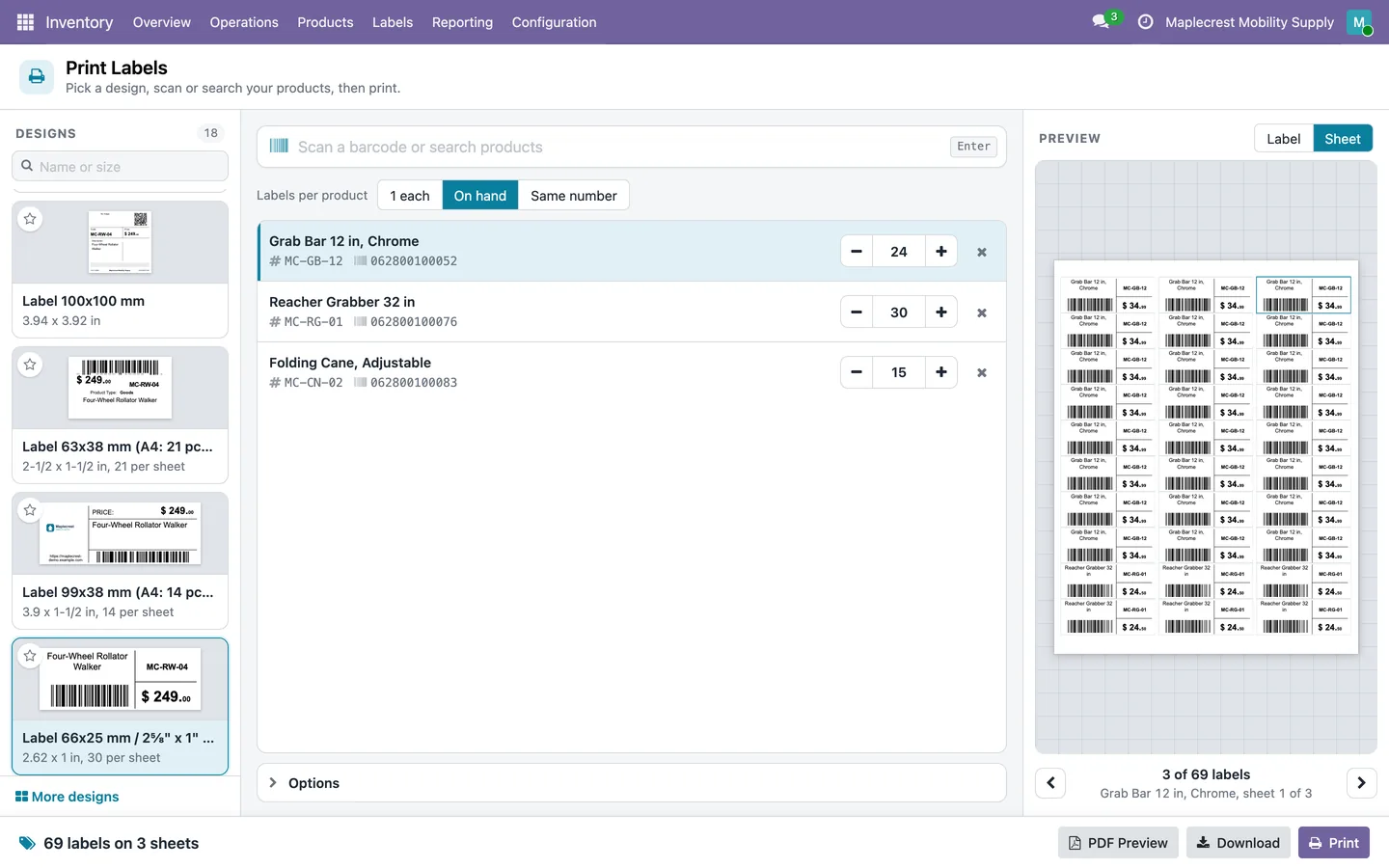
Choose a design and products
Pick a design, then scan or search products. Print one label each, the quantity on hand or the same number, with a promo price list for was and now prices.
Inventory > Labels > Print Labels
-
See the sheet
The Sheet view shows every label on the page and how many sheets the job takes.
-
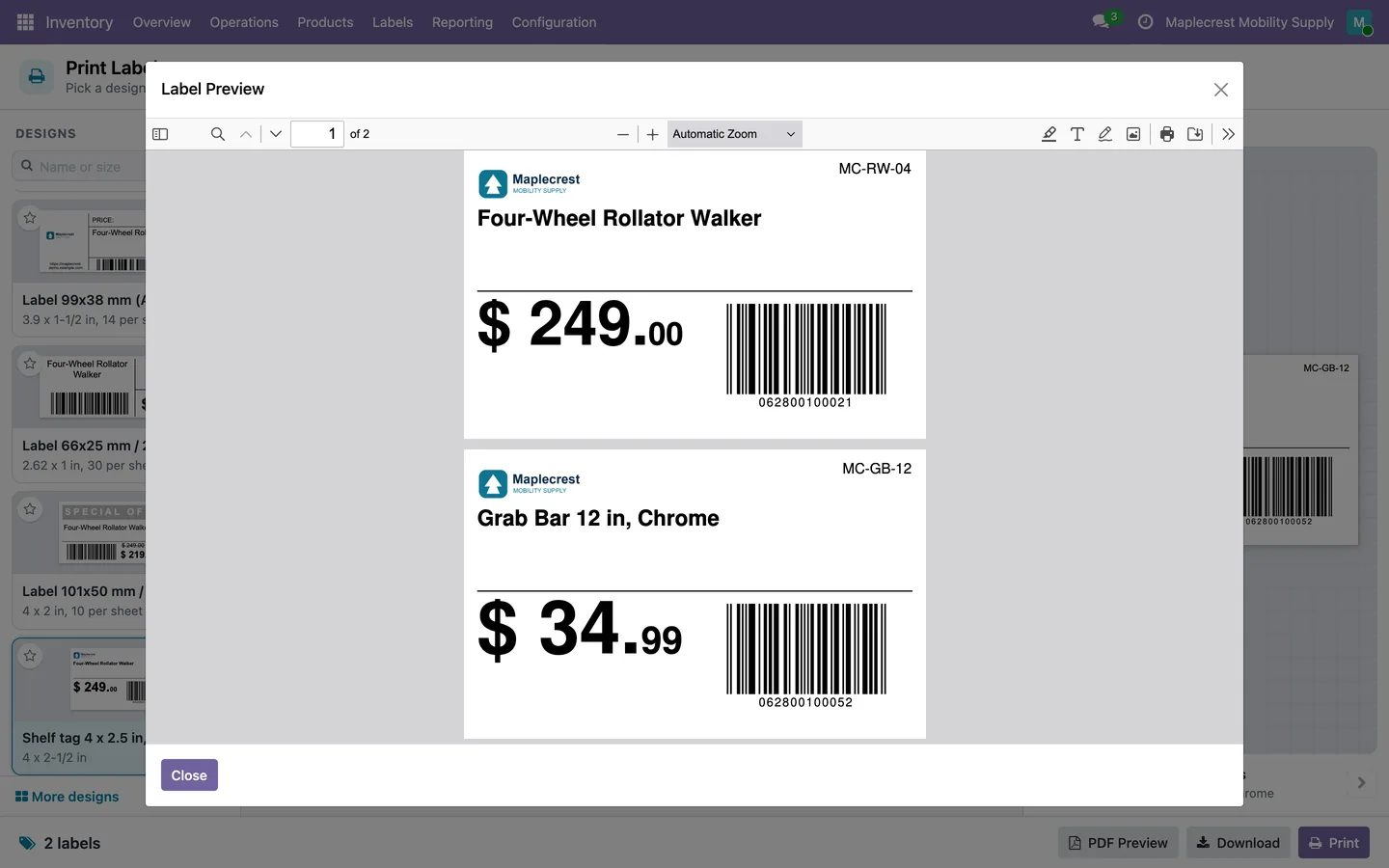
Preview, download or print
PDF Preview, Download or Print. The PDF is made on your own Odoo server.
-
From a product or a transfer
"Print Labels" on a product opens the same screen over it. On a transfer or the Lots list it prints one label per serial or lot.
Product > Print Labels
-
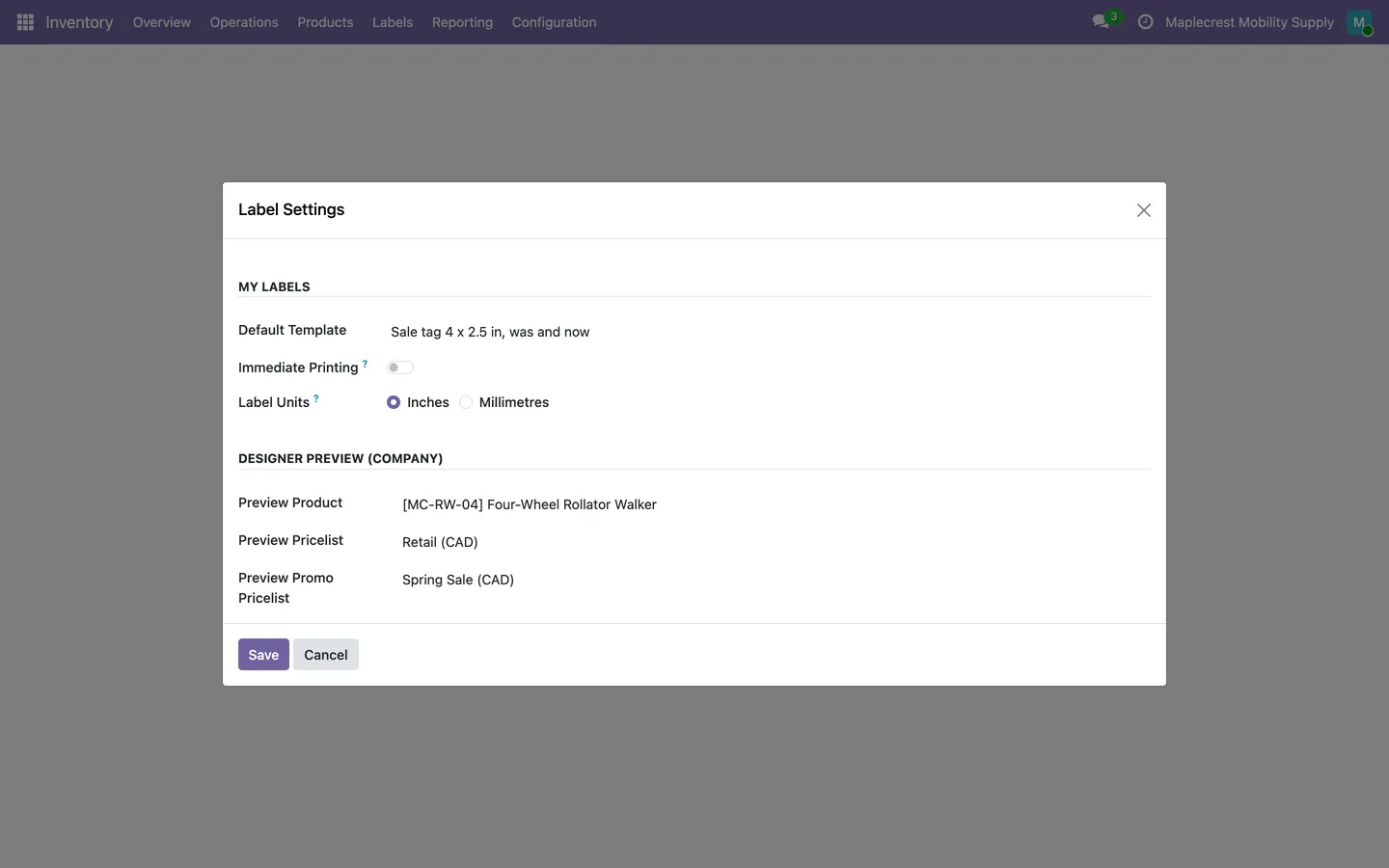
Set your defaults
Each user picks a default design and units. A labels manager sets the company's preview product and price lists.
Inventory > Labels > Settings
What it does
 Label Studio
- Label Studio is a drag-and-drop label designer with undo, redo, zoom, a grid, snapping and inches or millimetres.
- Elements include text, product fields, attributes, price, promo price, price by quantity, barcode, QR code, company logo, image, line and box.
- The designer previews the label with a real product and opens a PDF preview of the saved design.
- Long text can shrink to fit its box, never below a set minimum size, and prices can print their cents small.
- Text can print in the user's language, English or French (Canada), and shelf life prints as a best-before date in the Canadian bilingual month format.
- A valid 12-digit product code prints as a real UPC-A barcode, and a URL in a QR code can be shortened with Odoo's link tracker.
 Designs to start from
- A Design Gallery holds ready-made designs for medical and mobility, retail and grocery, warehouse and parts, and food and specialty, filtered by industry and label size.
- "Use this design" copies a gallery design into the company's own designs and opens it in the designer.
- Label Designs shows each design as a card with a live thumbnail, and each user can star favourites, which are listed first.
- A new design starts from a label stock: thermal roll (Zebra, Rollo), DYMO LabelWriter, Avery US Letter sheet, Brother QL, metric and A4, or a custom size.
- Starter designs cover shelf tags, product and bin labels, DYMO labels and 4 x 6 shipping and carton labels, each also in a bilingual version.
 Print Labels screen
- The Print Labels screen lists designs as cards searchable by name or size, with the user's default design preselected.
- Products are added by scanning a barcode or searching, and each line has plus and minus buttons.
- Quantities can be one label each, the quantity on hand or the same number for every product.
- Options choose the price list, a promo price list for was and now prices, and how many places to skip on a partly used sheet.
- The preview shows each label or the whole sheet, and PDF Preview, Download and Print buttons sit along the bottom.
- "Print Labels" on a product opens the same screen over the product, and on a transfer or the Lots list it prints a label per serial or lot.
 Settings and access
- Each user sets a default design and label units, and a user can be limited to chosen designs.
- A Labels Manager sets the company's preview product, price list and promo price list used in the designer.
- Labels User and Labels Manager groups follow Inventory access: inventory users can print and inventory managers can design.
- Food products carry ingredients, allergens, net content and shelf life on a Labels tab.
What's new
Recent changes to Fusion Labels Pro, newest first.
-
- French text prints empty rather than in English when a food field has no French text.
-
- A Design Gallery of ready-made medical, retail, warehouse and food designs, with "Use this design".
- Each user can star favourite designs, which are listed first.
- Labels print per serial number or lot from transfers and the Lots list.
- Food fields and best-before dates in the Canadian bilingual format.
-
- Label Studio, a drag-and-drop label designer, replaces the old section-by-section layout.
- A Print Labels screen with a live preview opens from the menu and over products.
- A North American label size catalogue and starter designs.
- Each user works in inches or millimetres.
- Long text shrinks to fit its box, and prices can print small cents.
Related modules
 Fusion Labels
Free
Product labels with prices and barcodes, printed as PDF on A4 sheets or single labels.
 Fusion Inventory
Margins, brand pricing, a portal stock sheet for reps and stock shared between two Odoo databases.
 Fusion PDF Preview
Free
Preview and print Odoo reports without downloading them first.
See Fusion Labels Pro on your own Odoo.
Book a call and tell us how your team works today. We'll show you the module and what it would take to set it up. Prefer the phone? Call 905-792-0000.