
Fusion Accounting AI
An accounting co-pilot that proposes and waits for your approval.
Questions that only read the books run at once, while anything the assistant would match, reconcile, post or pay waits as a proposal that only an accounting manager can approve. Data Egress starts at "Local only", where no company data goes to an outside AI service, and an administrator must choose "Allow named external providers" and list each one.
- Odoo 19
- Version 19.0.1.18.3
Fusion Accounting AI, step by step
4 workflows, 16 steps. Every screen is real, from a demo company with invented data.
Decide where your data may go
Choose the AI provider, keep company data local until you allow a named provider, and set what the AI may cost each month.
-
Open the Fusion AI settings
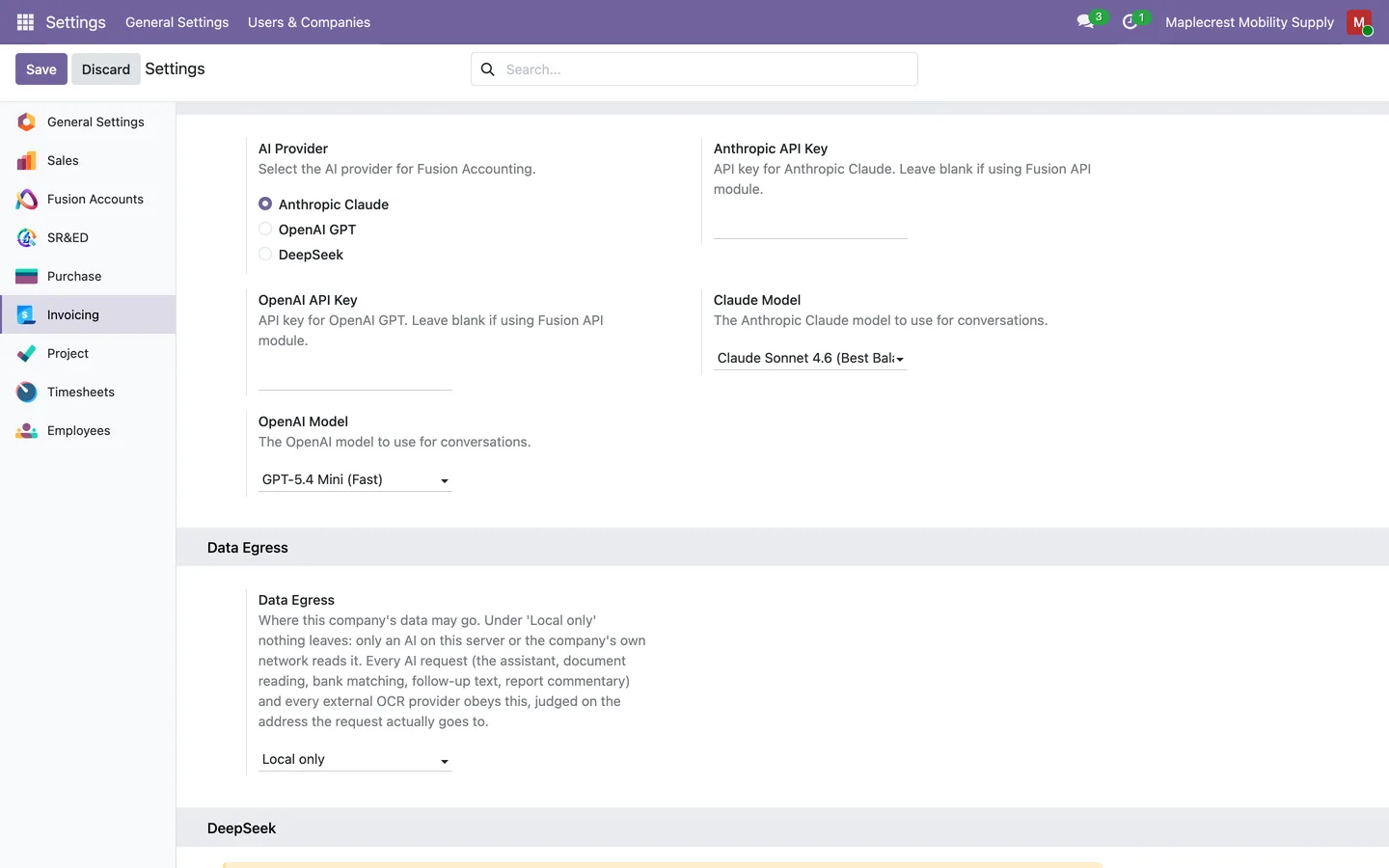
The settings show the provider choice, the key fields and Data Egress, which starts at "Local only" so no company data leaves until an administrator allows a named provider.
Accounting > Configuration > Fusion AI > Configuration
-
Set a monthly budget
Each company sets a monthly AI budget in US dollars or tokens. Accounting managers are warned at the warning share, and at the full budget the AI features pause while bank matching keeps working.
Accounting > Configuration > Settings > AI Budget and Usage
-
Review AI usage
AI Usage lists every AI call by day, user and feature with its tokens, cost, response time and outcome.
Accounting > Configuration > Fusion AI > AI Usage
A daily check proposes, a manager approves
Daily checks find card payments and cleared payroll cheques that match, and leave each one as a proposal with its exact journal items. Nothing is reconciled until an accounting manager approves.
-
Pair the card and the bank
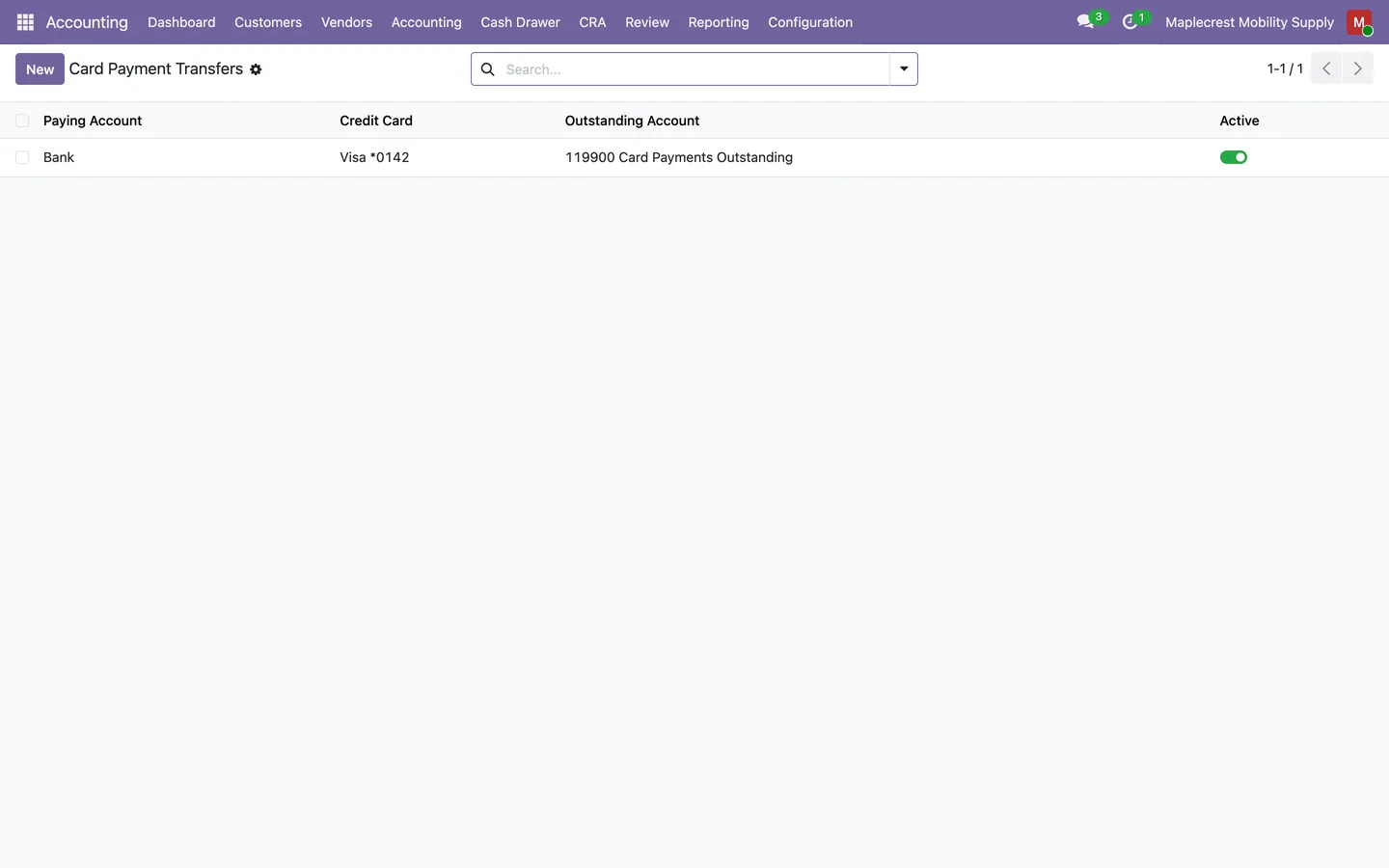
One row names the bank account that pays the credit card, the card, and the outstanding account where the payment waits until it is matched.
Accounting > Configuration > Fusion AI > Card Payment Transfers
-
The check runs each day
The transfer check matches each incoming card payment to the open transfer of the same amount within seven days, and the payroll cheque check matches cleared cheques to the payroll liability. Each line is proposed once.
-
Open the proposal
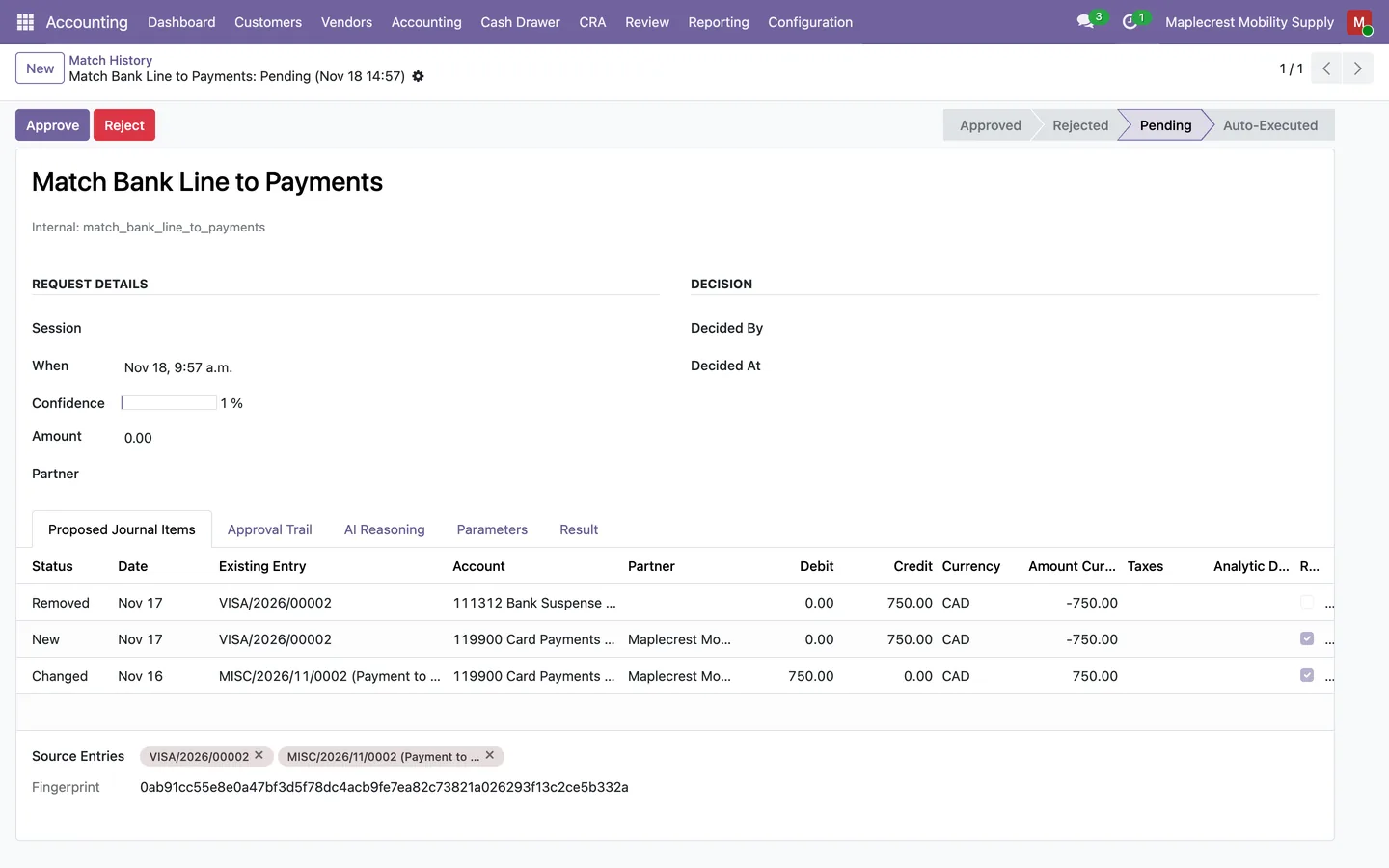
The pending proposal shows the journal items it would remove, add and change, the entries it comes from and the fingerprint it is pinned to, with "Approve" and "Reject".
Accounting > Configuration > Fusion AI > Match History
-
Approve and keep the trail
"Approve" checks the fingerprint against the books again before the match runs. The Approval Trail keeps who approved, when, and what ran, and nobody can edit a row.
Accounting > Configuration > Fusion AI > Approval Trail
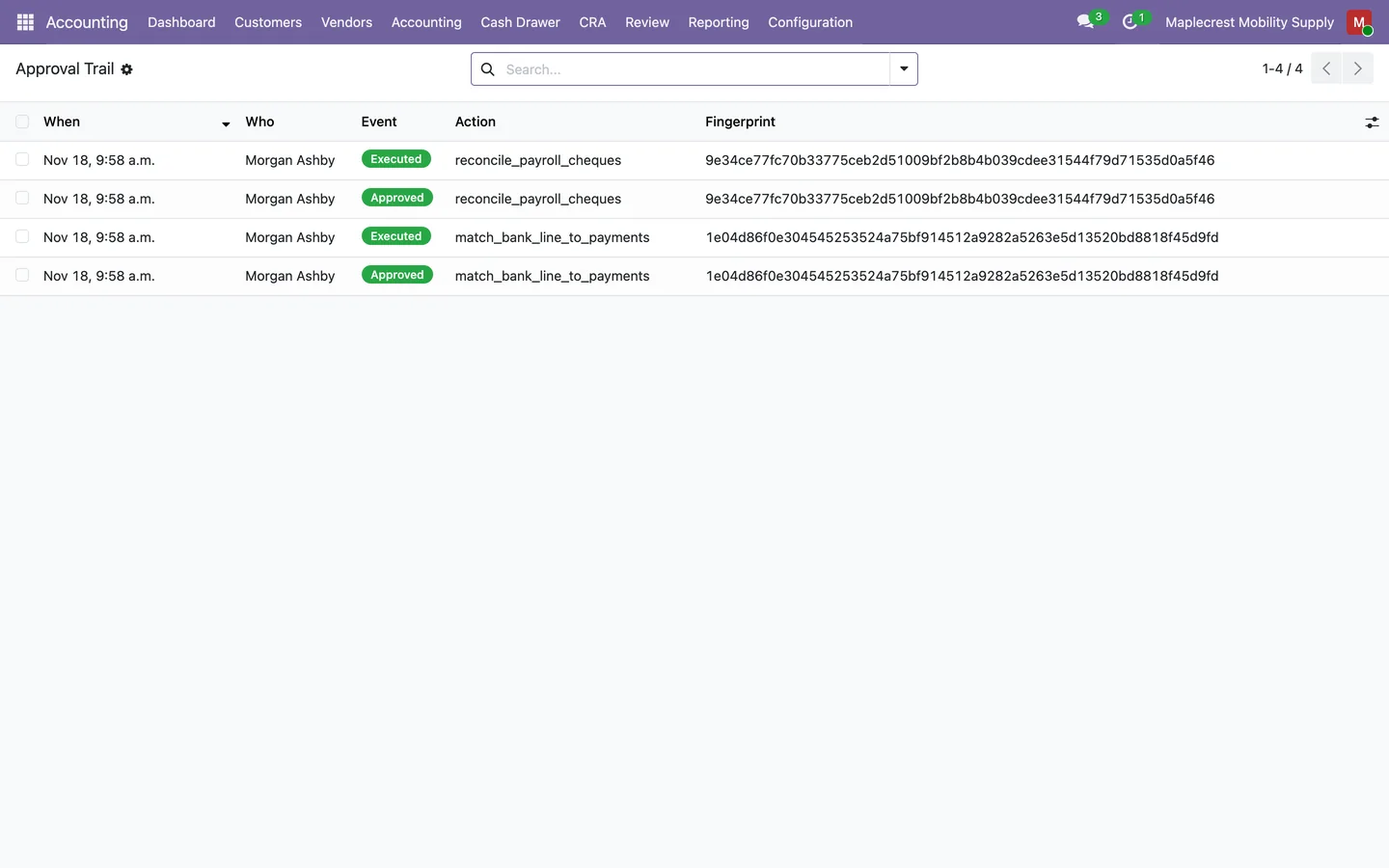
Teach it how your books work
Write your own accounting patterns in plain words and let the weekly rebuild record how repeating bank lines were coded.
-
Write a rule
A manager writes a rule in plain words with its type, fee or write-off account and journals. The list shows its approval tier, who created it and how often it was used.
Accounting > Configuration > Fusion AI > Fusion Rules
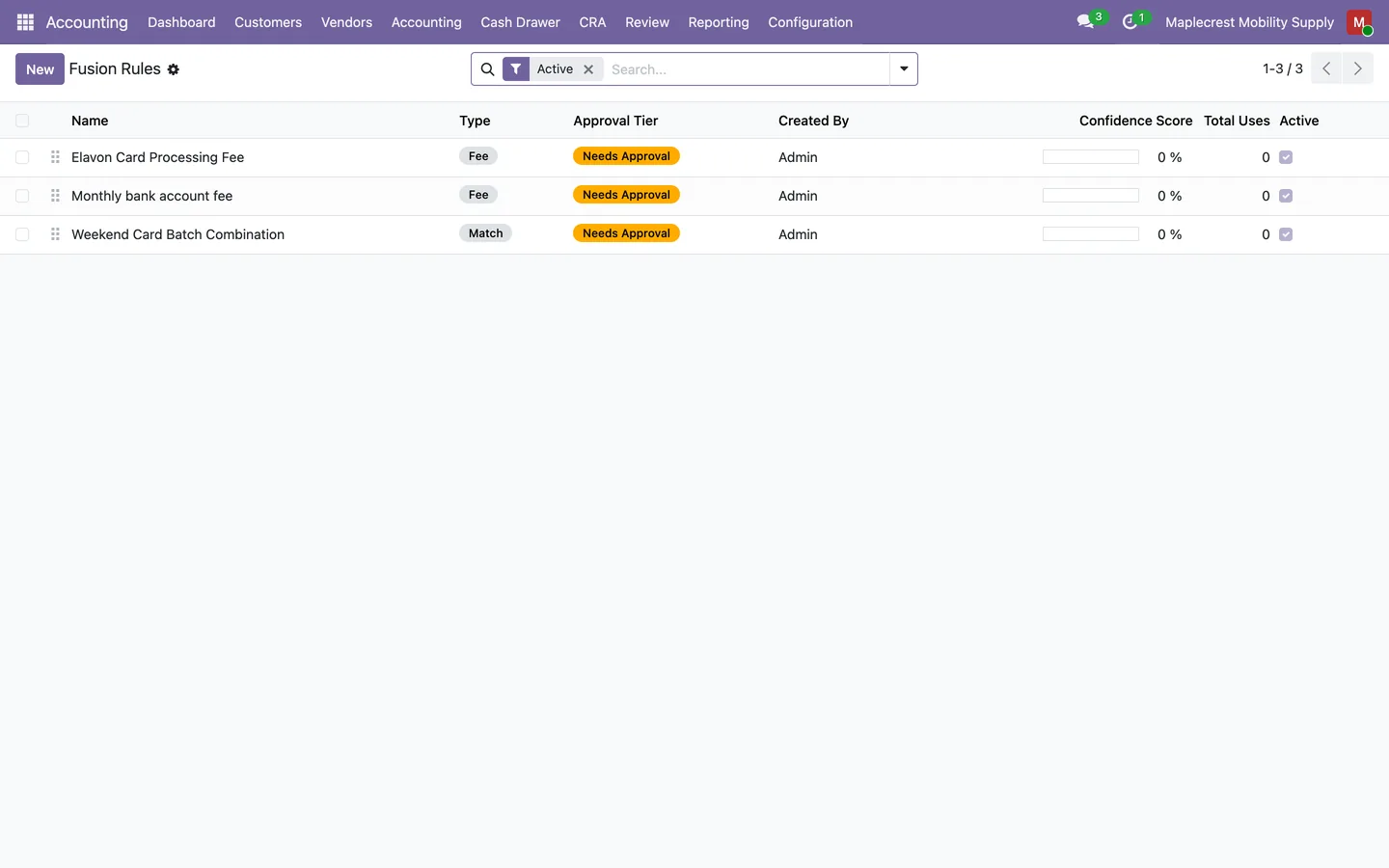
-
Recurring patterns
Each week, bank lines reconciled the same way three or more times become a pattern with the account, partner, whether HST applied and any reconciliation model that already handles them.
Accounting > Configuration > Fusion AI > Recurring Patterns
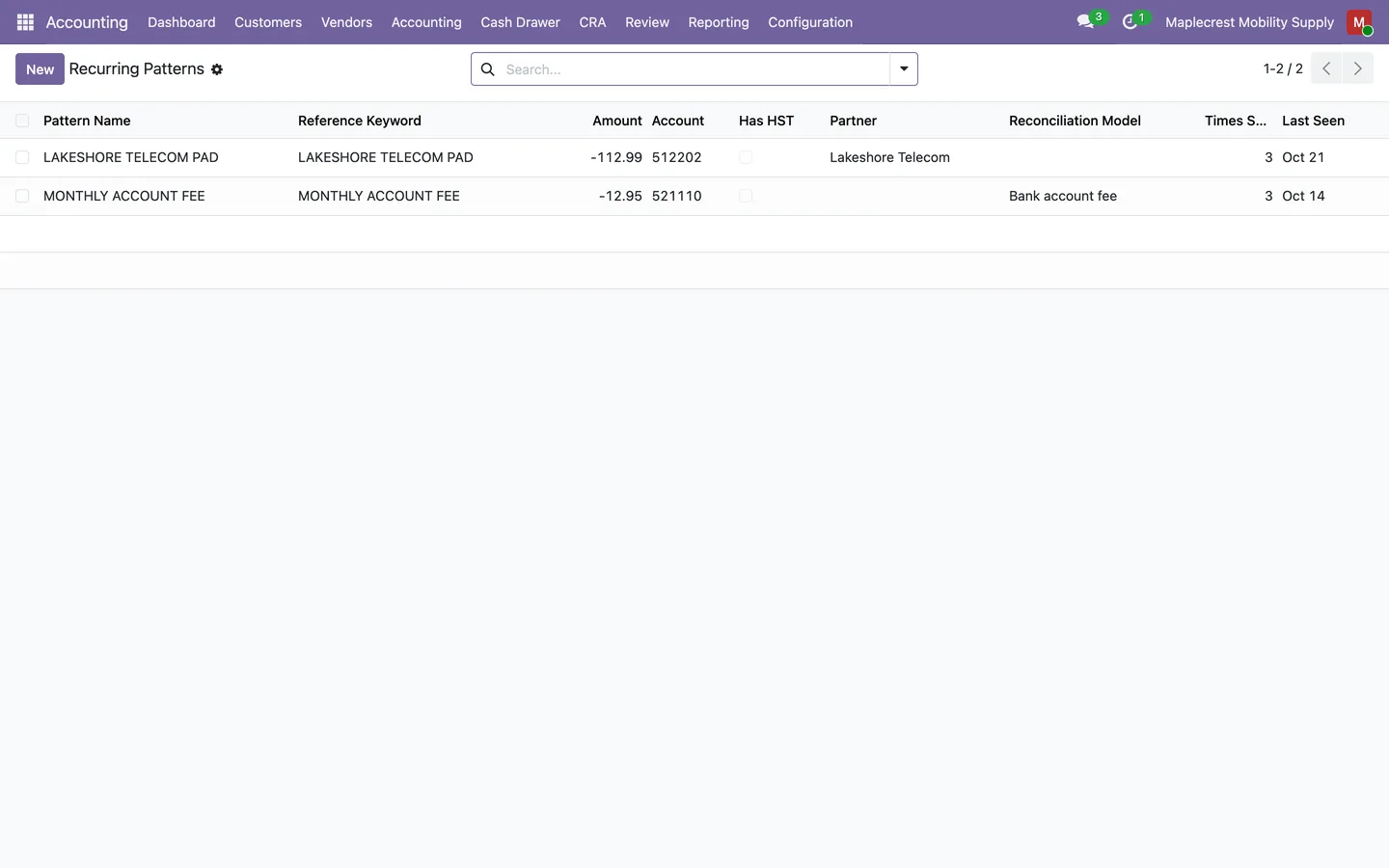
-
Company knowledge
Facts the assistant has learned from confirmed reconciliations, or that you asked it to remember, are listed with their partner, accounts and source. You can edit a fact or retire it.
Accounting > Configuration > Fusion AI > Company Knowledge
Close the fiscal year
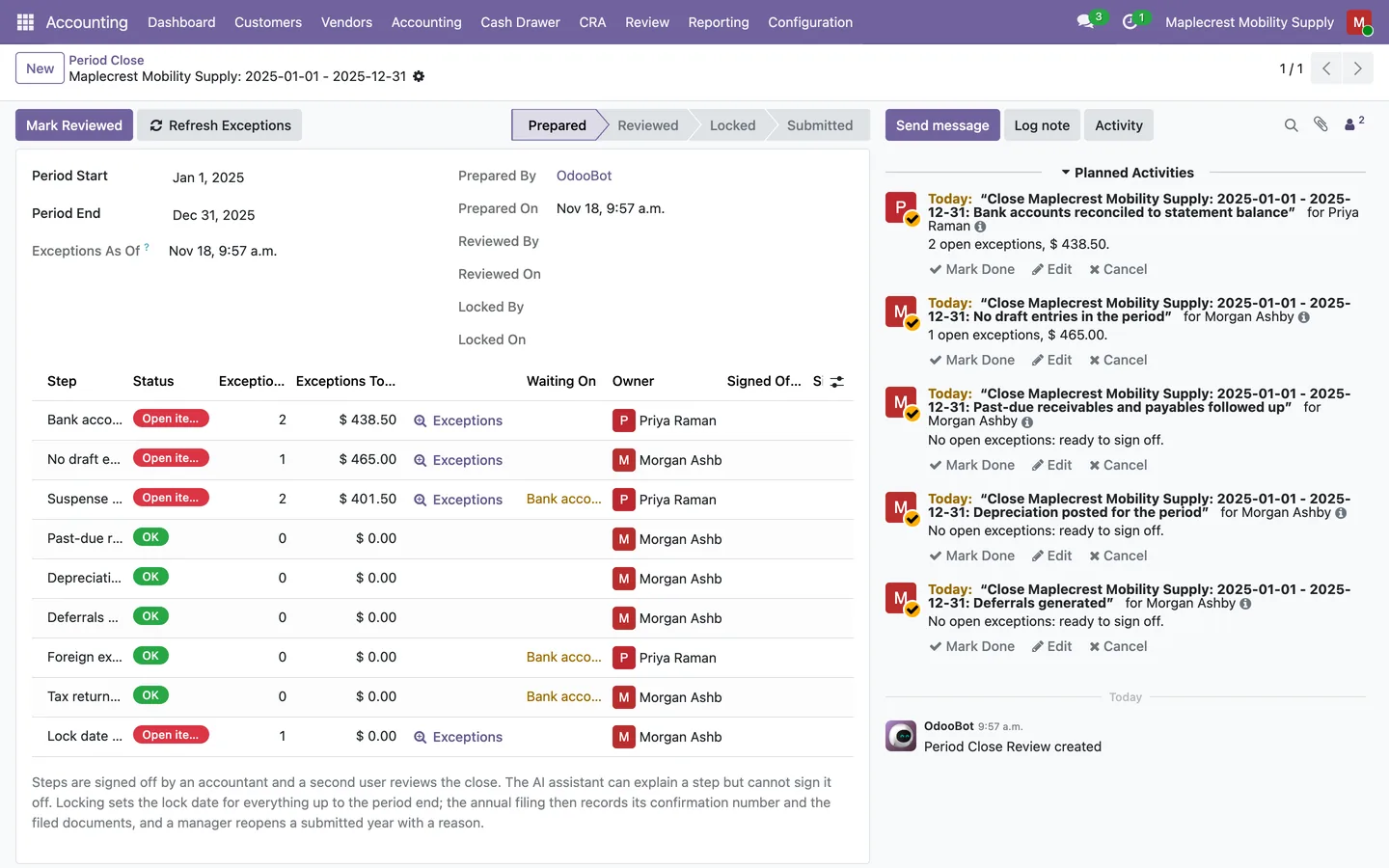
A checklist of nine steps reads the books for open items, a second manager reviews, and the year's result moves into equity before the year is locked.
-
Create the year's close
A close for one company and date range builds nine steps, links the steps that wait on others and reads the open items at once, with a count and a dollar total for each step.
Accounting > Accounting > Closing > Period Close
-
Work the exceptions
"Exceptions" opens the records that keep a step open, each with "Open" to go to it. Each step can have an owner, who gets a to-do while it can be worked on.
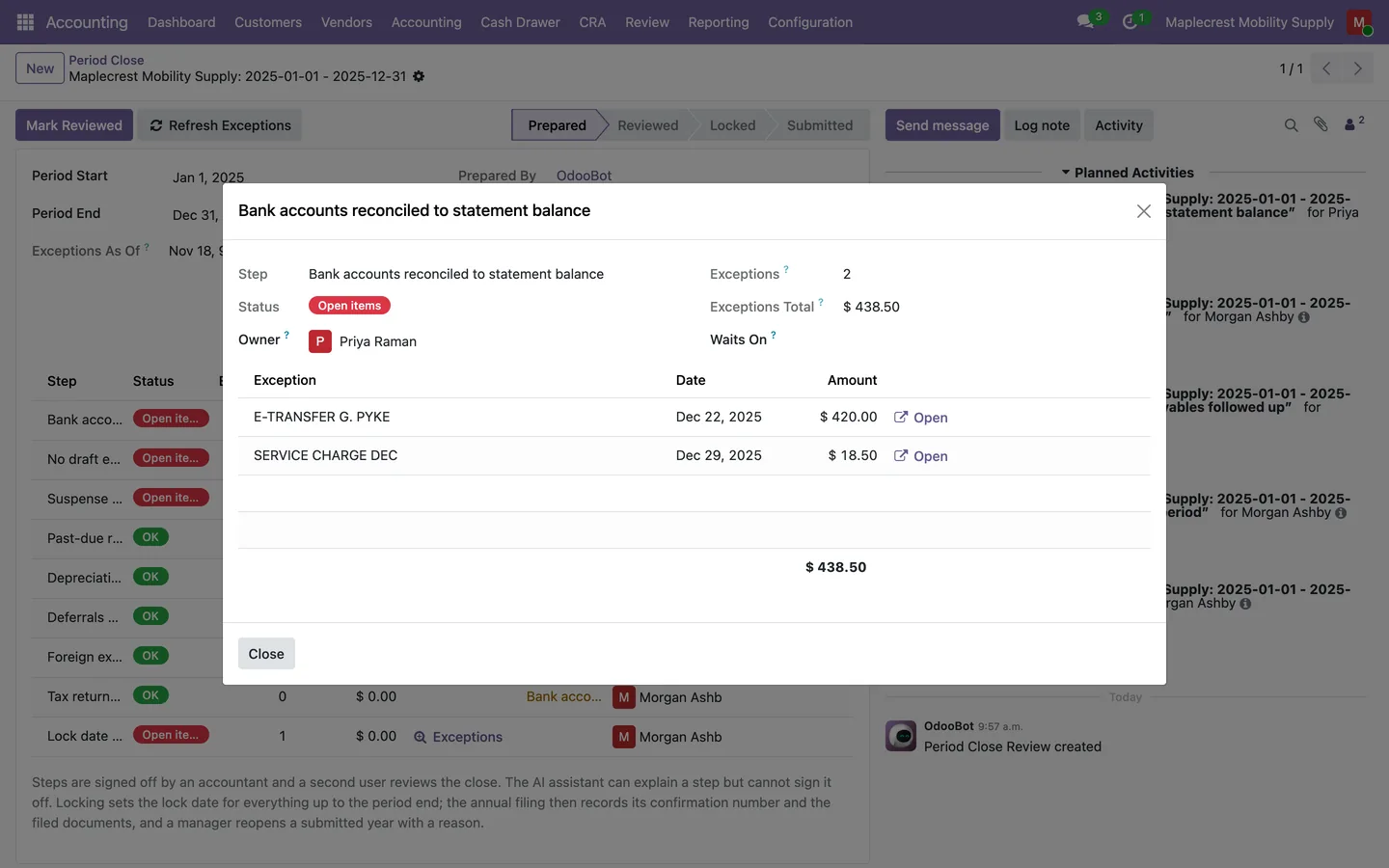
-
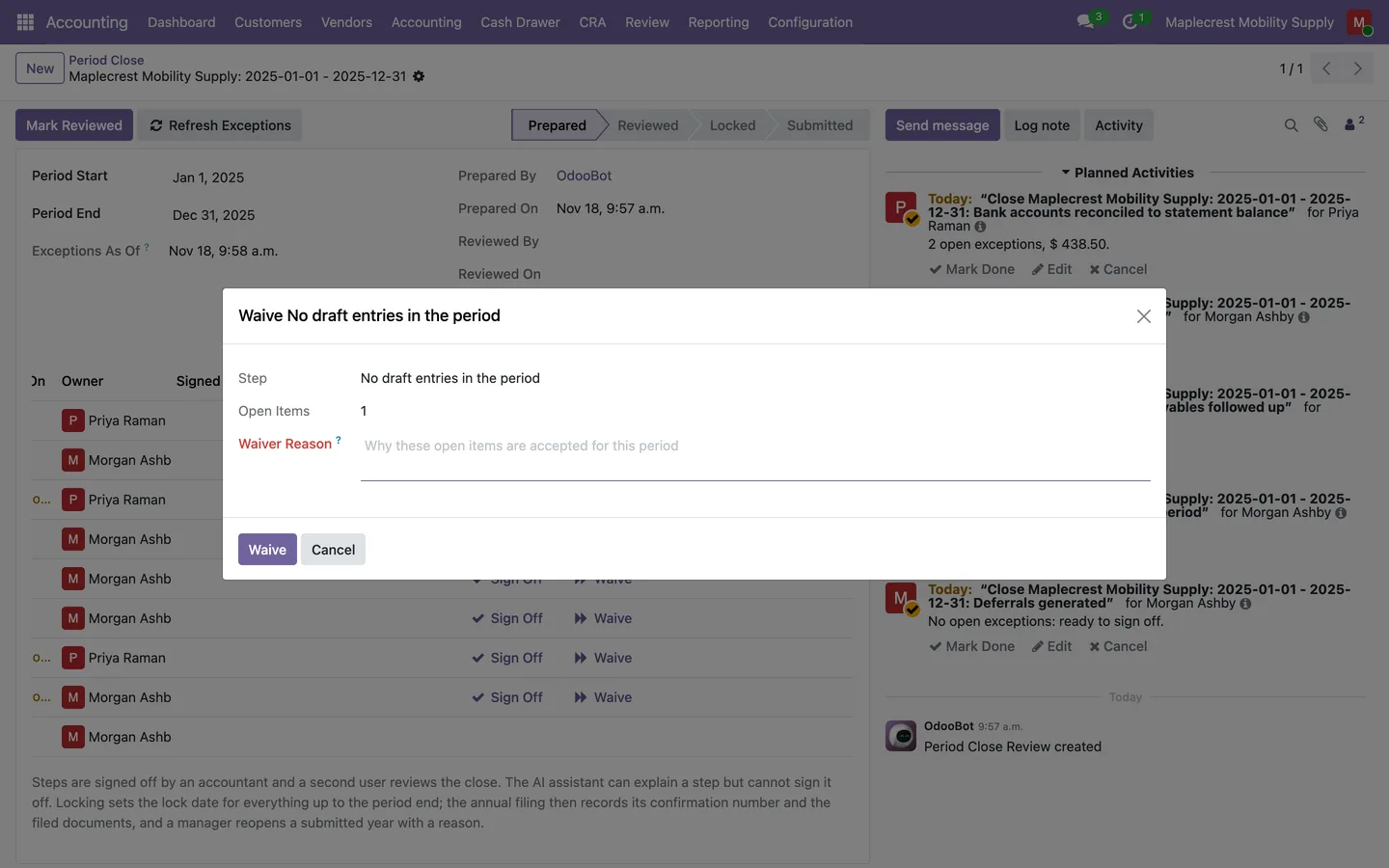
Sign off or waive
A step with no open items is signed off. A step whose open items are accepted is waived with a written reason, and "Undo Waiver" takes it back.
-
A second manager reviews
"Mark Reviewed" must come from a different accounting manager than the one who prepared the close.
-
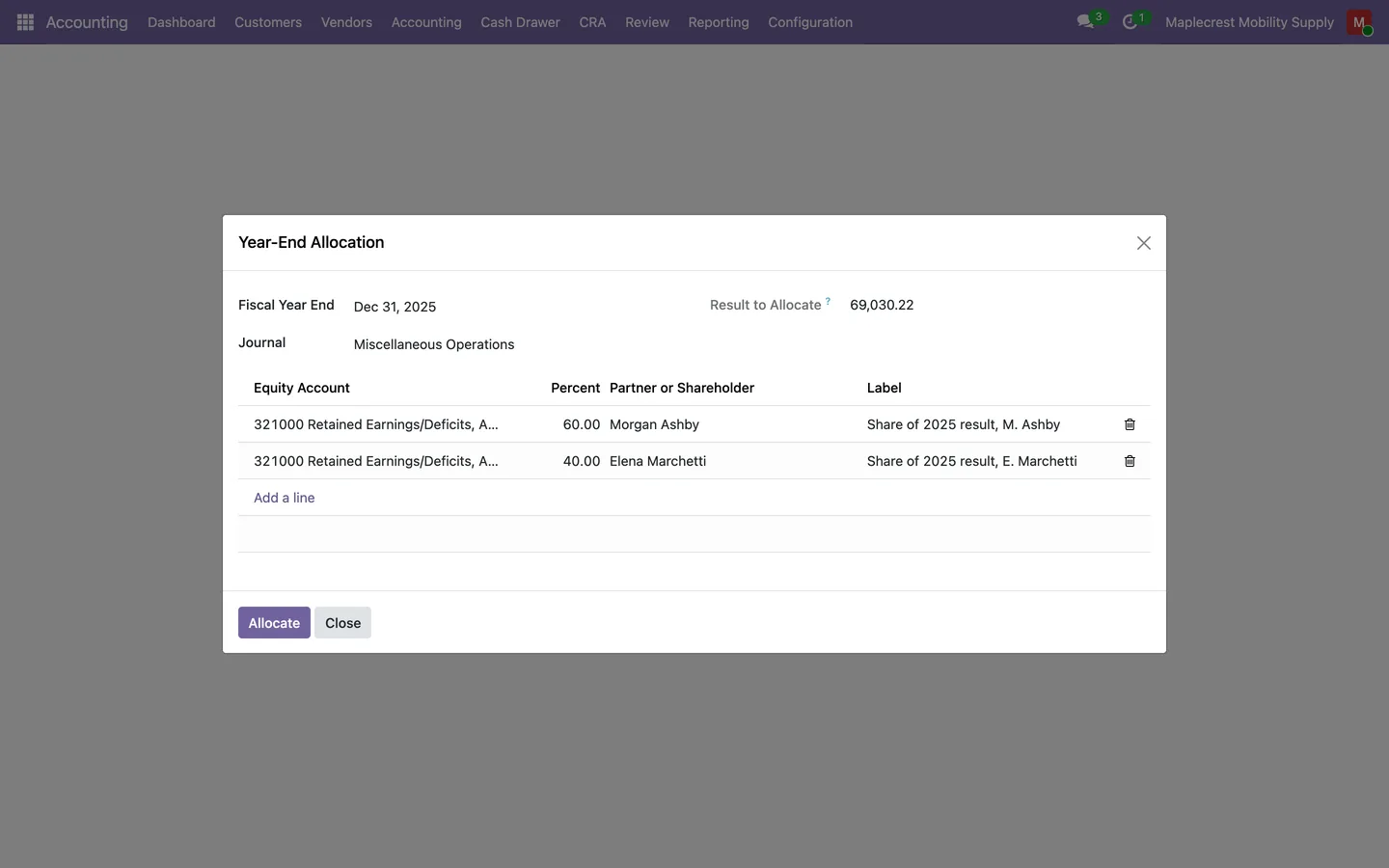
Allocate the year's result
The allocation moves the year's result into retained earnings or each shareholder's equity account by percentages that total 100, dated the first day of the next year. It refuses while the year's close still has open items.
Accounting > Accounting > Closing > Year-End Allocation
-
Lock and record the filing
"Lock Period" checks the posted entries' hash chain and sets the lock date. After filing outside Odoo, "Submit Annual Filing" records the reference, date and documents.
What it does
 Approve before it posts
- Questions that only read the books run at once, while anything the assistant would match, reconcile, post or pay waits as a proposal that only an accounting manager can approve.
- Each proposal shows the exact journal items it would create, change or remove and the entries it comes from, and approval is refused as stale when anything behind it changed after the preview.
- The "Approval Trail" keeps every approval, rejection, execution and stale refusal with who, when and the fingerprint it was pinned to, and nobody can edit a row.
- In "Match History" a pending proposal opens with "Proposed Journal Items", "Approval Trail", "AI Reasoning", "Parameters" and "Result" tabs, and accounting managers see "Approve" and "Reject".
- A rejected proposal keeps a Correction tab for why it was rejected and what should have been done instead.
 Checks that run daily
- "Card Payment Transfers" pairs each bank account with the credit card it pays and the account where the card payment waits until matched.
- Every day a check proposes matching each incoming card payment to the open transfer of the same amount dated within seven days, and nothing is reconciled until a person approves.
- With a reconciliation model named "Payroll Cheque", another daily check proposes matching each cleared cheque to the payroll liability of the same amount.
- A bank line is proposed only once while its proposal is pending, and a proposal that would change no journal item is not kept.
- A proposal left pending for 30 days is rejected with the reason "Auto-expired after 30 days".
- An optional "Post-Action Audit Hook" leaves a note on each posted entry that is unbalanced, has a line with no account, or has a product line missing the tax its product normally carries.
 Learns how your books work
- "Fusion Rules" hold your accounting patterns in plain words, typed Match, Classify, Audit, Fee, Routing or Follow-Up, with a fee account, a write-off account and the journals they cover.
- Each rule keeps its approved and rejected uses and a confidence score, and an administrator can "Demote to Needs Approval" or "Rollback to Previous Version".
- "Recurring Patterns" are rebuilt each week from reconciled bank lines that repeat with the same label and amount three or more times, with the account, partner, whether HST applied and any reconciliation model that already handles them.
- "Company Knowledge" lists the one-sentence facts the assistant has learned, each with its partner, accounts, source and confidence, and you can edit a fact, "Retire" it or "Use Again".
- A fact is learned only from a confirmed reconciliation or when you ask the assistant to remember something, and it never overrides an approval or the Data Egress setting.
 Your data and your budget
- The assistant works with Anthropic Claude, OpenAI GPT or DeepSeek, or with an OpenAI-compatible model server such as Ollama or LM Studio.
- Data Egress starts at "Local only", where no company data goes to an outside AI service, and an administrator must choose "Allow named external providers" and list each one.
- Every AI request is judged on the address it actually goes to, so only a server on this machine or the company's own network, written as an IP address, counts as local.
- Each company can set a monthly AI budget in US dollars or tokens that warns the accounting managers at 80% by default and pauses the AI features at 100%, while bank matching keeps working without AI.
- "AI Usage" records every AI call by day, user and feature with its tokens, cost, response time and outcome, and keeps the prompt text only when an administrator turns on "Log AI Prompts".
- Administrators set a failover order between providers, timeouts and retries, a pause for a provider that keeps failing, and a short cache for identical questions.
 Close the month and the year
- A Period Close for a company and date range builds nine steps, from bank accounts reconciled to the statement balance through to the lock date set.
- "Refresh Exceptions" reads the books again, each step shows its open items with a count and a dollar total, and its "Exceptions" button opens the records that keep it open.
- Steps wait on each other where it matters: suspense and foreign exchange wait on the bank, and the tax return waits on the bank, depreciation and draft entries.
- Each step can have an owner, who gets a to-do while the step can be worked on, plus a note and evidence attachments.
- A step is signed off only when it has no open items and waits on nothing, or it is waived with a written reason that "Undo Waiver" takes back.
- "Mark Reviewed" must come from a different accounting manager than the preparer, and "Lock Period" checks the posted entries' hash chain before it sets the lock date.
- "Year-End Allocation" moves the year's result into retained earnings or each shareholder's equity account by percentages that total 100, dated the first day of the next year, and refuses while that year's close still has open items.
- "Reverse Allocation" on the entry reverses only that equity entry, and "Submit Annual Filing" records the filing reference, date and documents, with "Reopen Year" needing a reason.
 Ask in plain words
- The Fusion AI dashboard shows unmatched bank lines, receivables outstanding, payables due this week, an audit score out of 100 and month-end readiness as cards beside the assistant's chat.
- A "Needs Attention" list ranks AI actions awaiting approval, unreconciled bank lines, overdue customer invoices, vendor bills due this week, draft entries older than 30 days and unmatched customer payments.
- You ask the assistant about the books in plain words, and it can read a pasted or attached screenshot such as a remittance advice.
- A follow-up goes out to a customer only when your own message asks for it, and text from bank memos, emails and scanned documents reaches the AI as data, never as an instruction.
- "Draft with AI" on an invoice, bill or journal entry writes its note in Canadian English or Canadian French from the record's own facts, and "Apply" changes only the note, never amounts, dates or lines.
What's new
Recent changes to Fusion Accounting AI, newest first.
-
- Every AI request, from the assistant to document reading, now obeys the company's Data Egress setting, judged on where the request actually goes.
- Each company can set a monthly AI budget, and every AI call is recorded under AI Usage with its cost and outcome.
- The daily transfer and payroll cheque checks now propose a match for an accounting manager to approve instead of reconciling by themselves.
-
- Approving an AI proposal is now tied to the exact journal items that were shown, and a proposal whose sources changed is refused.
- The period close became a work queue with open items per step, dependencies between steps and step owners.
- The year-end allocation now moves the result between equity accounts only, so each year's profit and loss stays intact.
Related modules
 Fusion Accounting
New
Accounting for Odoo Community: bills, bank, invoicing, reports, Canadian tax and assets in one suite.
 Fusion CRA Account Ledger
New
Your CRA payroll, GST/HST and corporate accounts, line by line, matched to your bank and your books.
 Fusion Accounts
Vendor bill emails turned into draft bills, with the sender matched to a vendor.
See Fusion Accounting AI on your own Odoo.
Book a call and tell us how your team works today. We'll show you the module and what it would take to set it up. Prefer the phone? Call 905-792-0000.