
Fusion Plating
One ERP suite for plating and metal finishing shops, from quote to certificate.
Organizes plating facilities with their own tanks, operators and capabilities. Creates native plating work orders from the plating lines on a sales order.
- Odoo 19
- Version 19.0.28.1.7
- Suite of 33 add-ons
Fusion Plating, step by step
5 workflows, 21 steps. Every screen is real, from a demo company with invented data.
Quote and order
A quote request becomes a priced quotation and a confirmed order that sets up receiving and the jobs.
-
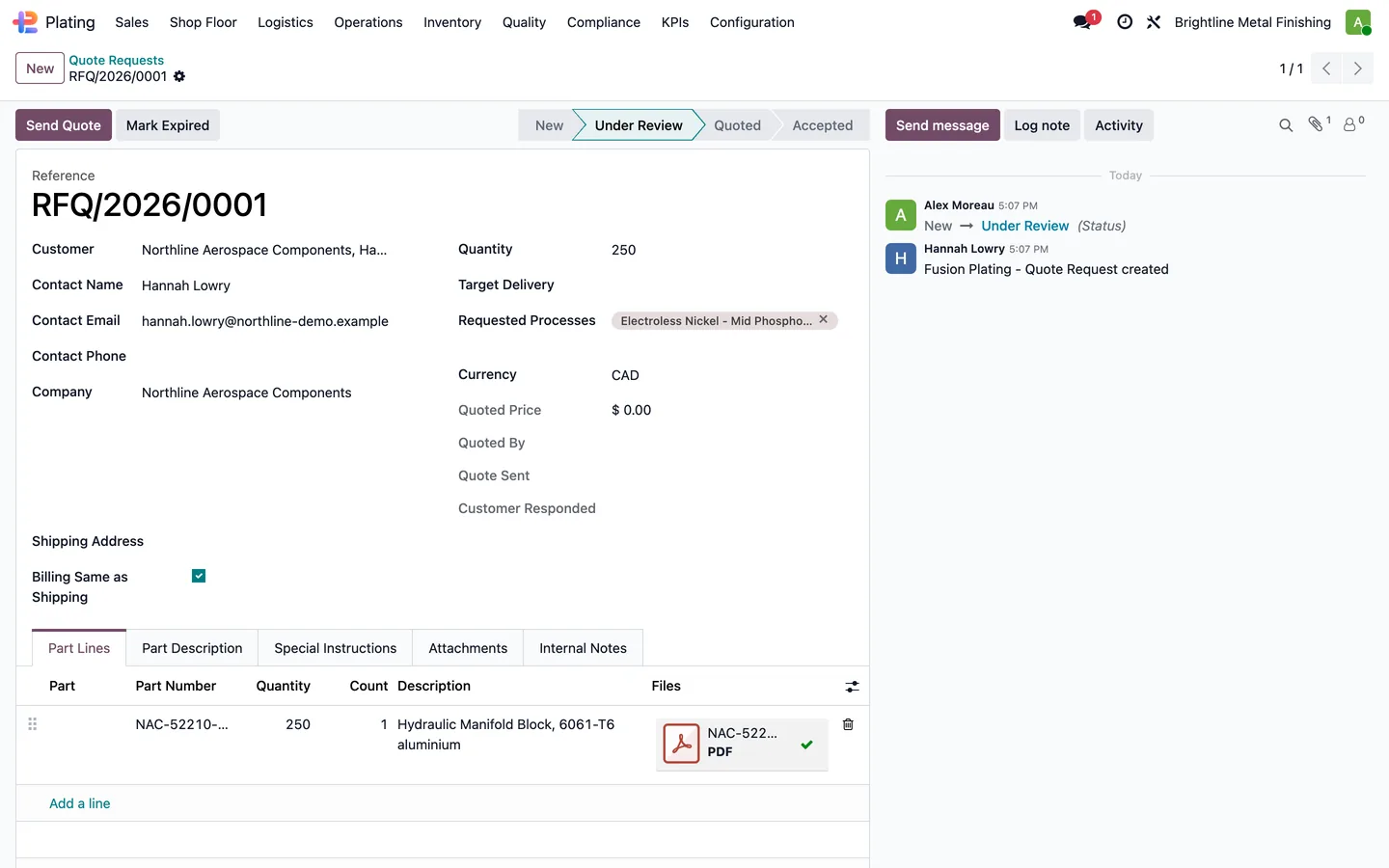
Quote request
Customers submit quote requests with drawings, target dates and notes from the portal, and each request is reviewed in the back office.
Plating > Sales > Quote Requests
-
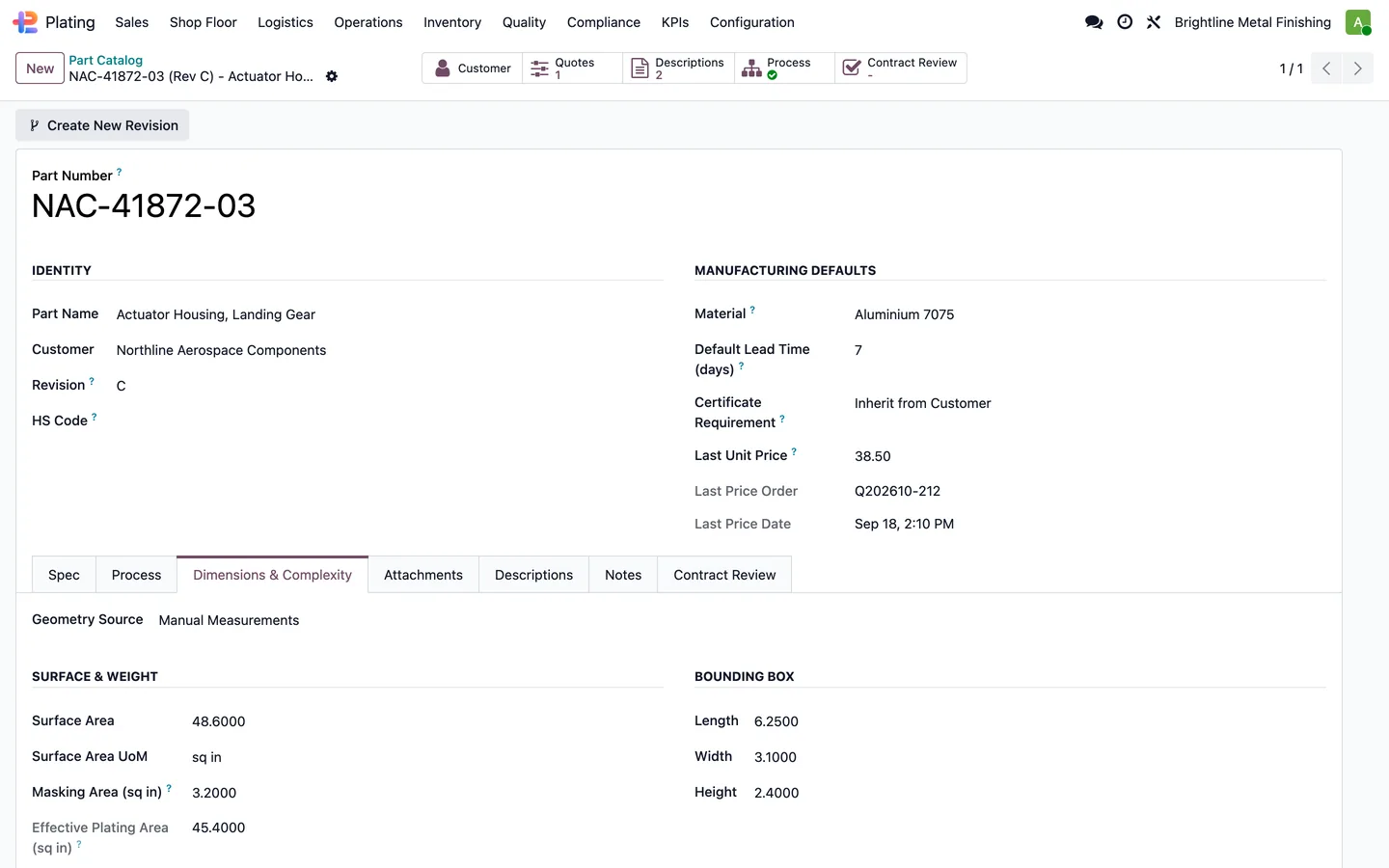
Part record
Each customer part keeps its material, geometry and revisions, and its surface area is calculated from the catalogue geometry.
Plating > Sales > Part Catalog
-
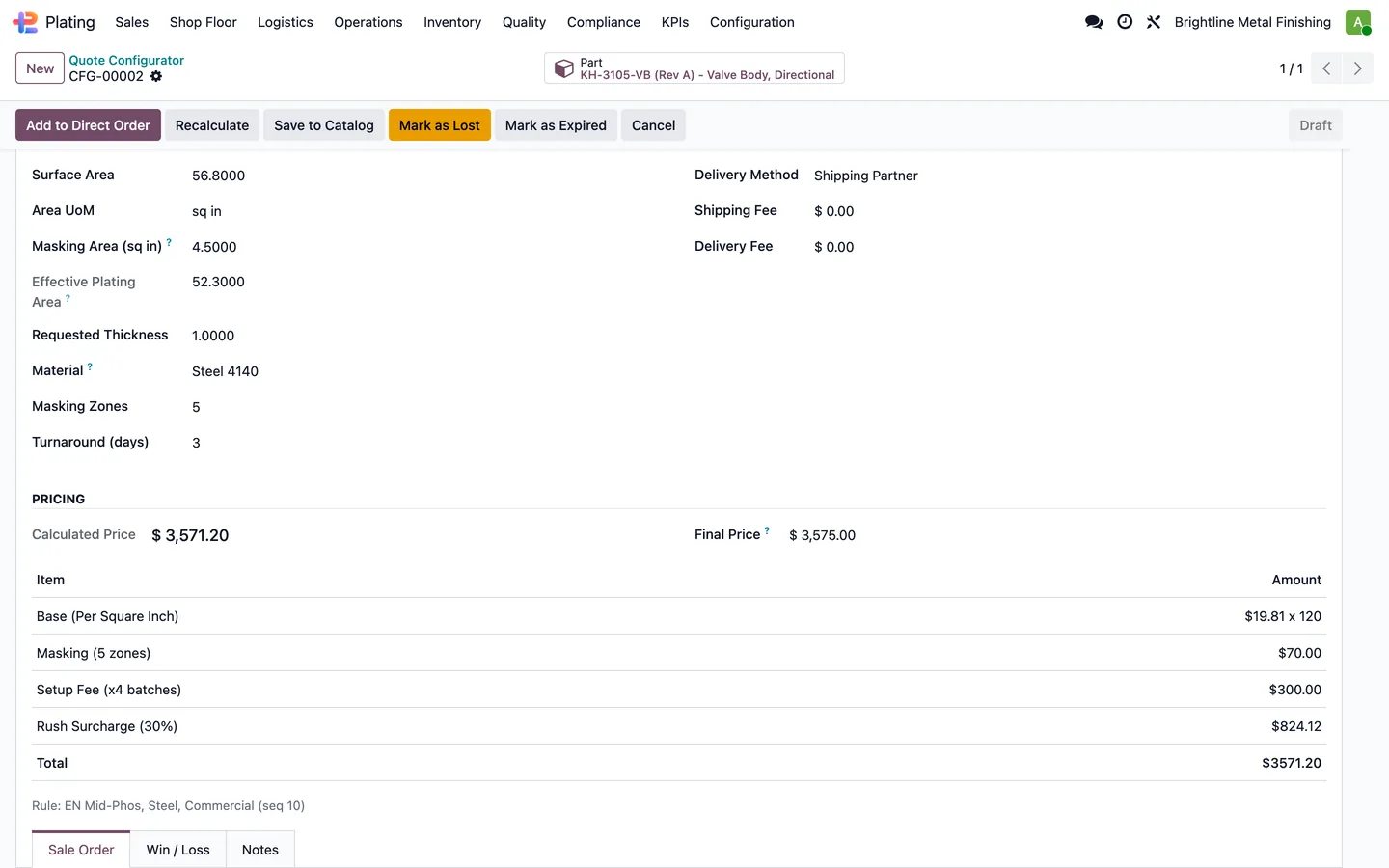
Price the job
The configurator builds the coating configuration with process, thickness and specification, prices it with formulas and complexity surcharges, and generates the sales quotation.
Plating > Sales > New Quote
-
Confirm the order
Confirming the plating sales order creates the receiving record with expected part quantities and the plating work orders, and the invoice strategy can raise a deposit or prepay invoice.
Sales order > Confirm
Receive and plan
Parts are counted in, inspected at racking and planned onto the line.
-
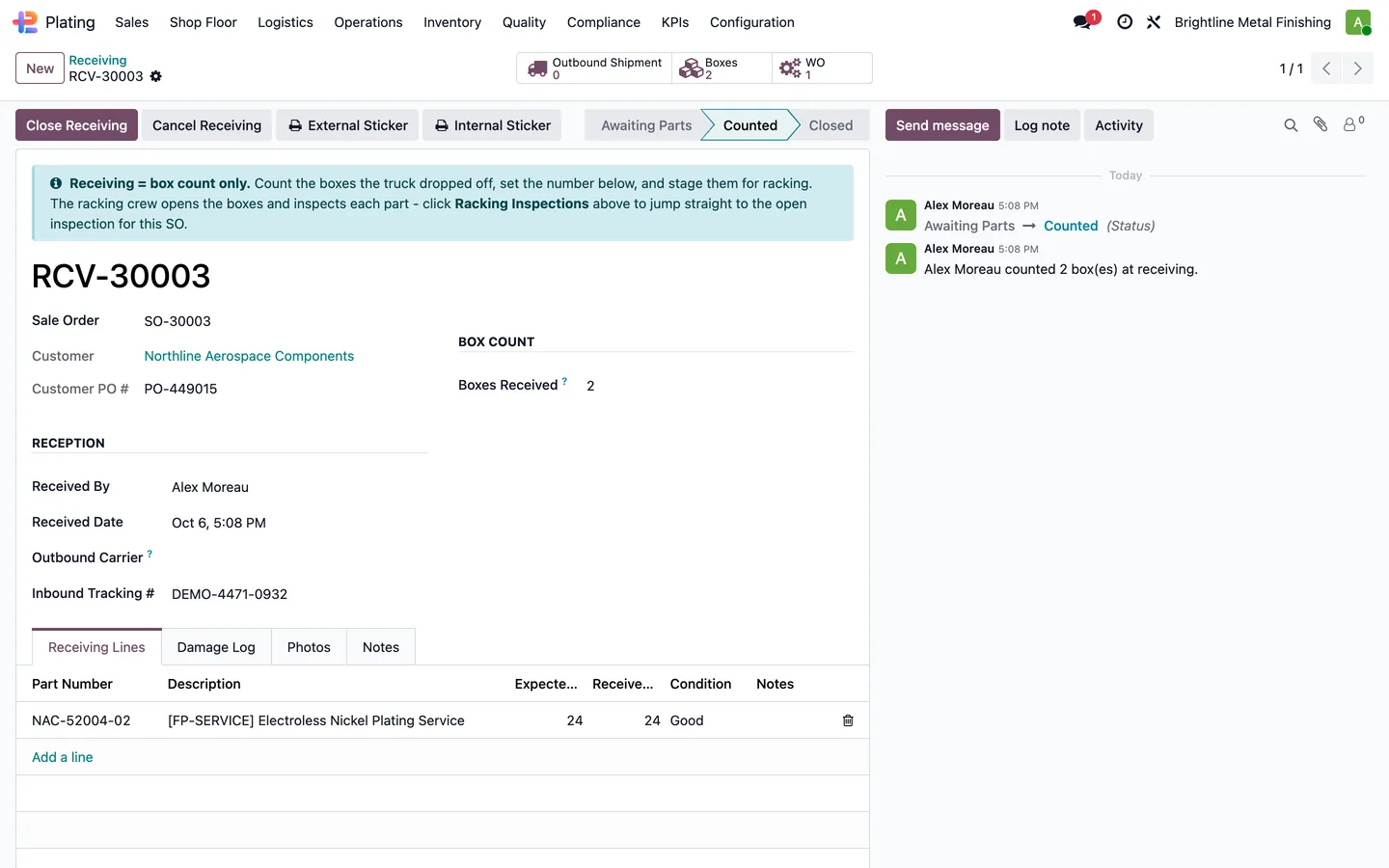
Count the boxes
Receiving records the box count and marks the record counted. Damage is logged with its severity, photographs, required action and the customer's response.
Plating > Logistics > All Receiving
-
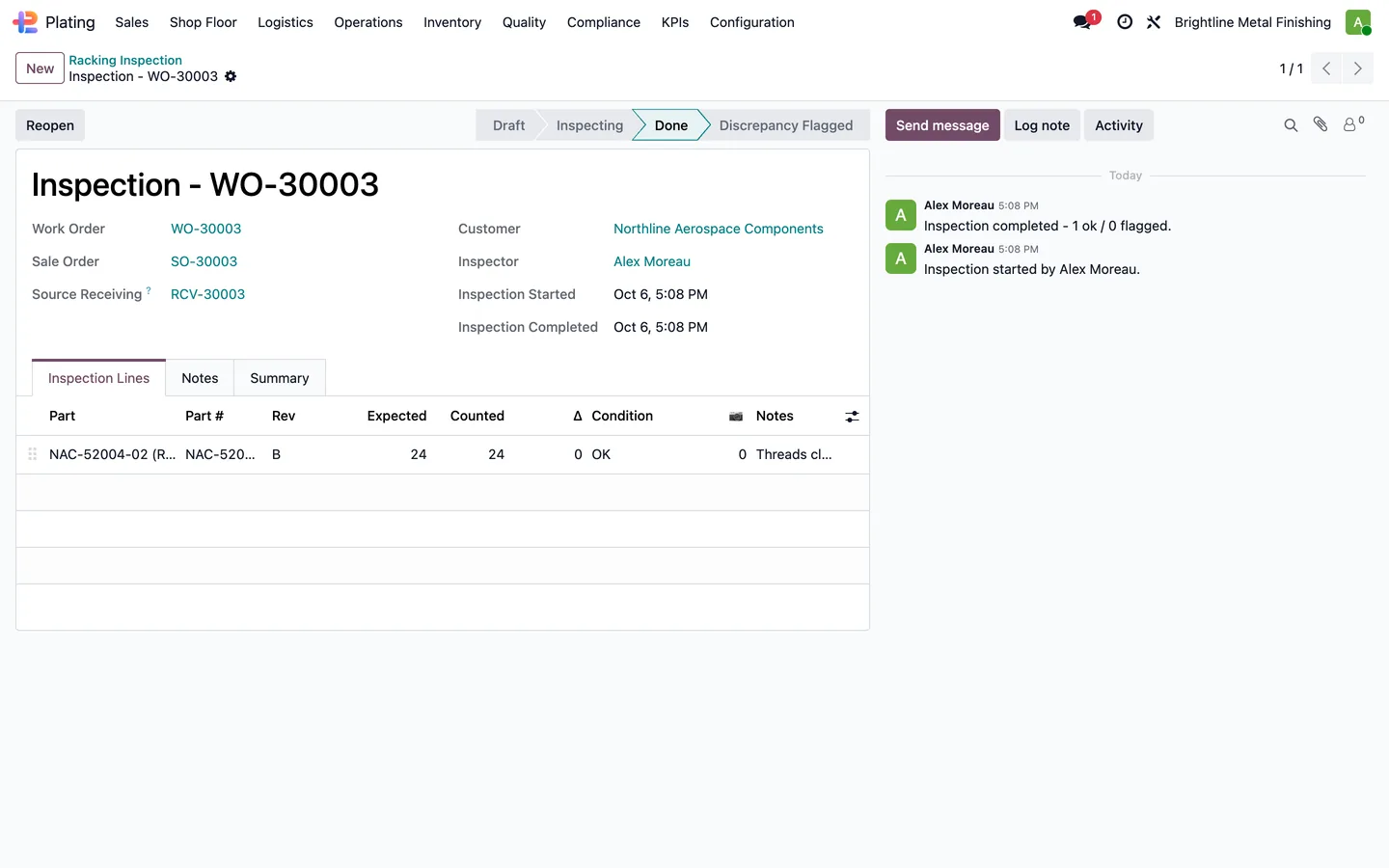
Racking inspection
The racking inspection counts each part against the expected quantity, records its condition and flags any discrepancy for resolution.
Plating > Operations > Racking Inspection
-
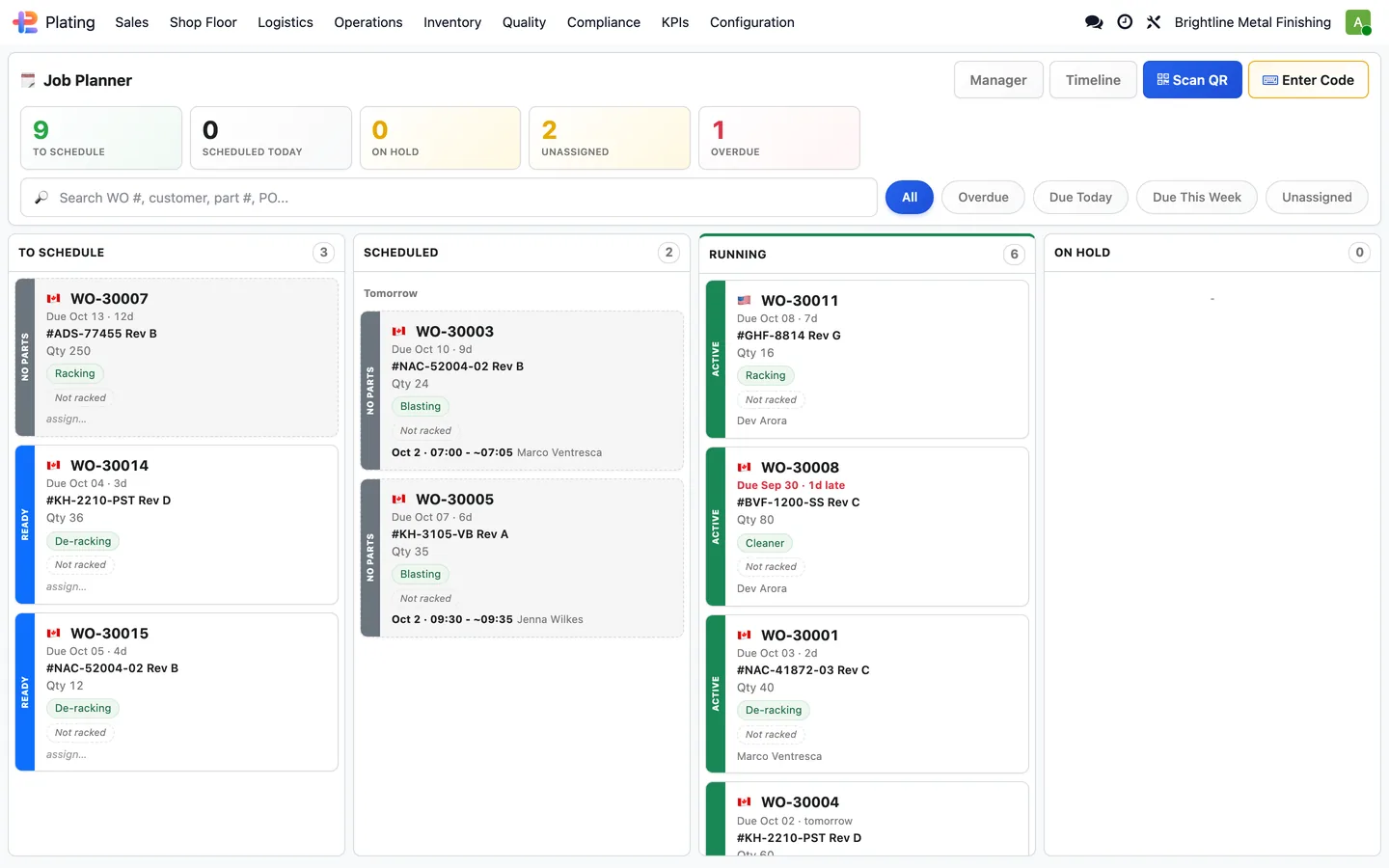
Plan the jobs
A manager claims the order and confirms its draft plating jobs, and the planner shows each work order with its part number, due date and operator.
Plating > Shop Floor > Work Orders
-
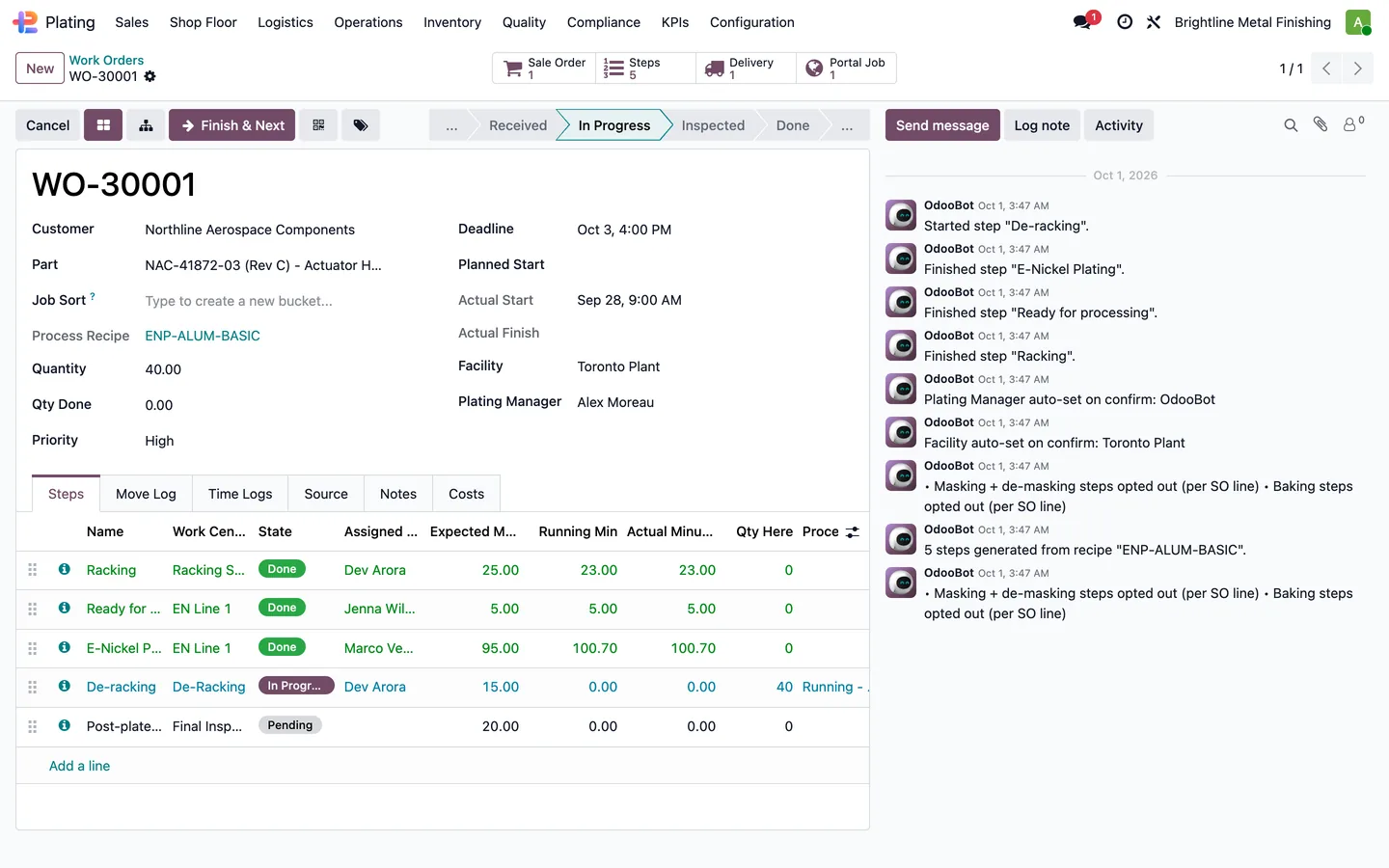
Work order steps
Each work order follows its recipe one step at a time. Operators sign off steps and record process inputs, and finishing a step moves the job to the next.
Work order > Steps
On the line
The shop floor runs from a tablet: racks, baths, relief bakes and thickness checks.
-
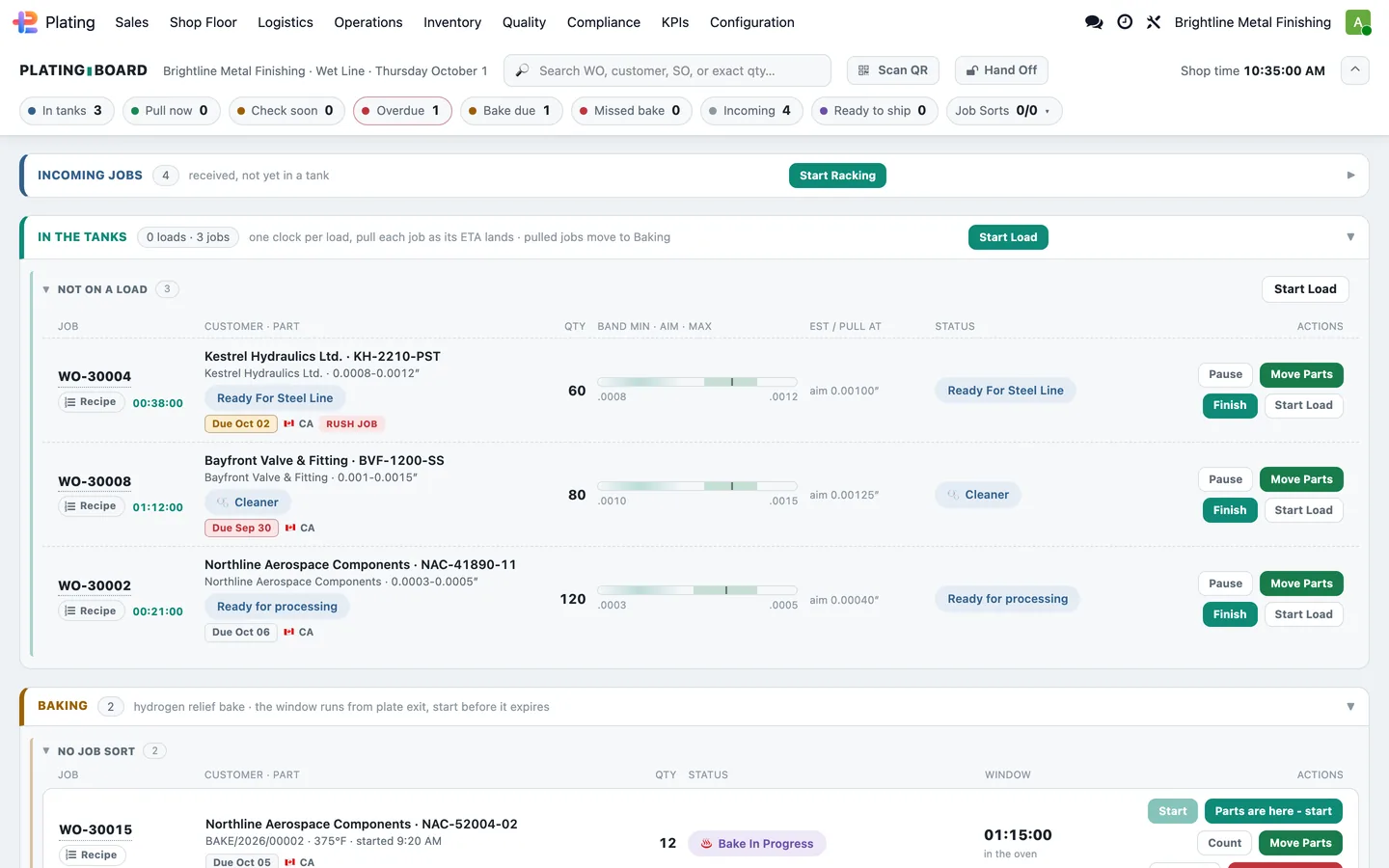
The plating board
The shop-floor tablet shows live tank, bath and job cards and the operator's next-up queue, and a scanned tank, bath, station or job code opens the right record.
Plating > Shop Floor
-
Start racking
Start Racking batches several work orders onto one physical rack from the board, suggesting jobs that share a recipe.
Plating board > Incoming > Start Racking
-
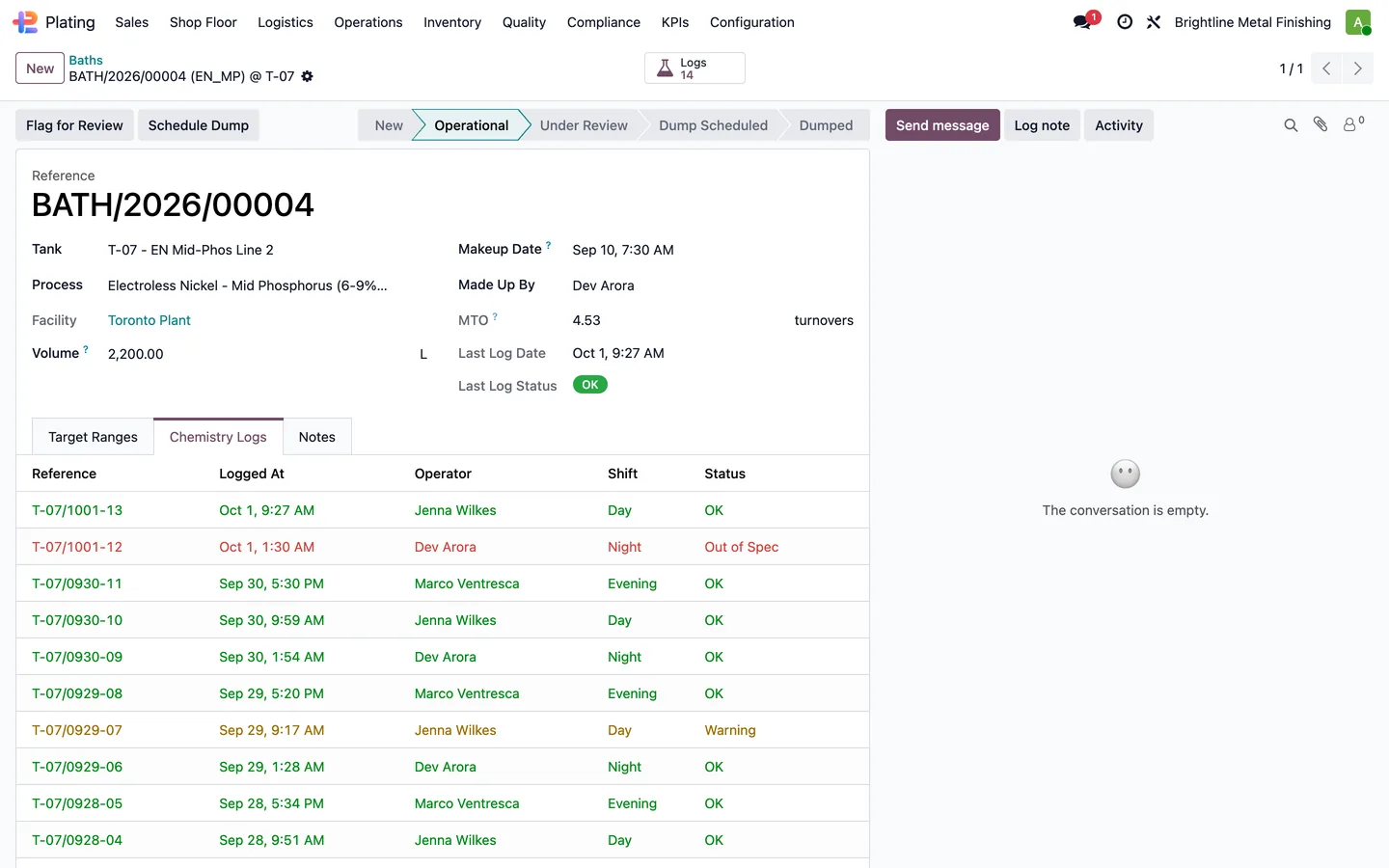
Bath chemistry
Each bath keeps its tank and history and moves through operational, review and dump stages.
Plating > Operations > Tanks > a bath
-
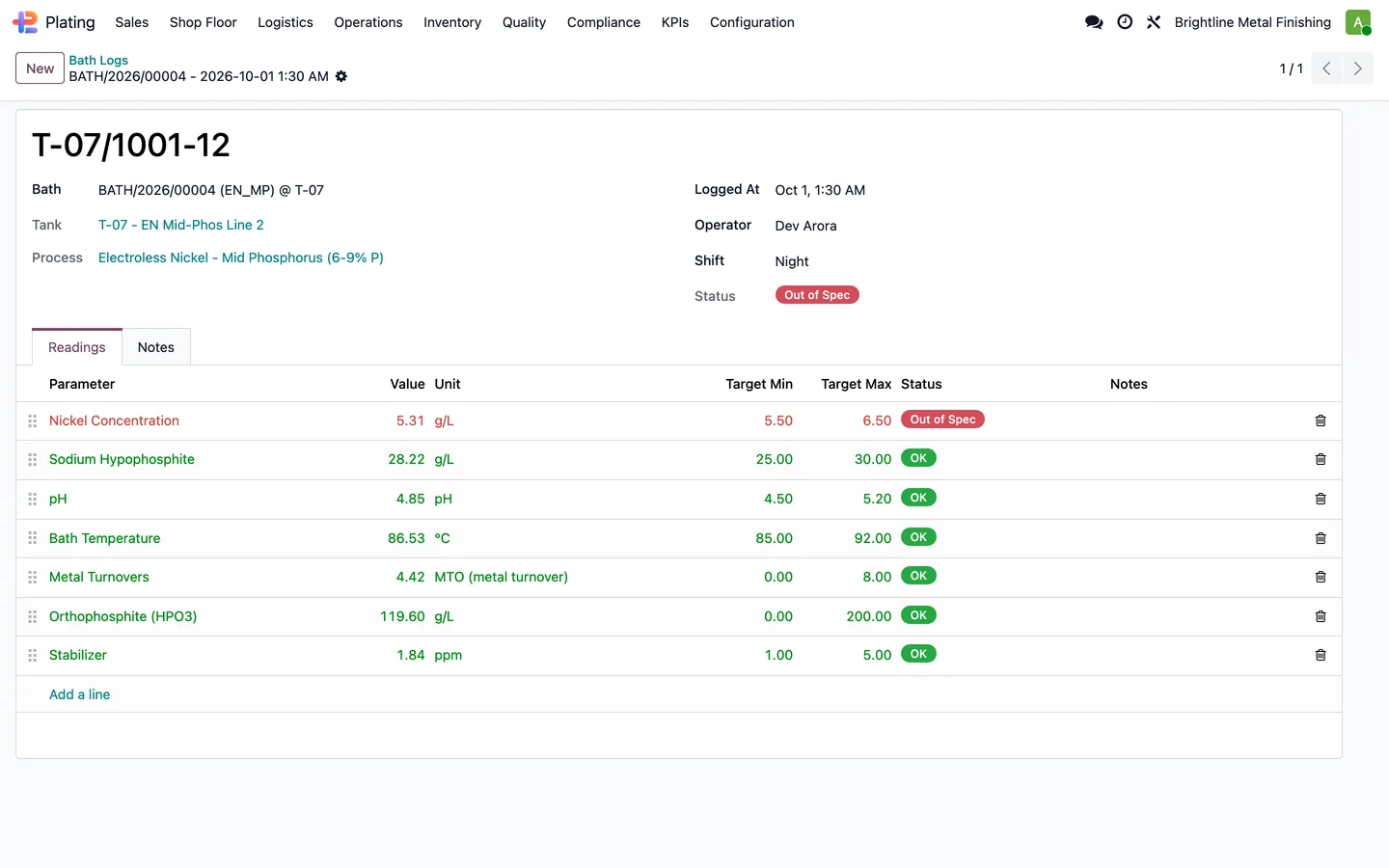
Log a reading
Daily or shift chemistry readings are recorded with pass, warning and failure results against each parameter's target range.
Bath > Chemistry Logs
-
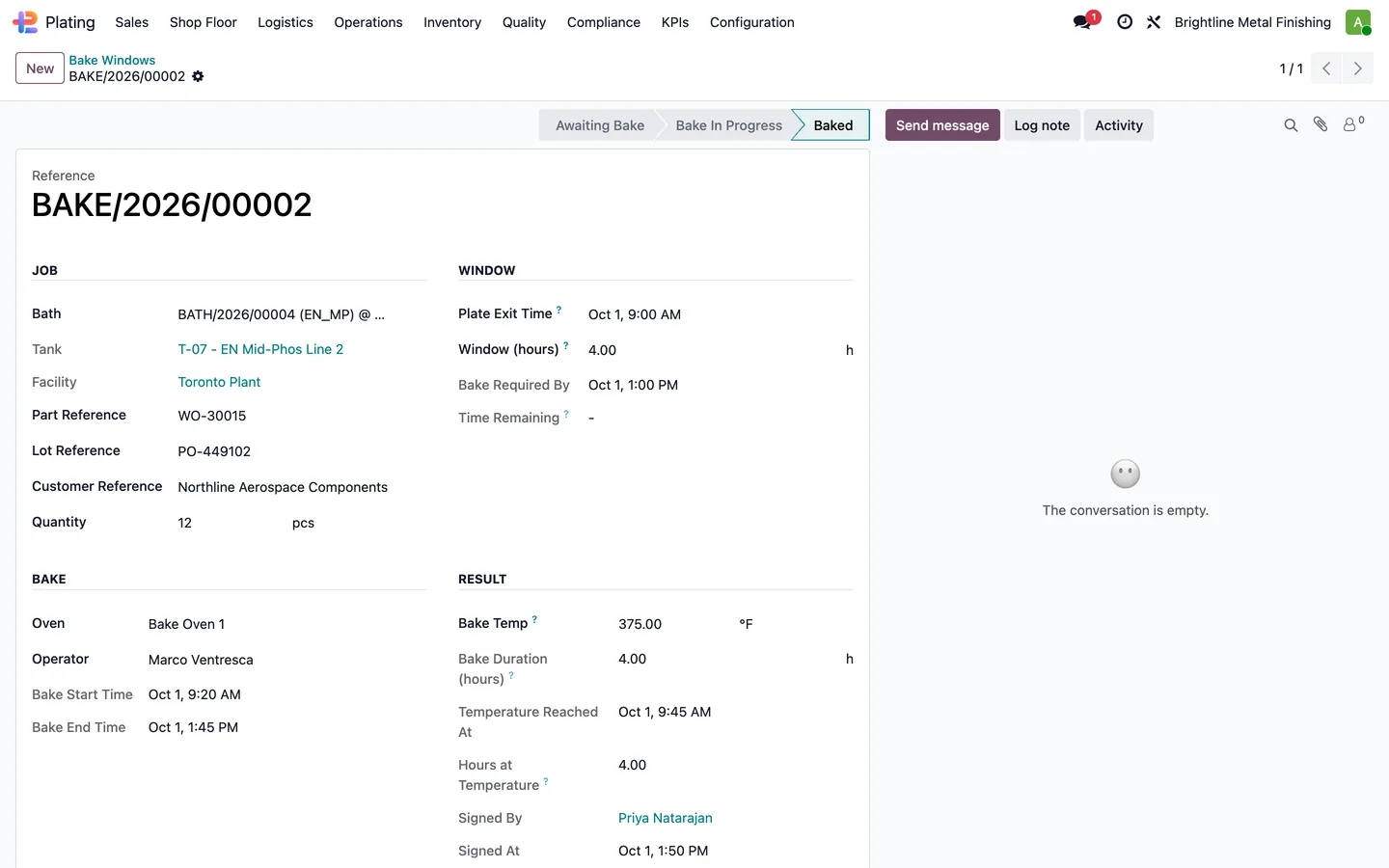
Relief bake
A relief bake is tracked against its deadline from the part exit time and the customer's window, and its start and completion are recorded.
Plating > Shop Floor > Bake Windows
-
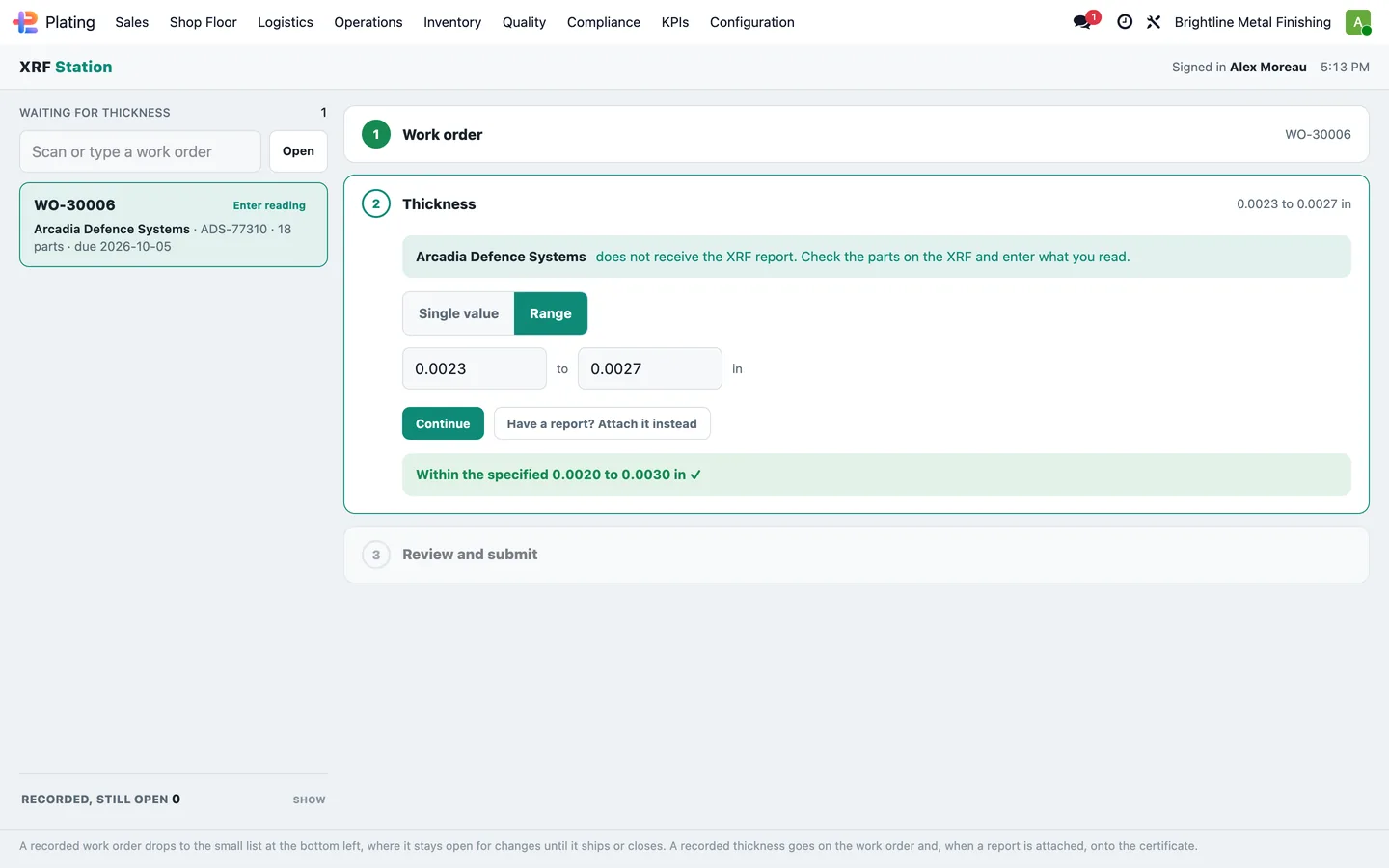
Thickness check
At the thickness station the reading is entered against the specified range, or an instrument report is attached and read.
Plating > Shop Floor > XRF Station
Quality and certificates
Non-conformances are worked to closure and every shipment can carry its certificate.
-
Non-conformance
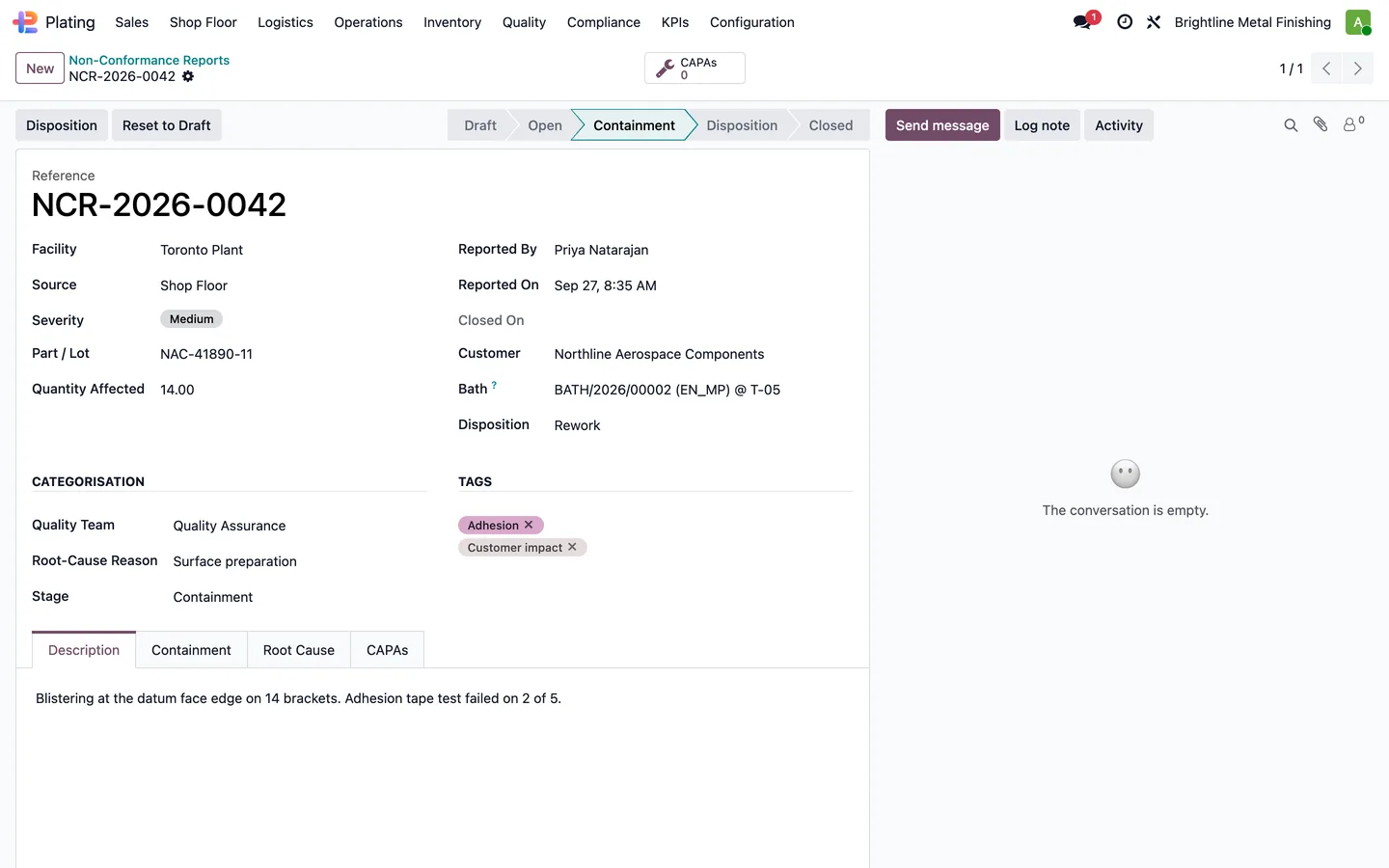
Non-conformance reports move through containment, disposition and review, with corrective actions, root causes and effectiveness checks linked to them.
Plating > Quality > NCRs
-
Certificate of conformance
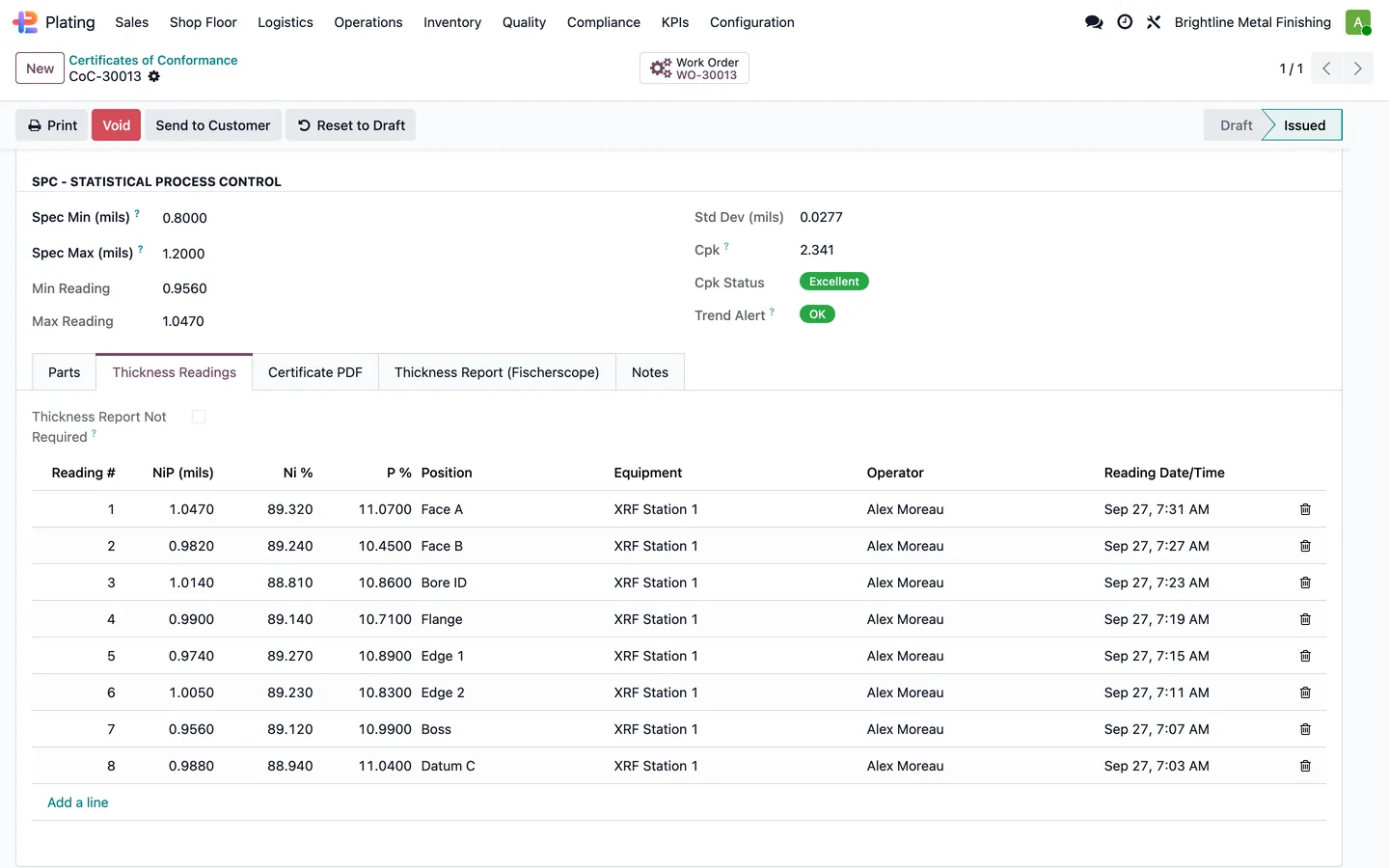
The certificate register links each certificate to its customer, order and shipment, with the parts, specifications and quantities it covers.
Plating > Quality > Certificates
-
Send the certificate
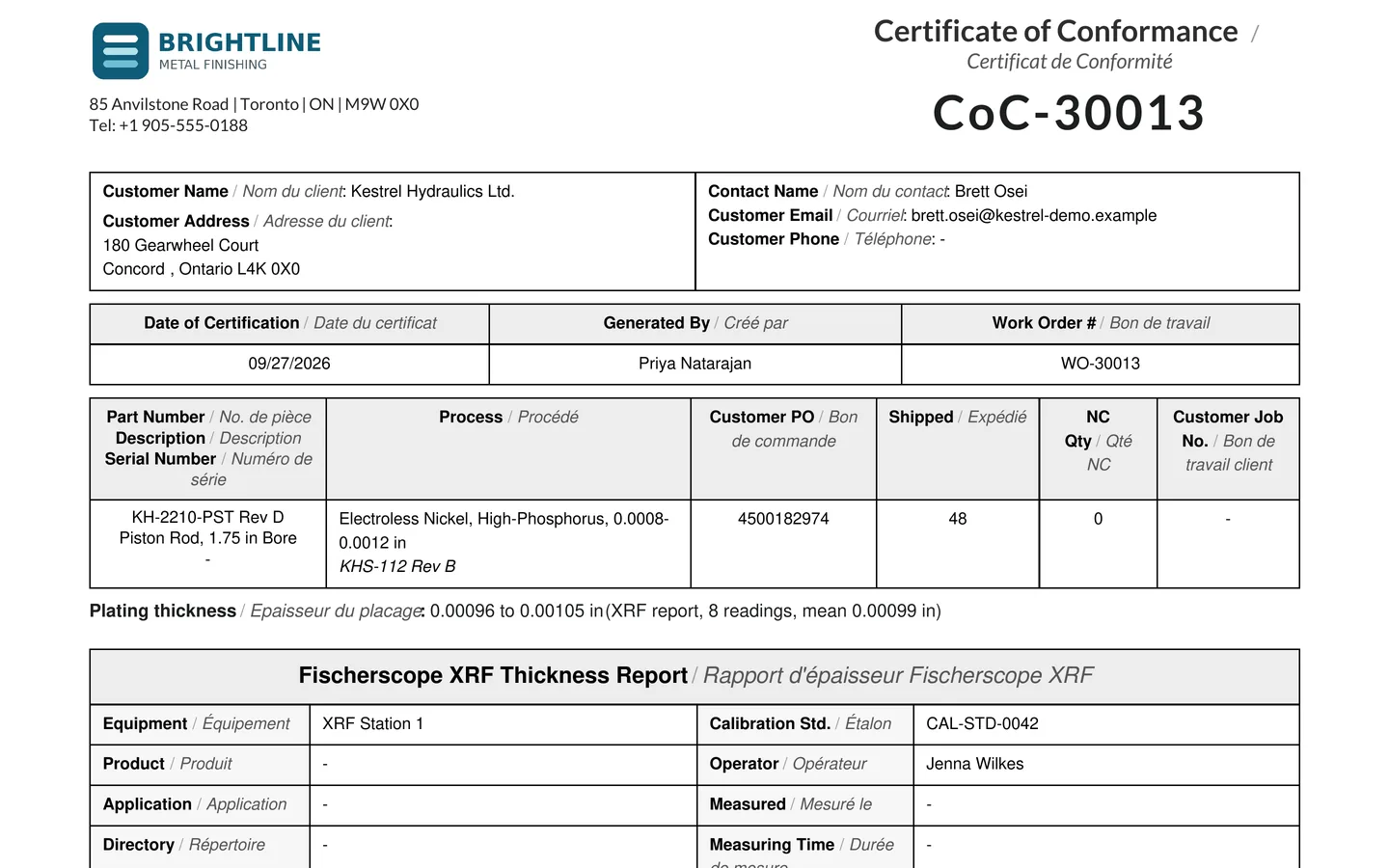
The certificate prints in a recipe-order or chronological chain-of-custody layout, an uploaded Fischerscope PDF is appended, and it is emailed to the customer contacts.
Certificate > Print, Send
Ship and invoice
Finished parts go out with proof of delivery, and the invoice follows the shipment.
-
Shipping dashboard
The Shipping Dashboard shows work ready to ship, jobs at inspection, and finalized and signed packing slips.
Plating > Logistics > Shipping Dashboard
-
Delivery
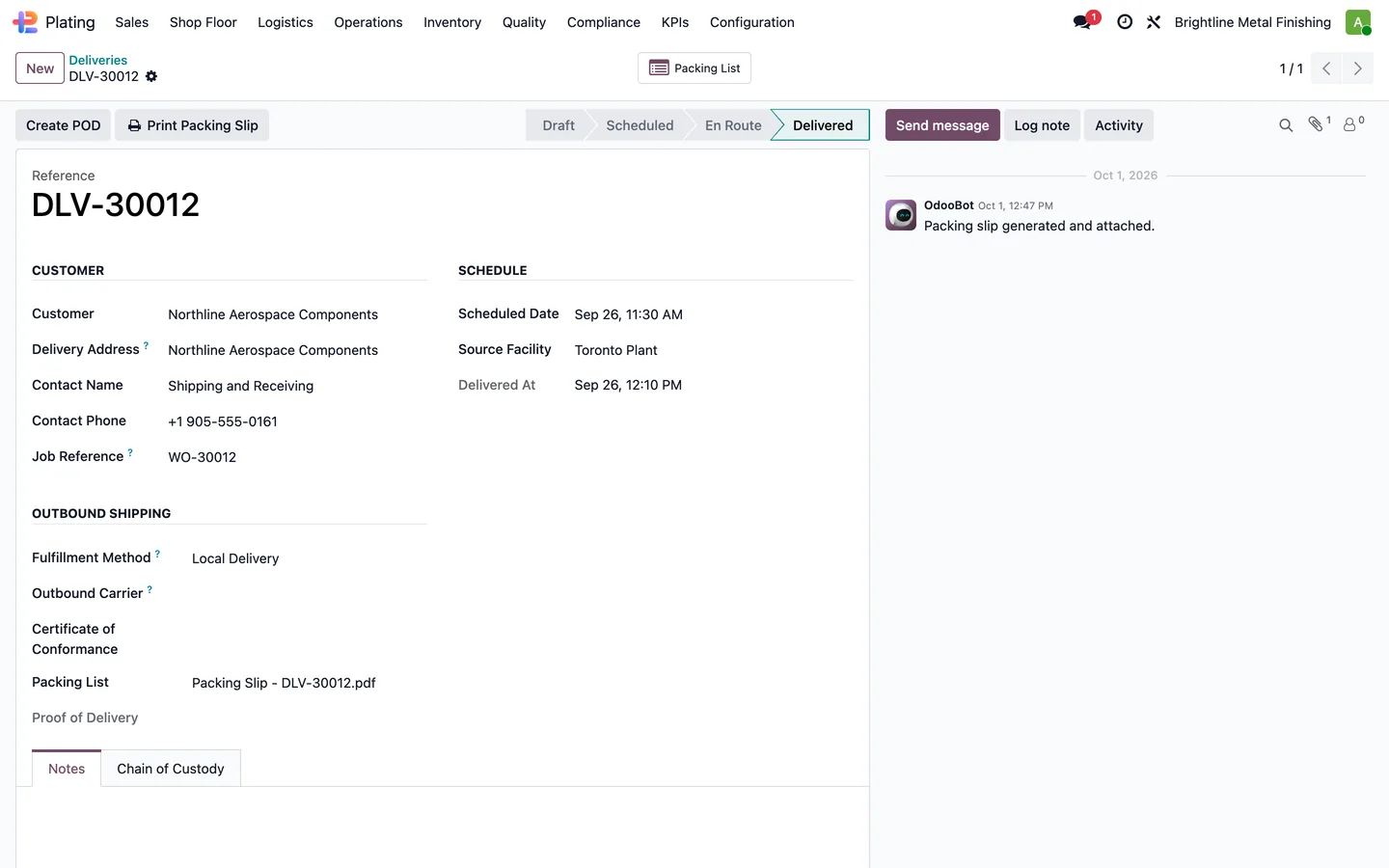
Deliveries are scheduled from the plant, record delivered, refused or returned outcomes, and capture proof of delivery with signature, photographs, location and time.
Plating > Logistics > Deliveries
-
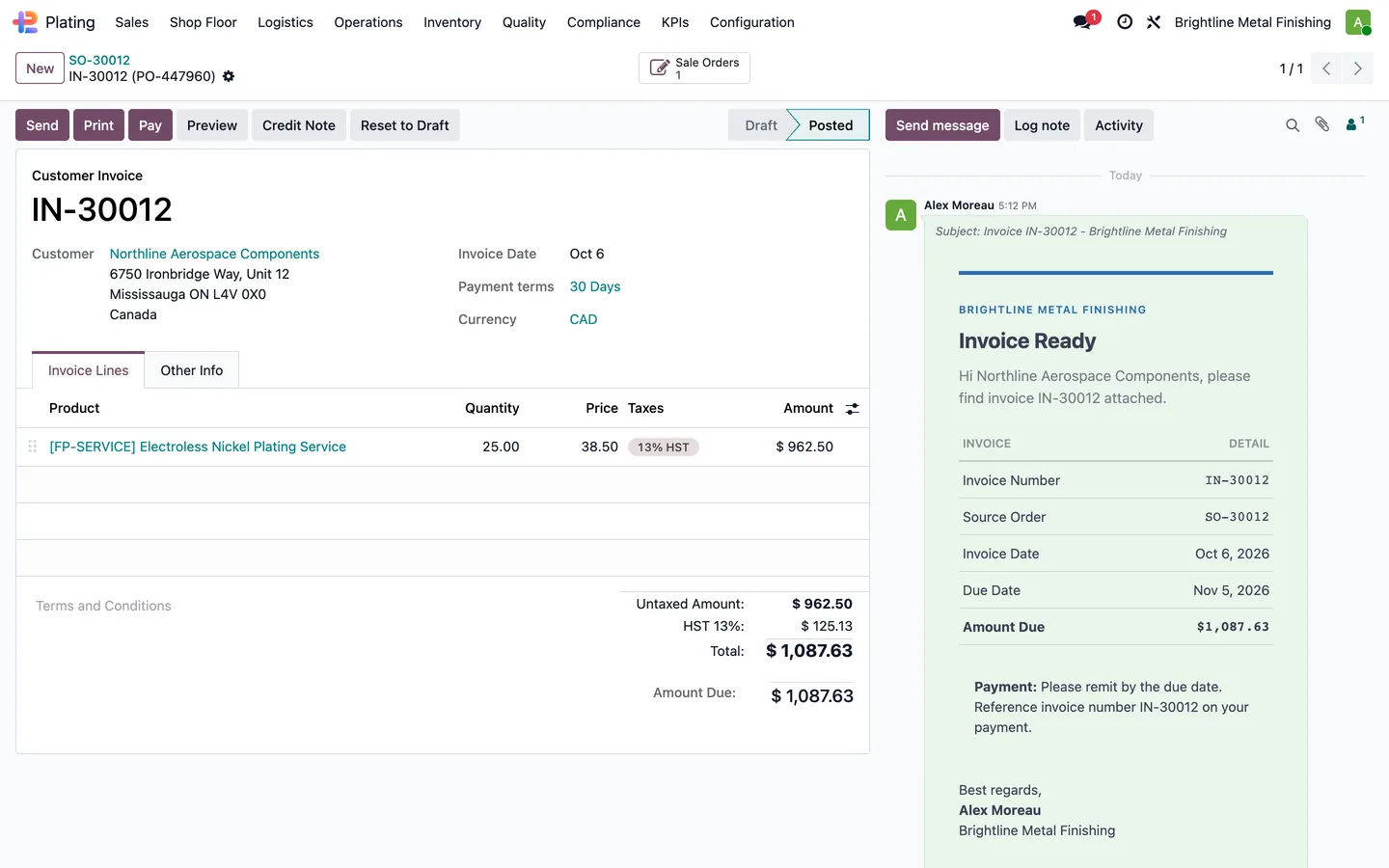
Invoice
The final progress or net-terms invoice is created on delivery once the shipping-wave check allows it.
Sales order > Invoices
-
Customer portal
Customers follow their jobs through received, processing, quality, ready and shipped, and download certificates and packing lists.
Customer portal > Work Orders
Certificates it produces
Shown with invented data from a demo company. Click a page to see it larger.
A bilingual certificate of conformance generated from the job, ready to send with the parts.
What it does
 Quoting and orders
- Maintain customer part records with material and geometry information.
- Build coating configurations with process, thickness and specification details.
- Calculate quotation prices with formulas and complexity surcharges.
- Generate sales quotations from configurator sessions.
- Calculate a part's surface area from its catalogue geometry.
- Choose deposit, progress-billing, net-terms or COD/prepay invoice strategies.
 Receiving and logistics
- Create receiving records and expected part quantities when a plating sales order is confirmed.
- Verify received quantities and move parts through counted, staged and inspection states.
- Record damage severity, photographs, required action and customer response.
- Schedule customer pickups and record progression through collection and receipt.
- Combine pickups and deliveries into routes for one driver and vehicle.
- Capture proof of delivery with recipient signature, photographs, location and time.
- The Shipping Dashboard shows work ready to ship, jobs at inspection, and finalized and signed packing slips.
 Jobs and the shop floor
- Creates native plating work orders from the plating lines on a sales order.
- Moves a job through receiving, processing and shipping milestones.
- Prints travellers, internal or customer box stickers and work-order detail documents.
- Registers shop-floor tablet stations and resolves scanned tank, bath, station or job codes.
- Shows the operator next-up work queue.
- Start Racking batches several work orders onto one physical rack from the plating board, suggesting jobs that share a recipe.
- Tracks bake deadlines from the part exit time and customer-specified window.
- Group parts into a rack or barrel batch tied to its facility, bath and tank.
 Tanks, baths and chemistry
- Tracks tank states, QR identifiers and bath history.
- Manages bath chemistry through operational, review and dump stages.
- Records daily or shift chemistry readings with pass, warning and failure results.
- Maintain chemical quantities, stock movement history and remaining inventory value.
- Record tank readings, chemical additions and operator comments.
 Quality and certificates
- Manage non-conformance reports through containment, disposition and review.
- Track corrective actions, root causes and effectiveness checks linked to non-conformances.
- Maintain calibration equipment and record calibration outcomes and impact assessments.
- Maintain first-article inspection reports by part, revision and customer.
- Maintains a register of certificates of conformance, thickness reports and other customer quality documents.
- Captures thickness measurements and parses uploaded instrument reports.
 Compliance, safety and defence work
- Maintain facility permits with regulator, jurisdiction, dates, conditions and attachments.
- Record discharge sample results and compare them with configured minimum, maximum or range limits.
- Track waste movements with quantities, carriers, receiving organizations and manifest attachments.
- Maintain a safety-data-sheet library with versions, hazard information, language and PDF files.
- Track employee training completion, expiry and current status.
- Track controlled-goods registrations and their renewal dates.
- Create inspection and test plans with hold points, witness points and customer review.
- Record Nadcap audits, auditor details, non-conformances and accreditation dates.
 Customers, reports and KPIs
- Let customers submit quote requests with drawings, target dates and notes.
- Show customer production jobs through received, processing, quality, ready and shipped stages.
- Provide Certificates of Conformance and packing-list downloads for available documents.
- Sends configured emails when orders are confirmed, parts are received or plating jobs complete.
- Produces quotation and sales-order PDFs for plating work.
- Prints certificates of conformance and chronological traceability reports.
- Provide built-in on-time delivery, lead-time and throughput measures.
 Process packs
- Adds low-, mid- and high-phosphorus electroless nickel process definitions.
- Adds PTFE composite, nickel-boron and nickel-strike process definitions.
- Adds Type I, clear and dyed Type II, and Type III anodizing process definitions.
- Add process definitions for hot, mid-temperature and room-temperature black oxide finishing.
See it running
Shown with sample data from a demo company.
Every job in the tanks with its thickness band and timer, plus hydrogen relief bakes in progress.
Quotes priced from surface area, thickness, masking zones, setup, and rush, with every line shown.
Each customer part with its revision, material, surface area, masking area, and last price.
Every bath with its tank, volume, metal turnovers, and a log of chemistry readings by shift.
Work orders move from to schedule, to scheduled, to running, with part numbers, due dates, and operators.
Routing steps with work centres, operators, and expected against actual minutes.
Non-conformances tracked from containment to disposition, tied to the part, lot, and bath.
A bilingual certificate of conformance generated from the job, ready to send with the parts.
The 33 add-ons in this suite
Fusion Plating is set up as one suite. Each add-on is listed with the version in the current release.
- Aerospace (AS9100 + Nadcap) 19.0.1.1.3 Maintain a hierarchical catalogue of aerospace quality clauses.
- Batch Processing 19.0.2.0.2 Group parts into a rack or barrel batch tied to its facility, bath and tank.
- CGP Bridge 19.0.1.2.8 Carries a controlled-goods flag from a customer order onto its plating jobs.
- Documents Bridge (EE) 19.0.1.4.1 Place attachments from supported quality records in a dedicated Documents workspace.
- Maintenance Bridge 19.0.8.0.1 Build maintenance plans and checklist items for equipment categories.
- MRP Bridge 19.0.13.0.10 Assigns a plating facility and work centre to an Odoo manufacturing work centre.
- Quality Bridge (EE) 19.0.1.0.2
- E-Sign Bridge (EE) 19.0.1.1.0 Open an Odoo Enterprise Sign request wizard from an approved First Article Inspection Report.
- Certificates 19.0.11.9.37 Maintains a register of certificates of conformance, thickness reports and other customer quality documents.
- Controlled Goods Program 19.0.1.2.7 Track controlled-goods registrations and their renewal dates.
- Compliance (Framework) 19.0.1.3.5 Maintain facility permits with regulator, jurisdiction, dates, conditions and attachments.
- Ontario Compliance Pack 19.0.1.0.0 Adds five Ontario regulator reference records to the compliance framework.
- Toronto Compliance Pack 19.0.1.0.1 Add Toronto as a municipality beneath Ontario in the jurisdiction catalogue.
- Configurator 19.0.26.15.4 Maintain customer part records with material and geometry information.
- Culture & Values 19.0.1.1.3 Stores company-owned sets of workplace values and behaviours.
- Chemical Inventory 19.0.14.5.1 Maintain chemical quantities, stock movement history and remaining inventory value.
- Invoicing 19.0.3.13.8 Choose deposit, progress-billing, net-terms or COD/prepay invoice strategies.
- Native Jobs 19.0.34.3.24 Creates native plating work orders from the plating lines on a sales order.
- KPI Dashboard 19.0.1.3.0 Configure operational KPIs with a target and display unit.
- Logistics 19.0.4.23.0 Maintain plating delivery vehicles with insurance, registration, service and TDG status.
- Notifications 19.0.12.10.2 Sends configured emails when orders are confirmed, parts are received or plating jobs complete.
- Nuclear (CSA N299, NQA-1) 19.0.1.2.3 Maintain nuclear quality programs by facility with audit dates and classification details.
- Customer Portal 19.0.4.15.0 Let customers submit quote requests with drawings, target dates and notes.
- Aluminum Anodizing Process Pack 19.0.1.0.0 Adds Type I, clear and dyed Type II, and Type III anodizing process definitions.
- Black Oxide Process Pack 19.0.1.0.0 Add process definitions for hot, mid-temperature and room-temperature black oxide finishing.
- Chrome Plating Process Pack 19.0.1.0.0 Add hard and decorative chrome process types for hexavalent and trivalent chemistry.
- Electroless Nickel Process Pack 19.0.1.0.0 Adds low-, mid- and high-phosphorus electroless nickel process definitions.
- Quality (QMS) 19.0.8.46.7 Manage non-conformance reports through containment, disposition and review.
- Receiving & Inspection 19.0.3.80.1 Create receiving records and expected part quantities when a plating sales order is confirmed.
- Reports 19.0.11.66.3 Produces quotation and sales-order PDFs for plating work.
- Safety (EHS) 19.0.2.13.0 Maintain a safety-data-sheet library with versions, hazard information, language and PDF files.
- Shipping Dashboard 19.0.3.12.0 The Shipping Dashboard shows work ready to ship, jobs at inspection, and finalized and signed packing slips.
- Shop Floor 19.0.70.17.0 Registers shop-floor tablet stations and resolves scanned tank, bath, station or job codes.
What's new
Recent changes to Fusion Plating, newest first.
-
- Chemical inventory records a batch number and expiry date, and tanks carry technical data sheets.
-
- Recipe step prompts can carry a default value, prefilled on the plating board.
- Rework can include a recorded relief bake between stripping and re-plating.
- Choose which certificates of conformance to combine from the shipping desk, one section per order.
- Start Bakes Together on a master work order, and attach files to a work order from any card on the plating board.
Related modules


See Fusion Plating on your own Odoo.
Book a call and tell us how your team works today. We'll show you the module and what it would take to set it up. Prefer the phone? Call 905-792-0000.