
Fusion Claims
ADP and funding claims run from quote to payment inside Odoo.
Tracks ADP claims from quotation through submission, approval, billing and closure. Calculates ADP and client portions on sales and invoice lines.
- Odoo 19
- Version 19.0.17.2.3
An ADP case, start to finish
24 steps in 6 phases, from the therapist's first call to the closed case. Each step has its own screen on the workflow page.
Therapist calls or emails
- 1 Intake and assessment 4 steps
- 2 Application 3 steps
- 3 Submission and approval 6 steps
- 4 Ordering and delivery 2 steps
- 5 Billing and ADP invoicing 6 steps
- 6 Audit and records 3 steps
Case closed, records kept
What the system checks for you
-
Ready for submission
Authorization date, client references, reason for application and signed pages are in place.
-
Submission files
A device type, the final application PDF and the XML file are attached, with the right file types.
-
Ready to bill
Approval, completed device verification, the delivery date and the proof of delivery PDF.
-
Supplier bill matching
Each device is matched to a posted supplier bill, and uncertain matches wait for a person.
-
Portions and deductions
Every exported portion is checked against the ADP device price list, and a mismatch stops the export.
-
Closing the case
Signed pages, final application, proof of delivery and supplier bills, or a written reason.
The documents it produces
Shown with invented data from a demo company. Click a page to see it larger.


The quotation PDF lists each device with its ADP code and the ADP and client portions.
The Approved Items Report lists each approved device with its ADP and client portions.
The proof of delivery form lists the devices and serial numbers for the client to sign.
The client invoice PDF shows the client portion alongside the ADP portion for reference.
The ADP invoice PDF shows the claim number, serial numbers and ADP portion.
The saved text file holds one line per device in the comma separated ADP format.
What it does
 Booking assessments
- Book meetings from the sales, technician and authorizer portal dashboards.
- Let authorizers request an assessment against the assigned sales representative availability.
- Synchronize the meeting calendar and send invitations, confirmations and advance reminders.
- Start a visit or assessment from the meeting page.
 Assessments
- Records wheelchair specifications, measurements and accessibility needs.
- Captures touch-friendly authorizer and client signatures.
- Creates a draft sales order when an assessment is completed.
- Distributes assessment documents to authorizers, sales representatives and internal records.
 Therapist portal
- Lets authorizers view assigned ADP cases and search by client or claim reference.
- Accepts ADP document uploads with revision tracking and allows document downloads.
- Lets authorizers add case notes and receive assignment or status notifications.
- Provides an authorizer document-library page.
 Cases and approvals
- Tracks ADP claims from quotation through submission, approval, billing and closure.
- Records which devices were approved before billing.
- Parses ADP statements, proposes case matches and applies agreed results.
- Tracks device serial numbers, placement and authorizer details.
- Provides claim dashboards and status boards for staff.
 Billing
- Calculates ADP and client portions on sales and invoice lines.
- Creates separate client and ADP invoices.
- Exports claim billing files in TXT format.
- Prints quotations and invoices with claim portions in portrait or landscape layouts.
 Audits and records
- Builds evidence packs for ADP audits.
- Imports ADP device-code reference data from JSON or CSV.
Funding programs it handles
ADP is not the only payer your office deals with. Fusion Claims gives ODSP and March of Dimes their own workflows, tracks WSIB, insurance, Muscular Dystrophy Canada and hardship cases with their own statuses, and keeps program forms in the therapist's portal.
- ADP The full claim workflow, from assessment to the claim file and audit.
- ODSP, SA Mobility and Ontario Works Three ODSP paths, each with its own statuses, forms and payment order.
- March of Dimes home and vehicle modifications Assessment, drawings, funding agreement, PCA and production on one case.
- WSIB A WSIB case form with the claim, adjudicator, Form 7 date and approval.
- Private insurance The client submits, or you bill the insurer directly.
- Muscular Dystrophy Canada Enrolment, the OT letter, the MDC purchase order and payment.
- Hardship funding One case type for any hardship funder, from pre-assessment to payment.
- ACSD ADP cases with the ACS client type, on the ADP workflow.
- Program forms in the therapist's portal Forms and links for IFHP, VAC, Blue Cross, Easter Seals and more.
- Direct and private, other payers and rentals Sale types on the same order, without an ADP claim.
See it running
Shown with sample data from a demo company.
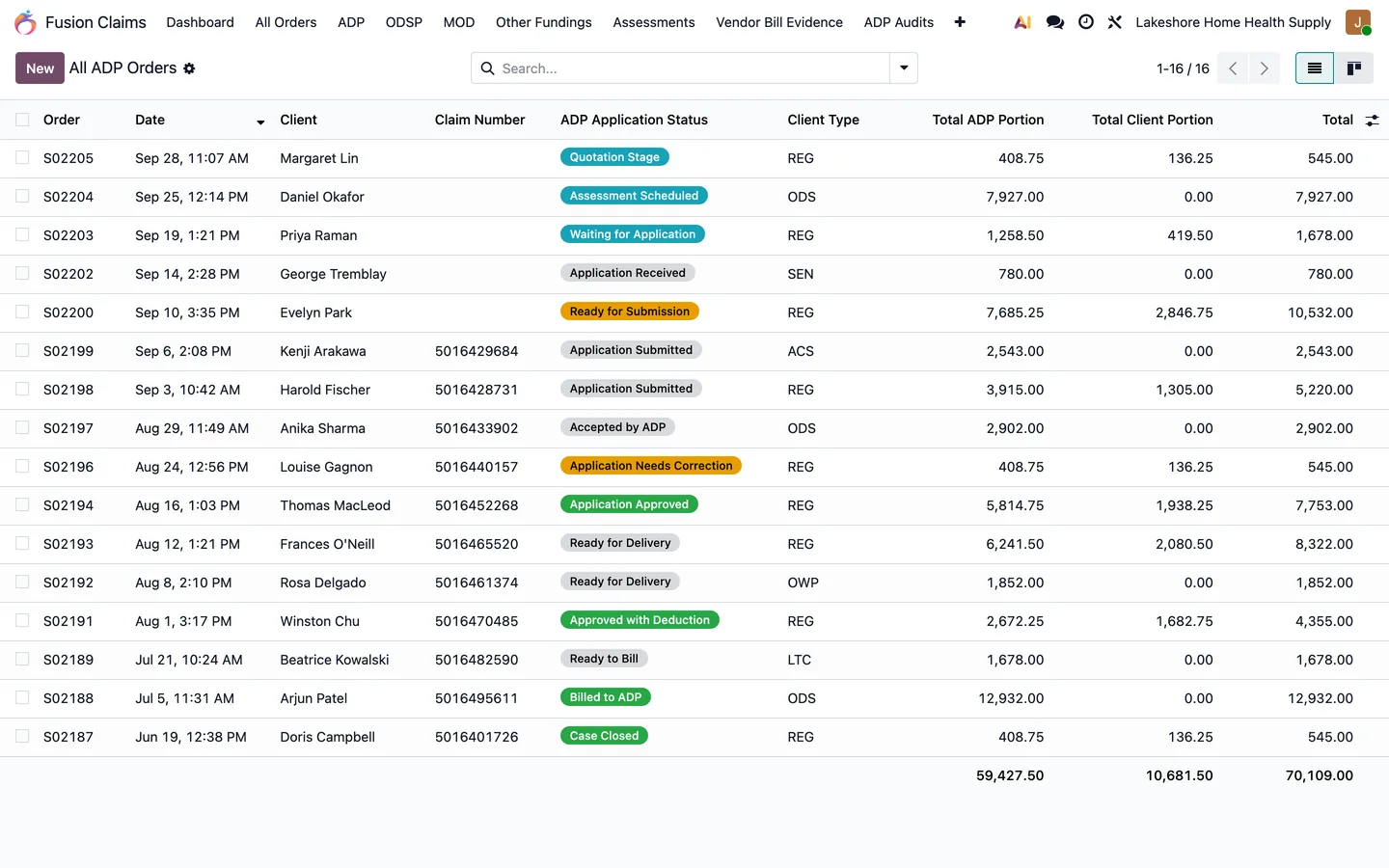
Every ADP order with its funding status, client type, claim number, and the ADP and client portions.
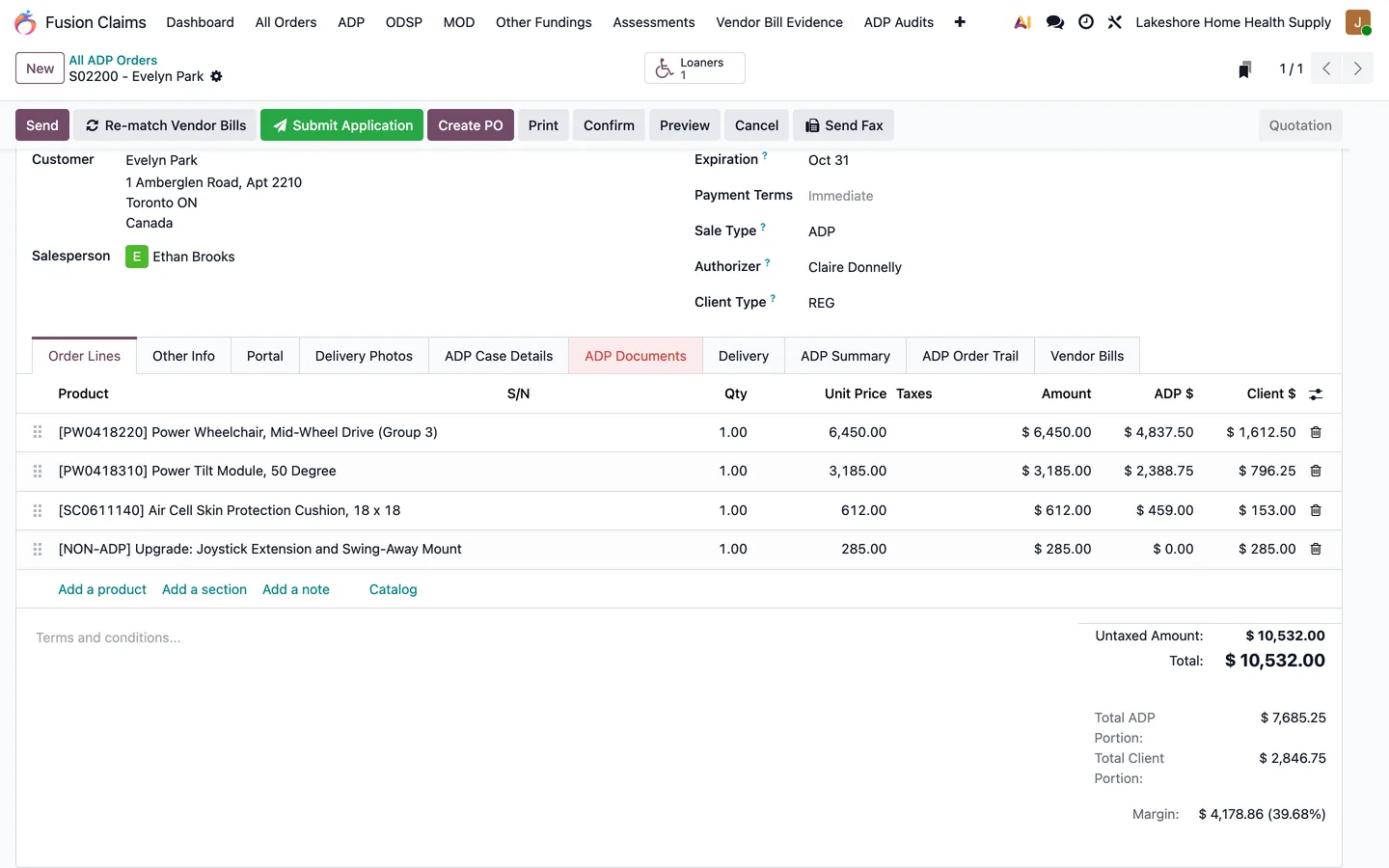
Device lines split between ADP and the client; non-funded upgrades go to the client.
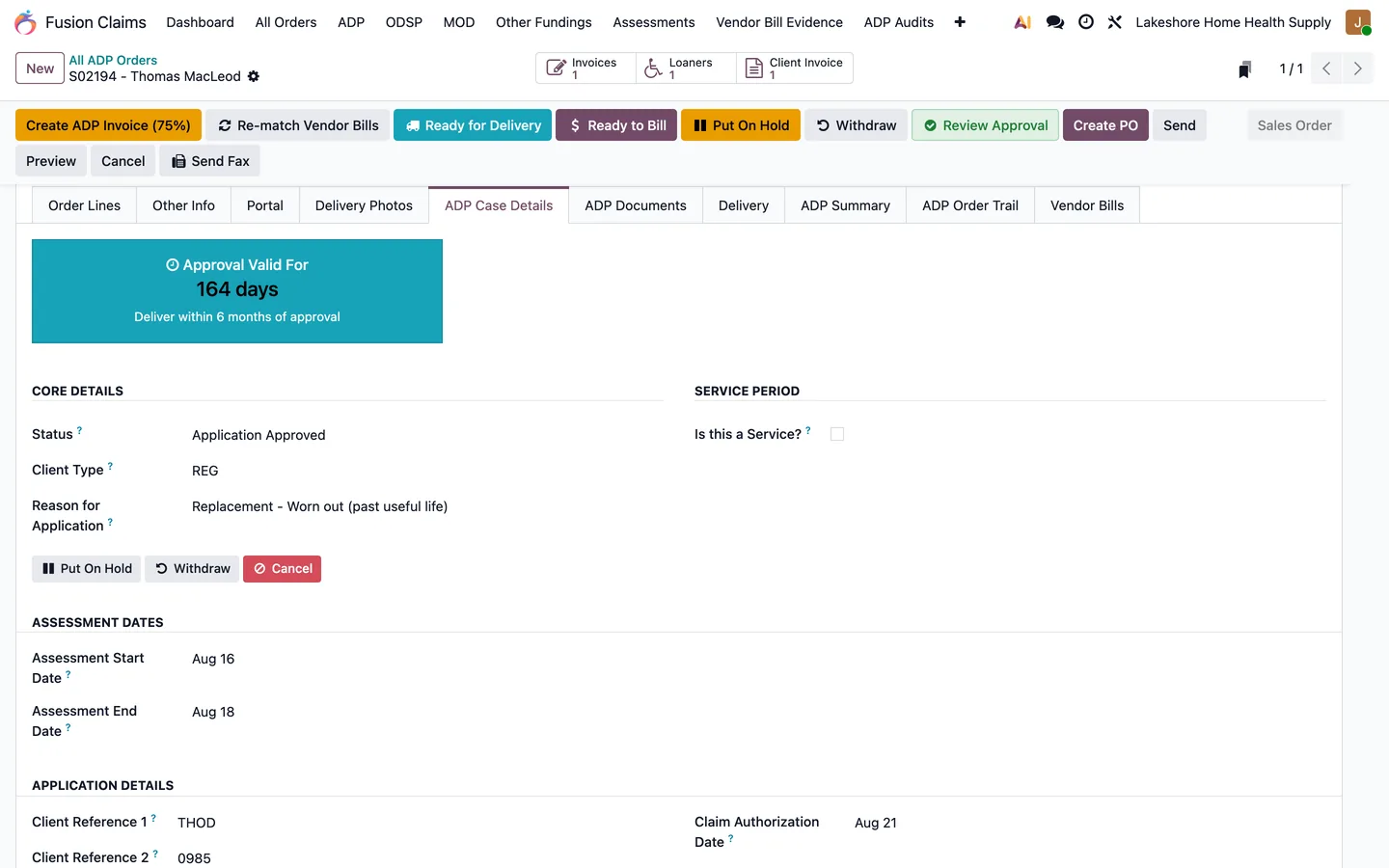
The approval countdown, client type, reason for application, and assessment dates on one tab.
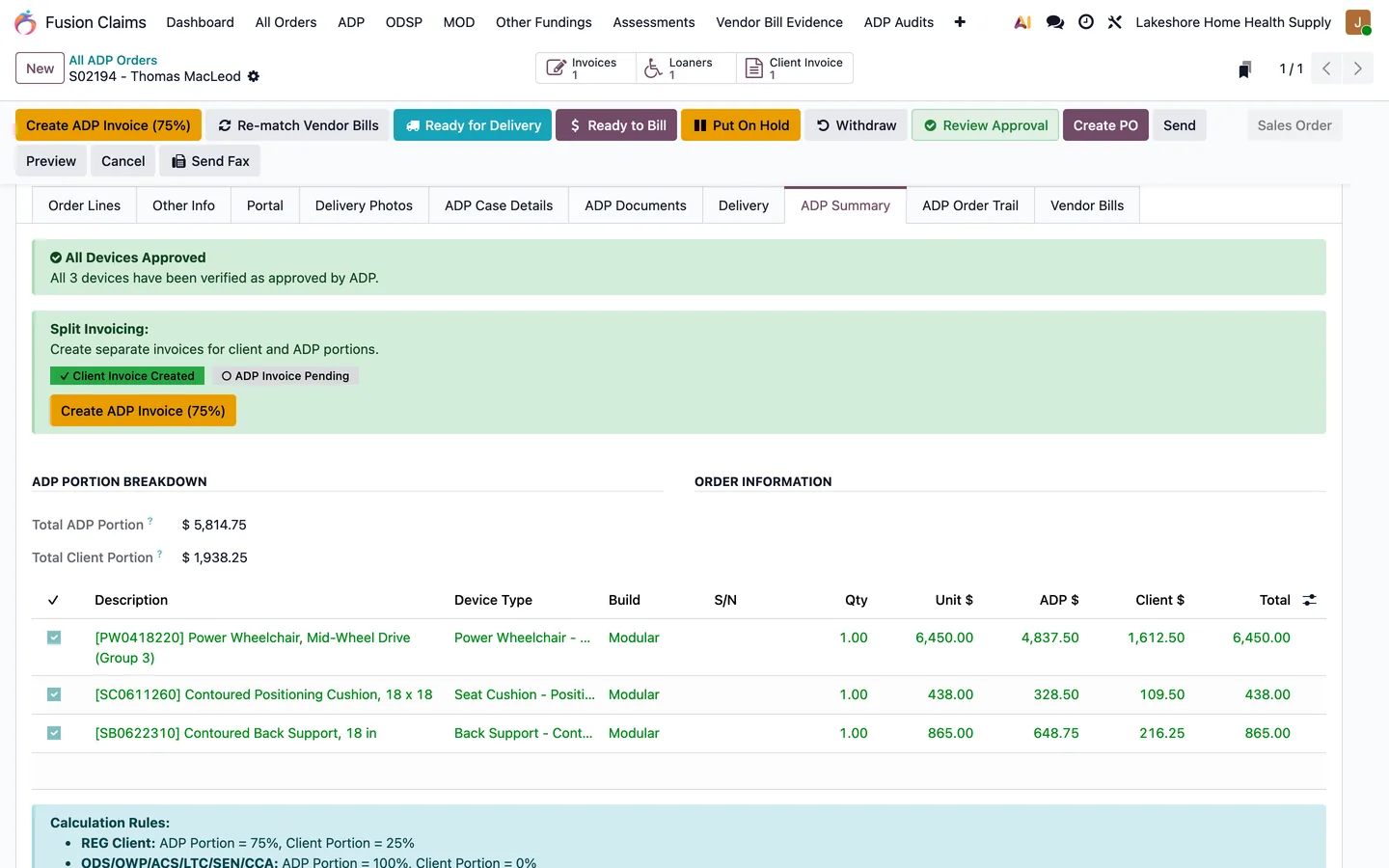
Approved devices, split invoicing, and the ADP and client portion of every device.
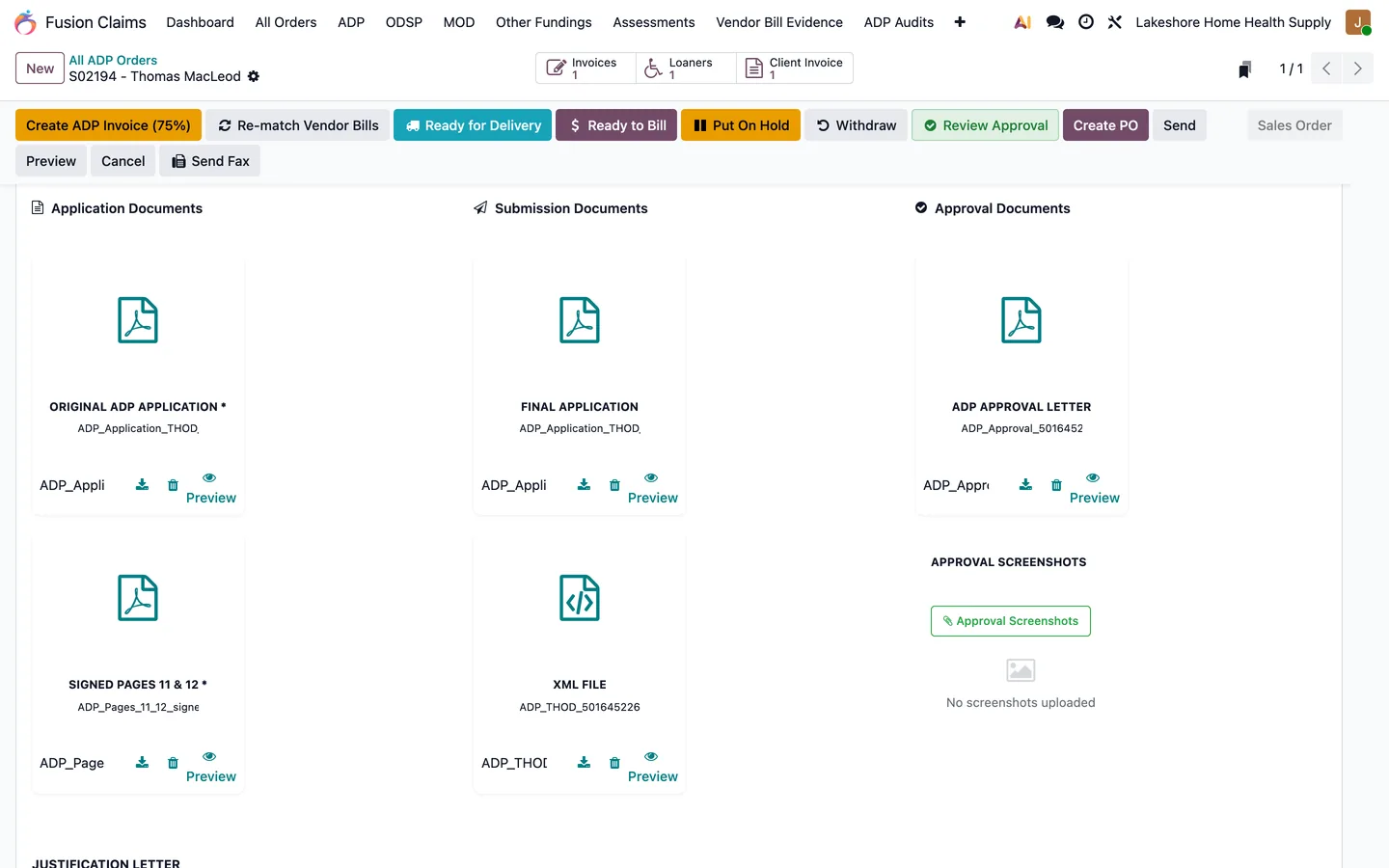
The application, signed pages 11 and 12, the XML file, and the approval letter, all on the order.
What's new
Recent changes to Fusion Claims, newest first.
-
- Cancelling a previously numbered draft payment now cancels its journal entry and preserves the number.
- Linking an ADP device now stores its code and price even when the form omits its read-only fields.
Related modules
 Fusion Authorizer & Sales Portal
A portal where authorizers and sales reps work their ADP cases.
Fusion Authorizer & Sales Portal
A portal where authorizers and sales reps work their ADP cases.
 Fusion Meetings
New
Meeting booking from the portal dashboards, with availability and reminders.
Fusion Meetings
New
Meeting booking from the portal dashboards, with availability and reminders.
 Fusion SO to PO
Free
Purchase orders prepared straight from a sales order.
Fusion SO to PO
Free
Purchase orders prepared straight from a sales order.
 Fusion Loaners Management
Loaner and demo equipment tracked from checkout to return.
Fusion Loaners Management
Loaner and demo equipment tracked from checkout to return.
 Fusion Tasks
Technician scheduling, routes and proof of delivery.
Fusion Tasks
Technician scheduling, routes and proof of delivery.
See Fusion Claims on your own Odoo.
Book a call and tell us how your team works today. We'll show you the module and what it would take to set it up. Prefer the phone? Call 905-792-0000.