
Fusion Website Tools
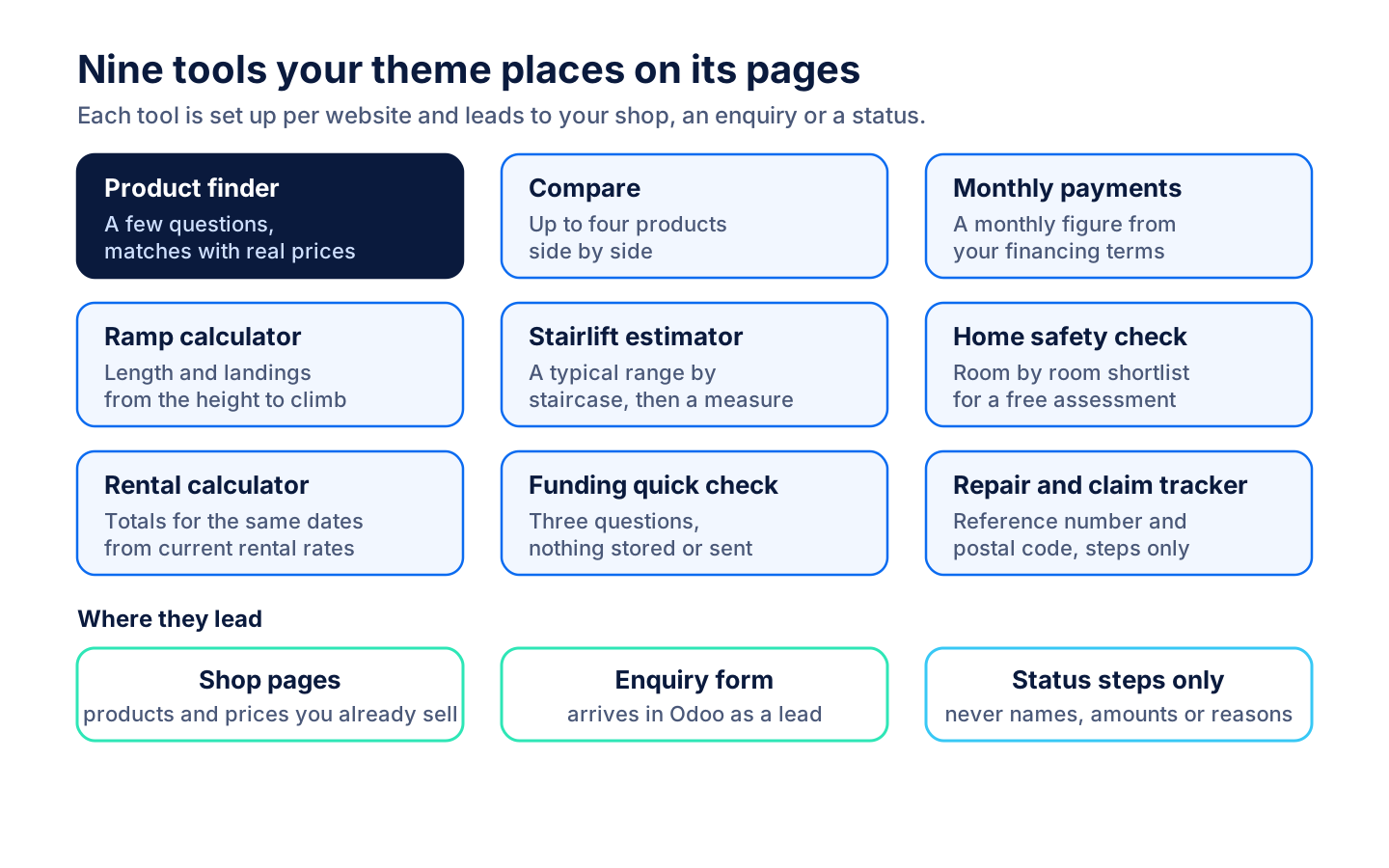
Product finder, compare, calculators and a repair and claim tracker for your website.
Helps visitors find products and compare selected products. Shows repair or claim progress after a reference-number and postal-code check.
- Odoo 19
- Version 19.0.1.1.0
- Newly listed
Fusion Website Tools, step by step
3 workflows, 9 steps. Each picture is a diagram of how the step works.
Help a visitor choose
A few questions narrow your catalogue to real matches, and the visitor can compare them or see a monthly figure.
-
Answer a few questions
The product finder asks what the visitor is looking for, where it is used, whether it must fold, funding and a price cap, and lists real matches with real prices.
-
Compare side by side
Ticking Compare on up to four products fills a tray, and Compare opens them side by side.
-
See a monthly figure
With financing terms set for the website, the visitor sees a monthly payment for an amount and term. Without them the calculator stays hidden.
Plan a change at home
Ramps, stairlifts and safety changes get a first answer on the website, then a free measure or assessment.
-
Size a ramp
The visitor enters the height to climb and how the ramp is used. The tool shows the length, the rest landings and a matching ramp suggestion.
-
Price a stairlift
The visitor picks the staircase shape, the number of steps and extras, and sees a typical range from the website's price bands, or an offer of a free measure.
-
Walk through the home
The visitor taps a room, sees the products and services set for it, and builds a shortlist for a free assessment.
-
Check who could help pay
Three yes or no questions point to programs worth checking and hand off to the full funding finder. Nothing is stored or sent.
Rentals and after-sales
Rental totals come from your own rental pricing, and customers can check a repair or claim without calling.
-
Compare rental totals
The visitor picks pickup and return dates and sees current totals from the products' existing rental pricing, then asks to reserve.
-
Track a repair or claim
The visitor enters the reference number and the postal code on file. A match answers with generic steps only, and lookups are limited per visitor.
What it does
 Finding products
- Helps visitors find products and compare selected products.
- The product finder asks what the visitor is looking for, where it is used, whether it must fold, funding and a price cap, and answers with real matches and real prices.
- Compare holds up to four products in a tray and shows them side by side.
- Estimates monthly payments for a purchase amount and term.
 Planning a home change
- Estimates ramp length from the height to climb and selected use scenario.
- The ramp calculator plans a level rest landing for every 30 in of rise and suggests a threshold ramp, a portable ramp or a modular ramp with a free quote.
- Estimates stairlift costs from stair shape, steps and optional features.
- Provides a room-by-room home-safety check.
- Guides visitors toward funding options worth checking.
- The funding quick check asks three questions about ODSP or Ontario Works, WSIB, Veterans Affairs or IFHP, and home changes; nothing is stored or sent.
 Rentals and tracking
- Estimates rental cost for a selected product and duration.
- Shows repair or claim progress after a reference-number and postal-code check.
- The tracker answers with generic steps only, never a name, address, amount or decision reason, and the same answer for a wrong reference or a wrong postal code.
- Tracker lookups are limited per visitor before anything is read.
 Setting up
- Each tool is a component a theme places on its own pages, and a preview page shows every tool at once for review.
- Each website sets its own ramp bands, stairlift price bands, rental items, financing terms, home safety rooms and funding link; a tool without the settings it needs stays hidden or offers a free measure.
- A tool's next step (reserve a rental, book a free measure or assessment) opens a short enquiry form that arrives in Odoo through Fusion Website Core.
What's new
Recent changes to Fusion Website Tools, newest first.
-
- The rental calculator now works with Fusion Rental and Fusion Rental Website instead of the Odoo Enterprise rental apps.
-
- The rental calculator lists every public rental product as picture cards and prices enquiries from the existing Odoo rental rates.
-
- The finder shows the real match count and every result past the first twelve, compare explains an empty list and its four-product limit, and the ramp Free quote opens the quote request page.
-
- Gave the product finder its own page hook so it no longer binds to the funding finder and crashes that page.


See Fusion Website Tools on your own Odoo.
Book a call and tell us how your team works today. We'll show you the module and what it would take to set it up. Prefer the phone? Call 905-792-0000.