Putting Parts on Quality Hold
On this page
Why the Hold exists
A Quality Hold is the immediate action when a defect is found: stop the batch, freeze it in place, investigate. Without the formal hold, batches can quietly continue down the line and a small defect becomes a customer claim.
Menu: Plating → Quality → Quality Holds.
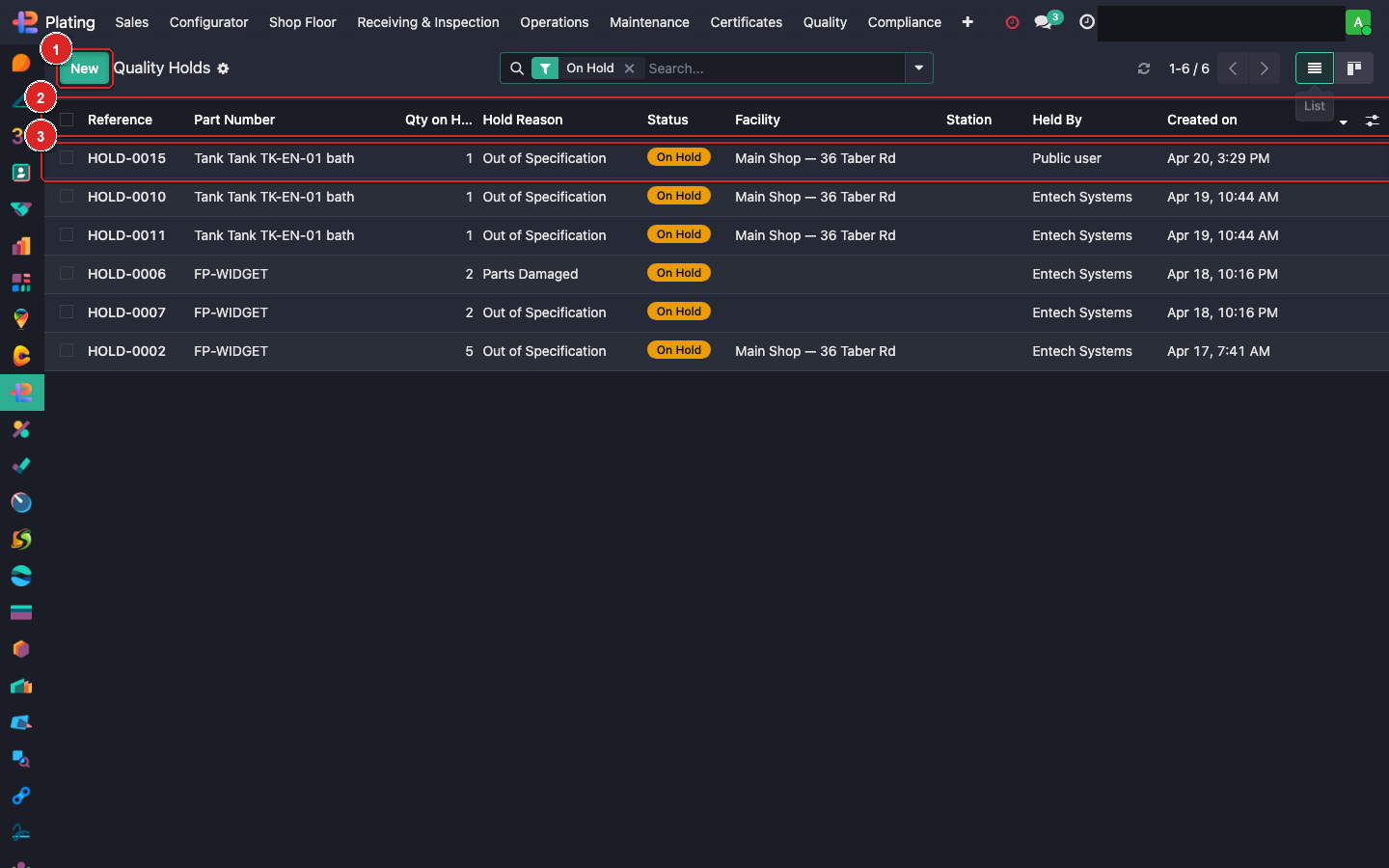
Box ① + New for a manual hold. Box ② columns (Reference, Part Number, Qty, Hold Reason, Status, Facility, Held By). Box ③ click into a hold record.
How holds get created
Three paths:
- Manual: QA clicks +New on this list.
- Automatic: when a thickness report fails, a first-piece gate rejects, or a receiving record hits the Reject button.
- Tablet-floor: operator clicks "On Hold" from the Tablet Station's active WO.
All three create the same kind of record; manual is for cases the automation didn't catch.
Creating a manual hold
Click + New:
| Field | What to fill |
|---|---|
| Batch / MO / Part | Which item is held |
| Hold Reason | Pick from: Out of Specification / Parts Damaged / Wrong Part / Contamination / Missing Cert / Customer Issue |
| Qty on Hold | How many pieces (usually whole batch; rarely partial) |
| Facility | Auto from your user |
| Held By | You |
| Description | Free-text. Be specific. Future auditors read this. |
| Photos | Drag-drop — visual evidence |
Save. The linked MO's progress flags. Tablet Station shows the hold to the next operator.
Resolving a hold
Open the hold → Resolve:
- Release — defect cleared, batch may proceed.
- Rework — create a rework order. Hold closes on rework completion.
- Scrap — parts are discarded. Close with disposition + scrap value.
- Accept-with-deviation — customer was notified and approved the out-of-spec parts. Record the approval ref.
Every resolution requires:
- A reason selection.
- A note in the chatter.
- A Quality Manager's approval for Scrap or Accept-with-deviation.
Automatic NCR
Most holds (especially thickness-fail and first-piece-reject) auto-create a linked NCR. The hold is the immediate action; the NCR is the formal nonconformance with full investigation. See Creating an NCR guide.
What can go wrong
Batch moved past the hold
Rare — should be blocked. If it happens: open the next WO, manually stop it, put the batch back on hold, investigate the bypass (process violation).
Can't find the batch to hold
Batch may be in an in-between state (moved from one WC to the next). Check the batch's current_location. Put the hold on the MO level instead.
Resolving fails — "open NCR"
The linked NCR is still open. Close it first.