
Fusion Odoo Fixes
A small fix for Odoo customer follow-ups after an invoice is paid.
Clears a customer's next follow-up reminder date when their invoices are fully paid. Checks the customer's whole receivable balance first, so a customer who still owes on another invoice stays on the follow-up list.
- Odoo 19
- Version 19.0.1.0.0
- Free
Fusion Odoo Fixes, step by step
2 workflows, 8 steps. Each picture is a diagram of how the step works.
A customer pays their last invoice
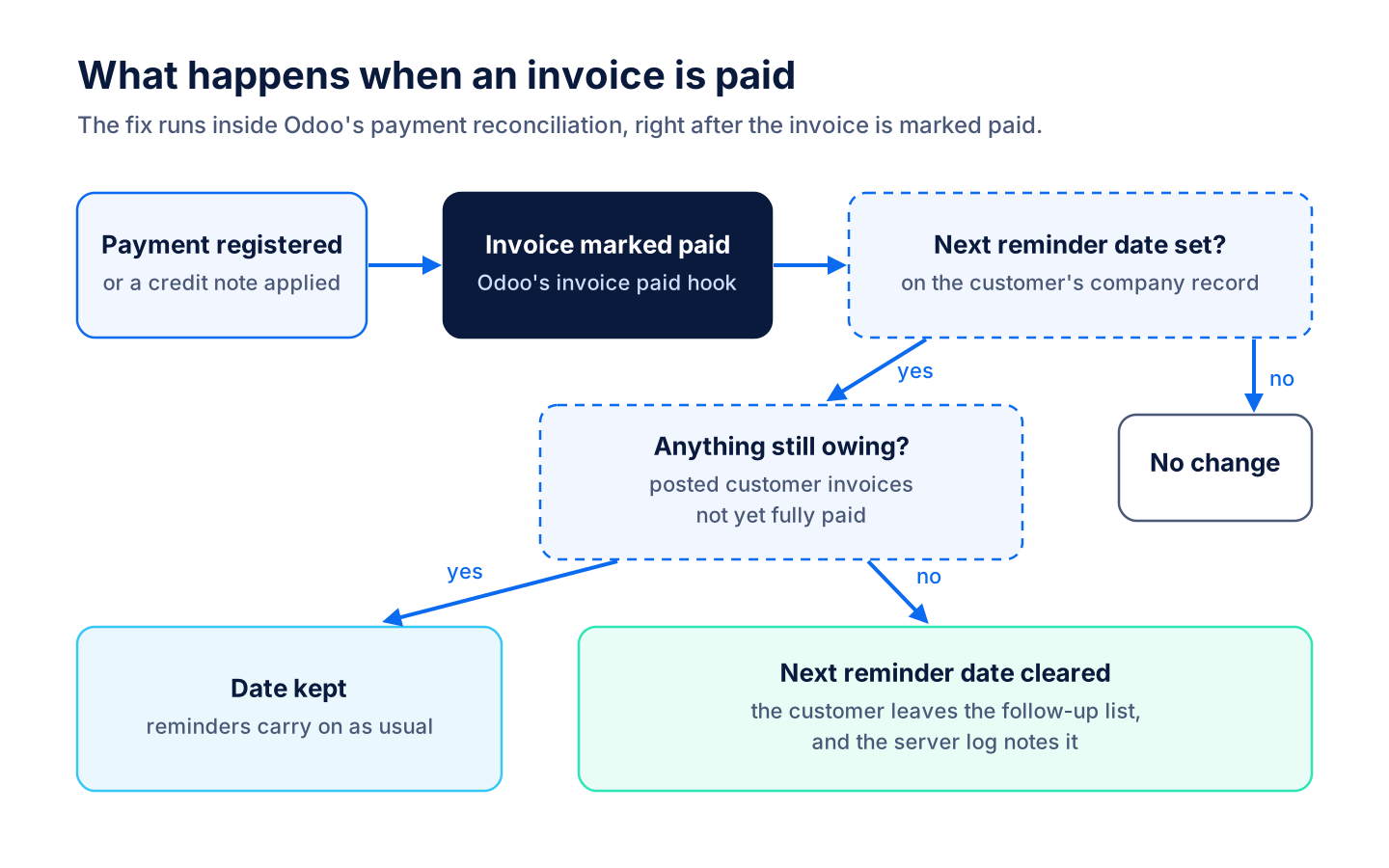
The fix runs inside Odoo's payment reconciliation and takes a fully paid customer off the follow-up list.
-
Customer is due a reminder
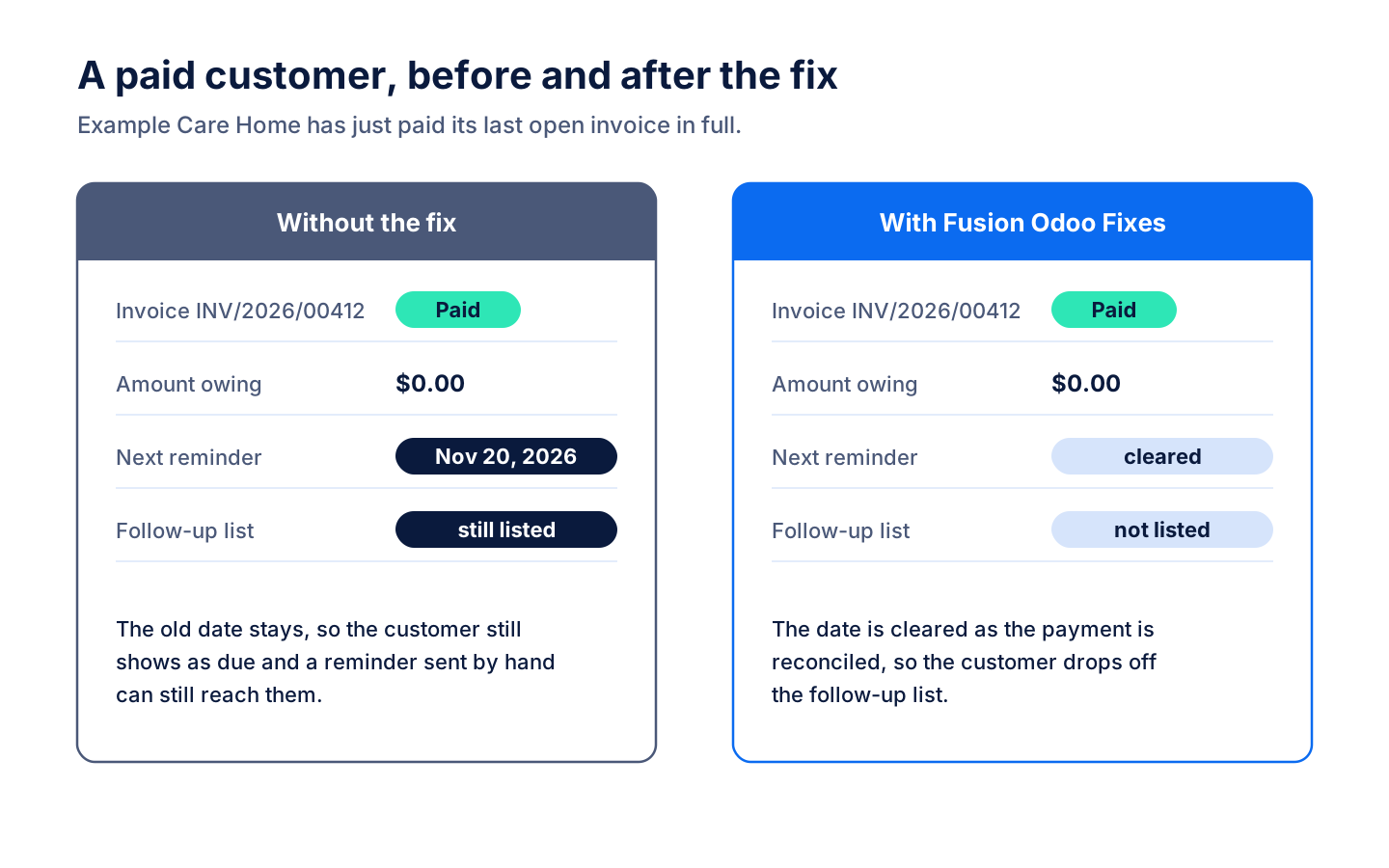
Odoo's follow-ups set a next reminder date on a customer with an overdue invoice. Without the fix, that date stays after the invoice is paid, so the customer still shows as due.
-
Payment is reconciled
Registering the payment, or applying a credit note, reconciles the invoice and Odoo marks it paid. The fix runs at that moment.
-
Balance is checked
For each customer with a next reminder date, the fix looks for any posted invoice amount that is still owing.
-
Reminder date cleared
With nothing owing, the next reminder date is cleared and a line in the server log records it.
-
Off the follow-up list
The paid customer leaves the follow-up queue, so nobody sends them a reminder for a zero balance.
When the fix holds back
The fix only clears a date when it is sure the customer owes nothing.
-
Still owing elsewhere
If the customer still has another open invoice, the date stays and reminders carry on as usual.
-
No date to clear
Customers without a next reminder date are skipped.
-
No follow-up app
On a database where no follow-up app has added the next reminder date, the fix steps aside and changes nothing.
What it does
 What it fixes
- Clears a customer's next follow-up reminder date when their invoices are fully paid.
- Runs when Odoo marks an invoice paid through payment reconciliation, so nobody has to remember an extra step.
- Checks the customer's whole receivable balance first, so a customer who still owes on another invoice stays on the follow-up list.
- Removes paid customers from the follow-up queue, so they are not sent collection reminders for a zero balance.
 How it behaves
- Only ever clears the date; setting the next reminder stays with Odoo's follow-ups.
- Writes a line to the server log for each customer it clears.
- If no follow-up app has added the next reminder date, it steps aside and changes nothing.
- Has no screens or settings: it works in the background once installed.
Related modules
 Fusion Accounting
New
Accounting for Odoo Community: bills, bank, invoicing, reports, Canadian tax and assets in one suite.
 Fusion Bank Statements
Free
OFX, QFX and QBO bank files imported with duplicates caught and balances carried forward.
 Network Traffic Logger
Free
A log of the outbound calls Odoo makes through Requests.
See Fusion Odoo Fixes on your own Odoo.
Book a call and tell us how your team works today. We'll show you the module and what it would take to set it up. Prefer the phone? Call 905-792-0000.