
Fusion Payroll - Canada
Canadian payroll that runs inside Odoo, from pay run to T4.
Calculate Canadian payroll taxes and CPP, CPP2 and EI deductions for supported jurisdictions, with Quebec explicitly excluded.
- Odoo 19
- Version 19.0.3.190.0
Canadian payroll rules, built in
Fusion Payroll follows CRA's T4127 payroll deduction formulas and the provincial rules for every province and territory except Quebec. This is what it covers.
 Deductions and tax
- Federal and provincial income tax follow CRA's T4127 formulas, including CRA's bonus method for bonuses and retroactive pay.
- CPP, CPP2 and EI are deducted every pay and stop at the yearly maximums, counted in pay-date order.
- The Ontario Health Premium is calculated from its official income bands, up to the $900 maximum.
- Every province and territory except Quebec. Payroll for a Quebec employee is blocked rather than calculated wrong.
- The calculation engine is checked by automated tests against CRA's published values.
 Pay
Pay
- Run weekly, biweekly, semi-monthly or monthly payroll schedules.
- Include vacation, statutory-holiday and overtime pay in payroll.
- Statutory-holiday calendars and holiday-pay formulas for all twelve supported jurisdictions.
 Year-end slips
- T4 slips, T4 Summaries and T4A slips print on CRA's own PDF forms.
- T4 and T4A returns export as XML, including amended and cancelled returns.
 Records of Employment
- Records of Employment export as a BLK file, built to match a file that ROE Web accepted.
- Paper copies print with a NOT FOR SUBMISSION watermark, so they are never mistaken for the filed record.
 Remittances (PD7A)
- Each paycheque's CPP, EI and income tax belongs to exactly one CRA remittance, with a PD7A worksheet and voucher to print.
- Your remitter type is checked against CRA's average monthly withholding thresholds.
- Workers' compensation, union dues and garnishments are remitted separately from CRA, each to its own payee.
- With Fusion CRA Account Ledger, CRA's own payroll account lines are matched to your remittances and short or excess payments are flagged.
 Direct deposit and records
- Create CPA-005 direct-deposit files and lock exported paycheques once the bank-upload stamp is recorded.
- Keep the original pay facts on generated paycheques so later employee changes do not silently reprice them.
- SIN validation on every employee record.
- Thirteen payroll reports, from paycheque history and tax liability to total payroll cost and workers' compensation, export to spreadsheets and PDF.
- Import historical paycheques, filed T4 XML, ROE BLK records and remittance history for payroll migration.
Always current with CRA
CRA publishes new payroll deduction formulas twice a year, effective January 1 and July 1. When it does, we publish an update for Fusion Payroll.
Your system checks for updates every week and tells your payroll managers when one is waiting. Each update is signed by Nexa and verified before it is offered, and one click shows exactly what changes and applies it. You never re-enter rates.
Rates are kept with the date they take effect, so pay dated before a change keeps the old rate and pay dated after it gets the new one.
Recent updates
-
- 2027 statutory-holiday calendars for all twelve supported jurisdictions.
-
- The 2026 Canada employment amount set to $1,501 on systems installed before the correction.
-
- July 1, 2026 rates (T4127, 123rd edition) published as a signed update.
The documents it produces
Shown with invented data from a demo company. Click a page to see it larger.


The T4 slip is filled on the CRA form with the employee and employer copies on one page.
The T4 Summary totals every slip for the year on the CRA form.
A T4A slip reports fees for services paid to a contractor in box 048.
The paper ROE lists insurable hours and earnings by pay period and is marked not for submission.
The PD7A worksheet and remittance voucher show the month's CPP, EI and tax deductions.
An Alberta employee gets a T4 slip with province code AB in box 10.
The pay stub shows current and year-to-date earnings and taxes for one pay period.
The paycheque prints the cheque with an employee stub and an employer stub.
The employee directory lists each employee with department, status and pay schedule.
The Payroll Summary prints in landscape with one line per paycheque.
The tax liability report prints the amounts owed, paid and still owing to the CRA.
Total Payroll Cost prints wages, contributions and employer taxes for the period.
The tax payments report prints each CRA payment with its confirmation number.
Deductions and Contributions prints employee and company shares of CPP and EI.
What it does
Pay runs
- Run weekly, biweekly, semi-monthly or monthly payroll schedules.
- Include vacation, statutory-holiday and overtime pay in payroll.
- Keep the original pay facts on generated paycheques so later employee changes do not silently reprice them.
Filing and remittances
- Generate T4 slips, T4 summaries and T4A slips, including configured PDF field positioning.
- Generate Record of Employment records and BLK exports, with paper copies marked as not for submission.
- Track CRA and third-party remittances with paid-period locks.
- Create CPA-005 direct-deposit files and lock exported paycheques once the bank-upload stamp is recorded.
 Employees and history
- Track employment status, Canadian addresses, SIN validation and employee pay schedules.
- Import historical paycheques, filed T4 XML, ROE BLK records and remittance history for payroll migration.
- Review a pay-cycle dashboard and export payroll reports as PDFs.
See it running
Shown with sample data from a demo company.


The dashboard walks the current pay period through seven steps and lists what is due to the CRA and Service Canada.
Hours, overtime and vacation pay are entered for each employee on one grid for the pay period.
Before submitting, the preview shows gross pay, employee taxes, net pay and the total cost of the run.
Submitting the run validates every paycheque and lists the cheques to print from the chosen cheque book.
The CPA-005 direct deposit file is generated for the pay run, ready to upload to the bank.
Employees are grouped by department across the Ontario, Alberta and British Columbia locations.
The employee record keeps the SIN masked and holds the home address and province of employment.
Each month of source deductions becomes a CRA remittance with its due date and payment status.
A remittance is marked paid when the matching payment posts on the CRA payroll account.
The ROE lists insurable earnings for each pay period and generates the BLK file for ROE Web.
The reports page opens thirteen payroll reports, from paycheque history to workers compensation.
The Payroll Summary lists every paycheque in the period with taxes, net pay and employer cost.
The tax liability report compares what was withheld with what has been paid to the CRA.
Total Payroll Cost adds wages, company contributions and employer taxes for the year.
Each CRA payment is listed with its date, period, method and confirmation number.
Paycheque History shows every paycheque with its pay method and status.
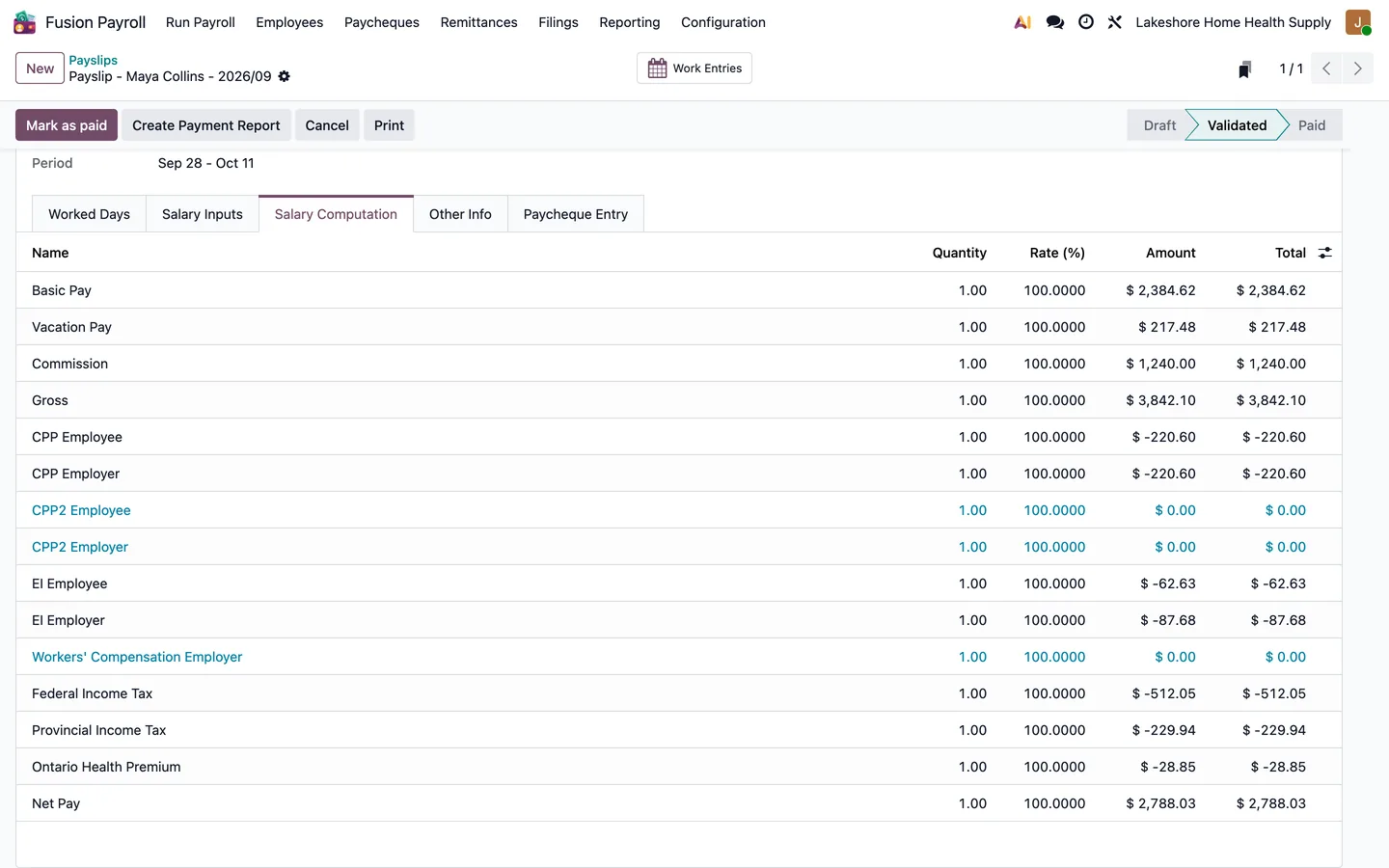
CPP, EI, federal and provincial tax and the Ontario Health Premium, line by line.
What's new
Recent changes to Fusion Payroll - Canada, newest first.
-
- Added 2027 statutory-holiday calendars for the twelve supported jurisdictions.
-
- Unified report PDF export with the Report Hub print action to preserve letterhead layout and rendering helpers.
-
- Added migration import of filed T4 history from CRA T4 XML files.


See Fusion Payroll - Canada on your own Odoo.
Book a call and tell us how your team works today. We'll show you the module and what it would take to set it up. Prefer the phone? Call 905-792-0000.